NextCrew runs your whole staffing business in one place: winning clients, hiring Crew, filling jobs, and getting everyone paid. Once you see how it fits together, every screen makes sense.
Summary
Your business has two sides, and they meet at the job. On the client side, CRM holds every prospect, client, contact and rate. On the Crew side, candidates apply, NextCrew onboards them, and they become Crew Members ready to work. When a client orders, you fill the jobs with your Crew. Crew clock in and out in the app, and their hours go on a timesheet. Approved hours feed payroll and the client's invoice. Because it's all one platform, NextCrew does much of the repeat work for you.
Your business, end to end
- Win and set up clients. Track prospects, then add contacts, rates and portal access in CRM. See Manage Clients: Start Here.
- Recruit Crew. Candidates apply and move stage by stage. See Recruit Candidates: Start Here.
- Onboard new hires. NextCrew sends and chases their documents. You check them and hire. See Onboard New Hires: Start Here.
- Keep your Crew ready. Records, credentials and availability stay current. See Manage Your Crew: Start Here.
- Fill the jobs. A client orders, the right Crew hear about it, and you confirm who works. See Fill and Schedule Jobs: Start Here.
- Crew work the job. They clock in and out in the app. You watch it live in Daily Pulse.
- Approve, pay and bill. Approved hours go to payroll and onto the client's invoice. See Approve Timesheets: Start Here, Run Payroll: Start Here and Invoice Clients and Get Paid: Start Here.
Your whole business, end to end
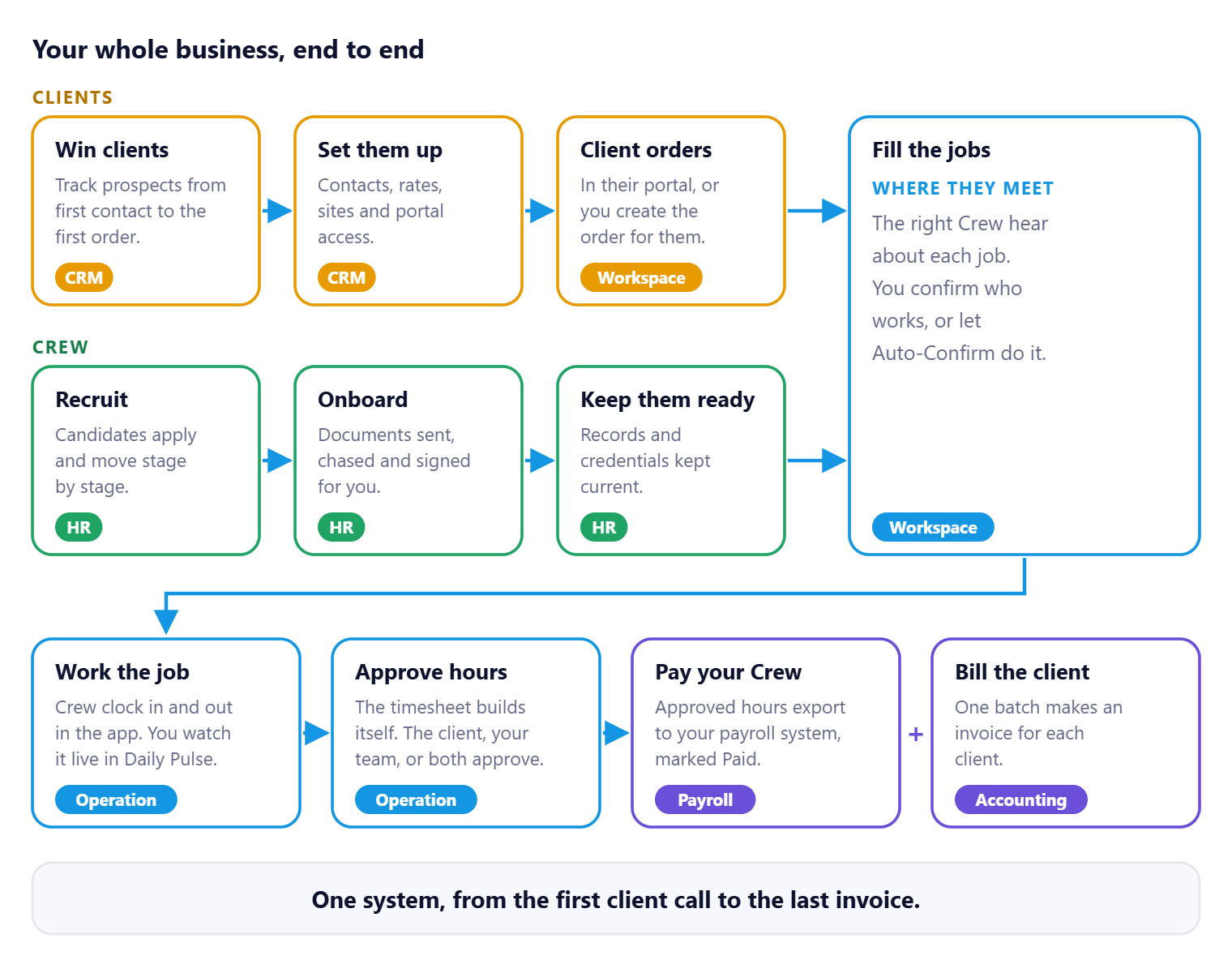
Clients and Crew are two sides of the same business, and they meet at the job. From there, one set of approved hours pays your Crew and bills your client. Nobody types them in twice.
That's your whole business in one system. Read on for what NextCrew does for you along the way, and the words you'll see at every step.
What NextCrew does for you
Everything lives in one place: your Crew, your clients, every job, timesheet and invoice. Because it's one platform, NextCrew can do the busywork for you. Here's where it saves your team the most time.
One platform, everyone connected
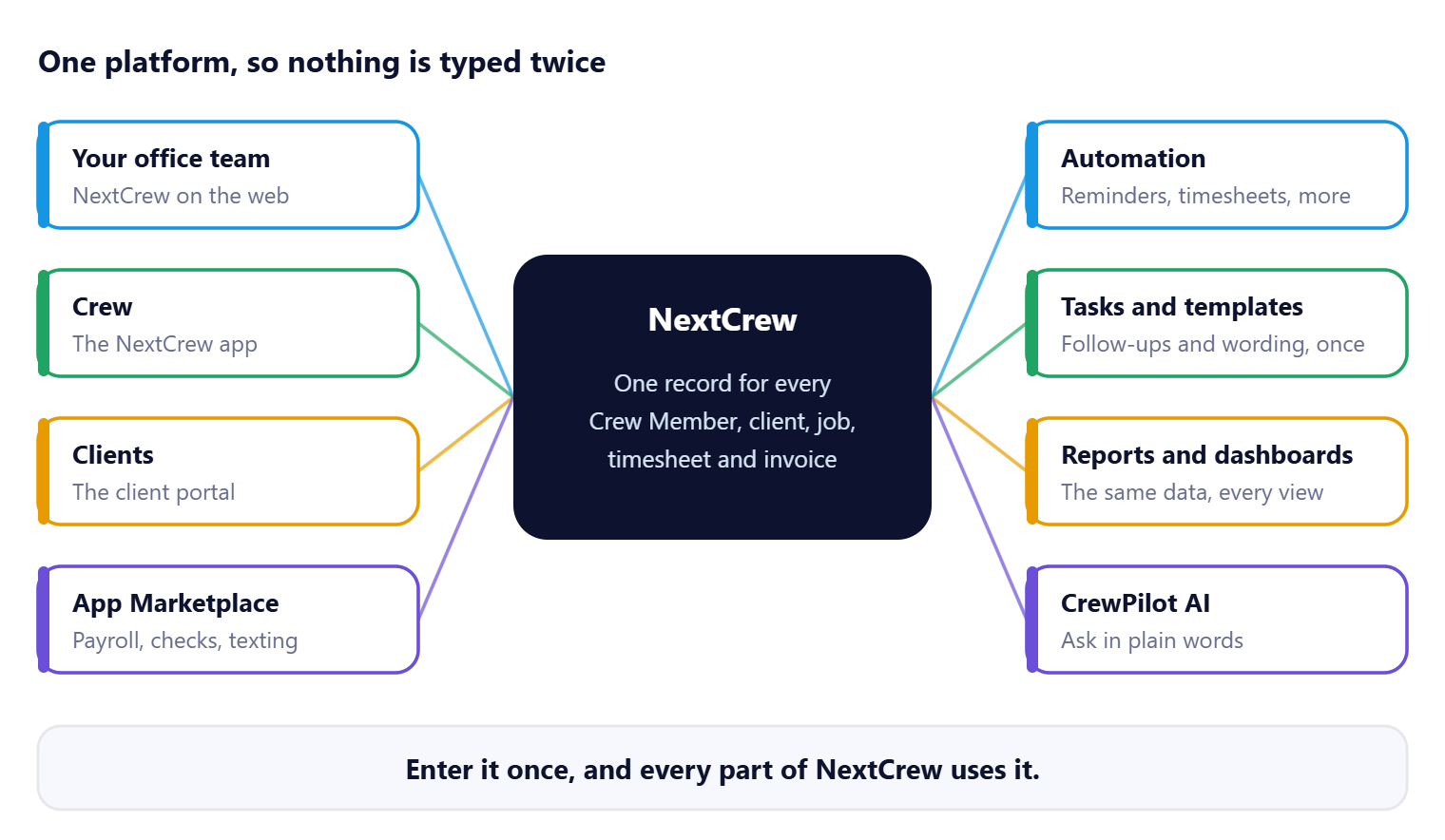
Your team, your Crew and your clients all work from the same record. So does everything around it. Enter something once and it shows up everywhere it's needed.
Automation
Reminders, onboarding follow-ups, timesheets, overtime, and Paid and Invoiced statuses happen on their own. Your team makes the decisions. See What NextCrew Automates for You.
Integrations
Background checks, texting, single sign-on and payroll connect to NextCrew, so nobody types the same data into two systems. See Integrations: Connect the Tools You Already Use.
Self-service
Crew apply, sign their documents, take jobs and clock in from the app. Clients place orders, approve hours and see who's coming in their portal. That means fewer calls to your office. See Self-Service: Crew and Clients Do It Themselves.
Tasks
Every follow-up goes on the right person's list, so nothing is left to memory. NextCrew creates some for you, like a reminder to finish onboarding documents. See Tasks: Nothing Falls Through the Cracks.
Templates
Write a message, email or note once, then reuse it. Shared templates keep one tone across your whole team. See Templates: Write It Once, Use It Every Time.
Reports and dashboards
Every report runs on the same data your team works in, so the numbers match. Each person can build a dashboard for their role. See Reports, Dashboards and Analytics.
CrewPilot AI
See what needs you first in the AI Command Center and the AI Ticker, and ask questions in plain words. See How CrewPilot AI Works and Ask CrewPilot.
The words you'll see most
| Word | What it means |
|---|---|
| Crew Member | A person your agency places in work. They use the NextCrew app. |
| Client | A business that orders staff from you. Client users sign in to the client portal. |
| Order | One request from a client. It holds one or more jobs. |
| Job | One position on specific dates and times, such as five servers on one evening. |
| Offer | One Crew Member's link to one job, from requested to confirmed. |
| Timesheet | The hours a Crew Member worked on a job. |
Next: Orders, jobs and offers: how they fit together, then Offer statuses, from Requested to Confirmed.
Three views of the same job
| Who | Where they work | Their guides |
|---|---|---|
| Your office team | NextCrew on the web | Guides for Staffing Agencies: Start Here |
| Crew Members | The NextCrew app | Welcome to NextCrew: get started in 10 minutes |
| Client users | The client portal | Welcome to NextCrew: your quick start as a client |
When a Crew Member or client asks you something, their guide shows exactly what they see.
Was this article helpful?
That’s Great!
Thank you for your feedback
Sorry! We couldn't be helpful
Thank you for your feedback
Feedback sent
We appreciate your effort and will try to fix the article