A Crew Member says they applied for a job, but they're not on the schedule. The offer status tells you exactly where they are.
Summary
Every offer has a status. Requested: you offered the job. Interested: the Crew Member wants it. Confirmed: they're booked. An offer can also be Declined by the Crew Member or Canceled. Interested is not booked. Crew are only booked when the offer is Confirmed. On an auto-confirm job, Crew see Accept instead of Interested, and accepting books them straight away.
How to do it
- Open the job and look at its offers.
- Check the Interested list and confirm the people you want.
- Chase anyone still on Requested if the job is soon.
- Only Confirmed Crew are booked. Check the count before the job.
The offer cycle at a glance
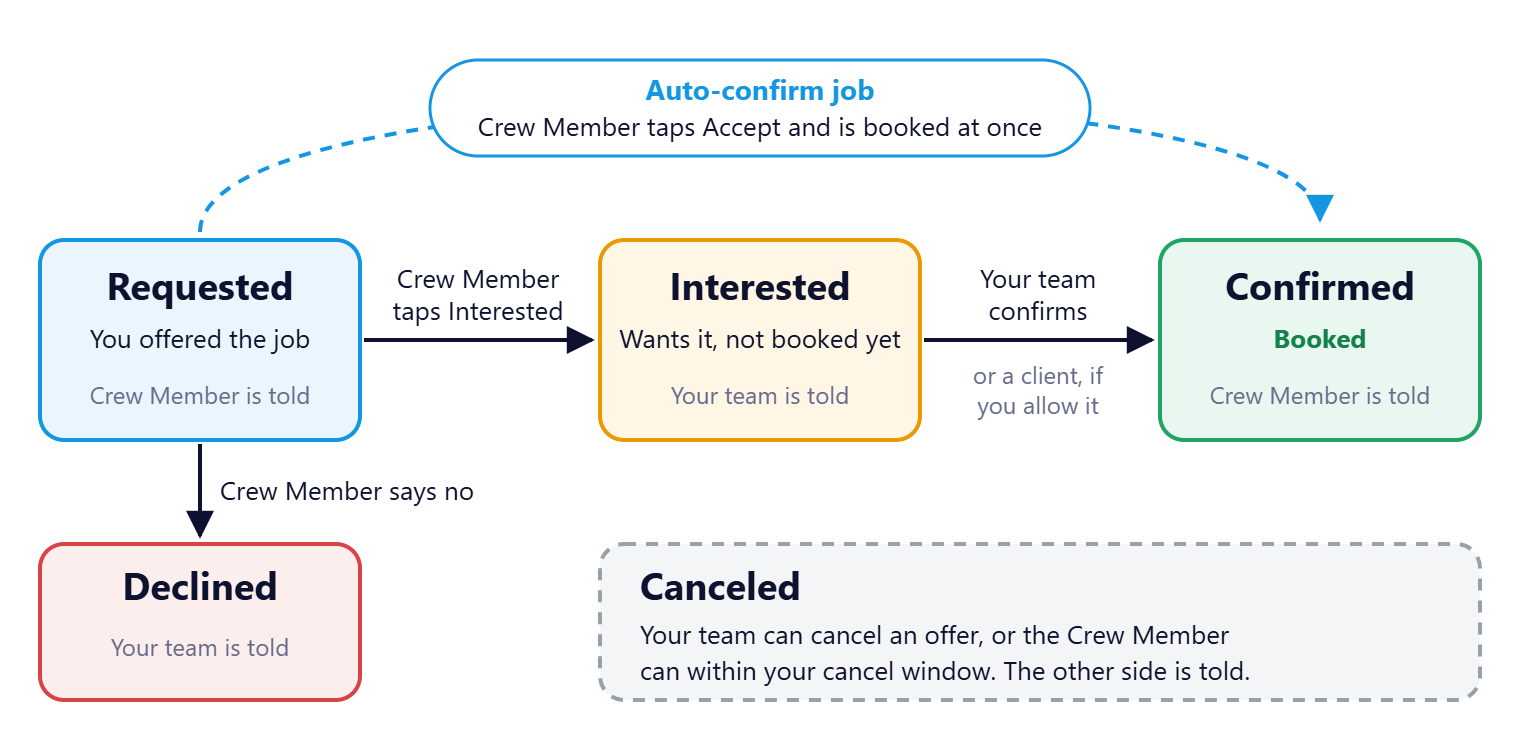
Only Confirmed Crew are booked. Interested means the Crew Member wants the job, not that they have it.
That's the offer cycle. Read on for who changes each status and who hears about it.
On this page
Each status
| Status | What it means | Who sets it | Who is told |
|---|---|---|---|
| Requested | You offered the job to a Crew Member | Your team | The Crew Member |
| Interested | The Crew Member wants the job, but isn't booked yet | The Crew Member | Your team |
| Confirmed | The Crew Member is booked | Your team, or a client if you allow it | The Crew Member |
| Declined | The Crew Member said no | The Crew Member | Your team |
| Canceled | The offer was canceled | Your team, or the Crew Member within your cancel window | The other side |
Auto-confirm jobs
When a job uses auto-confirm, Crew see Accept instead of Interested. Accepting confirms them at once, without waiting for you. Use it when speed matters more than choosing, such as a last-minute gap.
Add the reason with a sub-status
Sub-statuses add detail under a status, such as Waiting on Document under Interested. Your admin sets them up. See Set up job statuses and offer sub-statuses.
What the Crew Member sees
In the app, jobs sit in tabs: Requested, Interested and Confirmed. See Find and confirm your jobs, the guide your Crew read.
Other ways people ask this
- Does interested mean booked?
- What does Requested mean?
- Why isn't my Crew Member confirmed?
- What is auto-confirm?
- Can a client confirm Crew?
Related guides
- Orders, jobs and offers: how they fit together — where offers sit
- Cancel a job, and why you sometimes can't — the Crew side of canceling
Was this article helpful?
That’s Great!
Thank you for your feedback
Sorry! We couldn't be helpful
Thank you for your feedback
Feedback sent
We appreciate your effort and will try to fix the article