Not sure where something is, or need a quick answer about today's jobs? Ask CrewPilot in plain words instead of clicking through screens.
Summary
CrewPilot is the assistant built into NextCrew. Open it from the CrewPilot icon (the sparkle) in the system tray on the right of the screen and type a question. It can point you to the right help guide, answer questions about your data, such as open jobs this week or who is working today, search resumes, and make the same change across many jobs or timesheets at once, which you confirm before anything is saved. It's on for every NextCrew 2.0 agency. What goes wrong: acting on an answer, or confirming a bulk change, without checking it. Open the records it shows before you rely on them.
How to do it
- Open the CrewPilot icon (the sparkle) in the system tray on the right of the screen.
- Type your question in Ask CrewPilot a question and send it.
- Read the answer. Click View steps to see how it got there.
- Ask a follow-up to narrow it down.
The CrewPilot panel
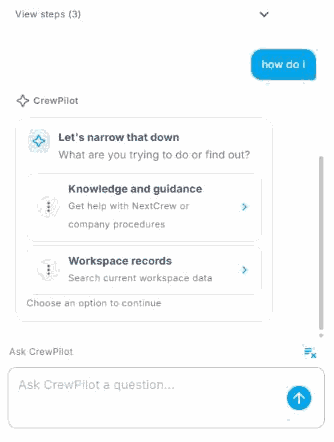
If your question could mean more than one thing, CrewPilot may ask whether you want help with NextCrew or a search of your records. Pick one to continue.
When you would use this
You can't remember where something is. Ask "How do I add a client?" and CrewPilot points you to the guide.
A client calls about this week. Ask "Show me open jobs for this week" and get a list while they're still on the line.
You need someone with a skill. Ask "Search for Crew Members with forklift in their resume" instead of reading resumes one by one.
That's your first answer. Read on for good questions to ask and what to check.
On this page
What you can ask
| Ask about | For example |
|---|---|
| How to do something | "How do I use groups?" "How do I add a Crew Member?" |
| Your jobs and Crew | "Show me open jobs for this week." "Who is working today?" |
| Resumes | "Search for Crew Members with forklift in their resume." |
| Changing rates on many jobs | "Change the bill rate on every RN job in this order." |
| Updating several timesheets | "Set the start, end and break time on these Crew Members' timesheets for Tuesday." |
| Approving timesheets | "Approve the timesheets for this client from Monday to Friday." |
| Assigning Crew | "Assign this Crew Member to the job on Saturday." |
| Messages | "Draft a message to the Crew on this job about the new start time." CrewPilot writes it; you review it and send it. |
Bulk updates, new in Release 4.11. When the same change is needed many times over, ask for it in one request. CrewPilot shows you exactly what it will change, and nothing happens until you click Confirm. Read the list first, especially when it includes timesheets that are already approved.
While you're viewing a Crew Member's resume, click Analyze and ask questions about that one person, such as "Has this person worked with forklifts?" See Find the Right Crew Member Fast.
Why ask CrewPilot
| Without CrewPilot | With CrewPilot |
|---|---|
| Searching the help center for the right guide | Ask the question and get pointed to it. |
| Building a list with filters to answer a quick question | Ask in plain words and get the list. |
| Reading resumes one by one | Search them all in one question. |
Check before you act
CrewPilot answers from your NextCrew data, and it can be wrong or miss something. Open the jobs, Crew Members or guides it shows before you confirm anyone or tell a client.
If something isn't working
| What you see | What to do |
|---|---|
| No CrewPilot icon in the system tray | Let us know, and we'll sort it out. See Get Help With NextCrew. |
| The answer isn't what you meant | Ask again with more detail, such as a date, client or position. |
Questions people ask
Do I need training?
No. Type a question the way you'd ask a colleague.
Does every agency have CrewPilot?
Yes. CrewPilot is on for every NextCrew 2.0 agency.
Can it see my data?
Yes. It answers questions about your jobs, Crew and clients in NextCrew.
Other ways people ask this
- How do I use the AI assistant?
- What is CrewPilot?
- How do I search resumes?
- How do I turn on CrewPilot?
- Can I ask NextCrew a question?
Related guides
- How CrewPilot AI Works — the AI Command Center and AI Ticker
- Find the Right Crew Member Fast — searching resumes
Was this article helpful?
That’s Great!
Thank you for your feedback
Sorry! We couldn't be helpful
Thank you for your feedback
Feedback sent
We appreciate your effort and will try to fix the article