A client calls to say one of your Crew was late, left early or was rude to a supervisor. What you write down in the next ten minutes decides whether the next scheduler knows about it.
Summary
Record it as a violation on the Crew Member, and pick the Client it happened at. Then add a note on the client saying what you told them, and decide whether the Crew Member should be Not Allowed there. The violation follows the person to every client. The note keeps the account's side. What goes wrong: handling it on the phone and writing nothing down, so the same person is sent back next month.
How to do it
- Get the facts first: what happened, on which job and date, and the name of the person at the client who reported it.
- Open HR › Crew Members, click the Crew Member's name, and check it's the right person.
- On the Overview, find Violations and click + ADD.
- Pick the Violation Category, and choose the client in Client.
- Write what was reported and who reported it, then click Add.
- Open the client and add a note saying what you told them. If they don't want the person back, mark them Not Allowed.
Add a violation on the Crew Member
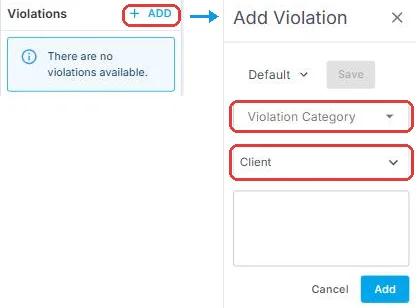
On the Crew Member's Overview, click + ADD under Violations. Pick the Violation Category, choose the Client it happened at, write what was reported and who reported it, then click Add. The violation follows the Crew Member to every client, so the next scheduler knows about it before they book that person again.
That's the incident on record. Read on for what to write, and what to do on the client side.
On this page
How incidents reach you
| Route | What NextCrew does | What you do |
|---|---|---|
| The client calls, emails or tells you on a visit | Nothing. It exists only in the conversation. | Record it. This is the most common route, and the one most often lost. |
| The client leaves a poor review after the job | It lands on the Crew Member's record as a review, lowers their rating, and emails the Crew Member's manager. | Read it and decide if it needs a violation. A review never becomes one by itself. |
| Your own team saw it | Nothing. | Record it, with extra care over the facts. |
What to write
Write what was reported, not your verdict. "Site manager Dana Ruiz called at 3pm: he left at 2pm without telling anyone" is a fact. "Walked off the job" is a conclusion. Facts still read clearly when someone looks at the record in six months.
| Put this in | Example |
|---|---|
| What happened | Arrived 9:10 for an 8:00 start, no call ahead. |
| Who reported it | A named person at the client, not just "the client". |
| When, if it wasn't today | The date is stamped when you click Add. Recording something from last week? Start with the real date. |
⚠️ Watch out
The Save button beside the template menu overwrites your template. It doesn't save the violation. Click Add to save it.
Category, templates and where violations show up are covered in Record Violations and Spot Problems Early.
The client side of the same incident
The violation records what the Crew Member did. It doesn't record what you did about it, and the client will ask. So decide what follows:
| If | Then | Where |
|---|---|---|
| The client doesn't want them back | Mark them Not Allowed, then check jobs they're already booked on at this client. | Track Preferred and Not Allowed Crew for a Client |
| The client needs an answer | Add a note on the client saying what they reported and what you told them. | Add Notes to a Record and Use Note Templates |
| You owe them a follow-up | Create a dated task. | Create and Track Tasks |
| A job now needs someone else | Fill it first. The write-up can wait an hour. | Find the Right Crew Member Fast |
⚠️ Watch out
Keep incident details in Notes, never in the client's Policies and Procedures. Crew see a client's policies when they apply for its jobs.
An incident doesn't have to mean Not Allowed. That's a separate decision for your agency and the client.
Why record it in NextCrew
| Handled on the phone | Recorded in NextCrew |
|---|---|
| The scheduler filling a gap at 6am has no idea what happened in March. | A warning appears when anyone confirms that Crew Member for a job. |
| Nobody connects three complaints from one site. | The Violation Report shows which clients and categories keep coming up. |
| The client asks what you did, and nobody knows. | The client note says what was reported and what you changed. |
Violations are internal. Crew and clients never see them.
When this isn't the right record
This is for problems caused by a Crew Member. If the problem is the client, such as an unsafe site or a supervisor who won't sign timesheets, don't record a violation against the worker. Add a note on the client and raise it with whoever owns the account.
If something isn't working
| What you see | Check this first | Who fixes it |
|---|---|---|
| No + ADD under Violations | You're on the Crew Member's record, not the list. If it's still missing, your role can't add violations. | Your admin. See Permissions |
| It's on the wrong person | Violations can't be edited. Add it to the right person, then ask an admin with delete permission to remove the wrong one. | Your admin |
| A poor review sat for weeks | Nothing chases reviews. Make reading new reviews someone's weekly job. | You |
Questions people ask
Does a bad review create a violation?
No. It lowers the Crew Member's rating and emails their manager. Recording a violation is a decision someone makes.
Can I edit a violation?
No. Check it before you click Add. Only an admin with delete permission can remove one, for example if it's on the wrong person or a duplicate.
The Crew Member disputes it. Should we delete it?
A disagreement isn't an error. Add a note with their side instead.
Does the client see the violation?
No. Only your team does.
Other ways people ask this
- How do I log a client complaint about a worker?
- A client complained about a temp. What do I do?
- How do I record a no-show reported by a client?
- Where do client complaints go?
- How do I write up a worker after a client calls?
Related guides
- Record Violations and Spot Problems Early — the violation record itself
- Track Preferred and Not Allowed Crew for a Client — when the client doesn't want them back
- Add Notes to a Record and Use Note Templates — the client-side note
Was this article helpful?
That’s Great!
Thank you for your feedback
Sorry! We couldn't be helpful
Thank you for your feedback
Feedback sent
We appreciate your effort and will try to fix the article