Ten Crew Members work the same position, and one of them also drives the others to site. That person should earn more, but they're doing the same job at the same time. Don't build a separate job for one person. Change the rate on their offer.
Summary
Everyone booked on a job has their own offer, and each offer carries its own pay rate and bill rate. They start as the job's rates. Change them on one offer and only that person changes: their timesheet uses the new rate, and it's the rate they see. Rate Locked ticks itself when you change a rate by hand, so a later refresh of the order's rates leaves it alone. What goes wrong: no note on the offer, so months later nobody knows why one person was paid more.
How to do it
- Open the job, go to its offers, open the Crew Member's offer and click DETAILS.
- Click EDIT on Rate Details.
- Change the Pay Rate, the Bill Rate or both. Rate Locked ticks itself.
- Click Update.
- Add a note to the offer saying why, such as drives the team to site.
When you would use this
A driver or team lead. One person on the position takes on something extra, like driving the others or leading the team, and gets paid more for it.
A client pays more for one person. The client agrees a higher bill rate for someone specific. Change only the bill rate on their offer.
A hard-to-fill job. You agree a higher rate with one Crew Member to cover it, without changing the rate for everyone else.
Rate Details on the offer
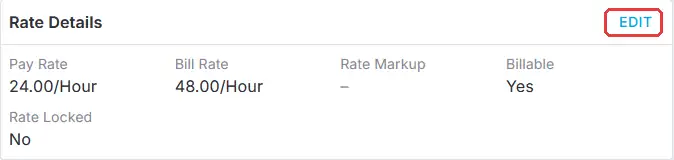
Each offer has its own Rate Details. Click EDIT to change this one person's pay or bill rate.
That's one person's rate changed. Read on for how Rate Locked works and what the change affects.
On this page
How Rate Locked works
A job's rates come from its order's rate configuration. When an order's rates are refreshed, for example before a rate increase, every offer on it takes the new rates, except offers that are Rate Locked.
| Rate Locked | What happens when the order's rates are refreshed |
|---|---|
| Ticked (it ticks itself when you change a rate by hand) | This person keeps the rate you set. |
| Not ticked | This person moves to the order's rates, like everyone else. |
Rate Locked keeps one person's rate
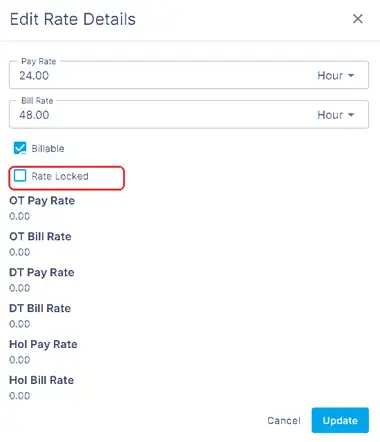
Change the pay or bill rate on one offer and Rate Locked ticks itself. A locked rate stays put when the order's rates are refreshed.
Want this person back on the job's rates at the next refresh? Untick Rate Locked and click Update. See Update the Rates on an Order for refreshing an order.
What the change affects
- Their timesheet. Timesheets created from now on use the rate on their offer.
- What they see. The Crew Member sees the rate on their offer.
- Everyone else. The rest of the Crew on the job keep the job's rates.
- Their other jobs. Nothing changes. It applies to this job only.
Why it's simpler in NextCrew
| Without NextCrew | In NextCrew |
|---|---|
| A separate job for one person, at the same time and position | One offer with its own rate |
| The extra pay tracked in a spreadsheet and added at payroll | The timesheet uses the offer's rate |
| A rate change for the client overwrites the one person's rate | Rate Locked keeps it in place |
If something isn't working
| What you see | Check this first | Who fixes it |
|---|---|---|
| You can't edit Rate Details | Your permissions for pay and bill rates. | Your NextCrew admin |
| Their rate went back to the job's rate | Rate Locked was unticked when the order was refreshed. Set the rate again. | You |
| A timesheet shows the old rate | It was created before you changed the offer. Change the Pay Rate and Bill Rate on the timesheet itself. See Fix the rate on a timesheet. Fix it on the timesheet. | You |
Questions people ask
Do I need a separate job for someone paid more?
No. Change the rate on their offer. They stay on the same job and position.
Does it change their rate on other jobs?
No. It applies to this job only.
Can I change only the bill rate?
Yes. Change the Bill Rate and leave the Pay Rate as it is.
Will a rate increase overwrite it?
Not while Rate Locked is ticked.
Other ways people ask this
- How do I pay one worker more than the others on the same job?
- How do I change the pay rate for one Crew Member?
- Can I bill one person at a different rate?
- What does Rate Locked mean?
- Why didn't one person's rate change when I refreshed the order?
Related guides
- Change the Rate or Dates for One Crew Member on a Job — dates and other changes for one person
- Update the Rates on an Order — refreshing an order's rates
- Plan a Rate Increase — new rates from a set date
- Add, Clone or Fix a Timesheet — fixing a timesheet created earlier
- Anatomy of a Job — where a job's rates come from
- Create and Manage Travel Nursing Pay Packages — travel nursing only
- Change a Job’s Position: What Updates Automatically and What Doesn’t — change the whole job instead
Was this article helpful?
That’s Great!
Thank you for your feedback
Sorry! We couldn't be helpful
Thank you for your feedback
Feedback sent
We appreciate your effort and will try to fix the article