Legacy has served you well, and we're working toward retiring it. NextCrew 2.0 is where your agency's day gets easier, and moving takes less than you think. Pick your switch date and be fully on 2.0 by the end of 2026.
Summary
NextCrew 2.0 uses the same login and the same data as Legacy. Your Crew keep the same app, and your subscription doesn't change. What changes is the work: clients order and approve timesheets in their own portal, CrewPilot answers questions in plain words, saved views and dashboards open your day in one click, and Channels reach the whole team at once. Our team helps you switch for free, including moving your Legacy invoices and payments. What goes wrong: waiting for a retirement date. Moving on your own timetable, with free help, is far calmer than moving in a rush.
How to do it
- Book your free switch session: choose Support at the top of any screen, or see Get Help With NextCrew.
- Go to your usual address ending in .app, such as yourcompany.nextcrew.app, and sign in with your usual username and password. Bookmark it.
- Pick your switch date, before the end of 2026, and tell your team.
- Move one daily task each week. Start with approving timesheets.
- Ask us to move your Legacy invoices and payments across. It's free for your agency.
- On your switch date, everyone works in NextCrew 2.0.
▶ Watch a quick tour of NextCrew 2.0
The same morning, two ways
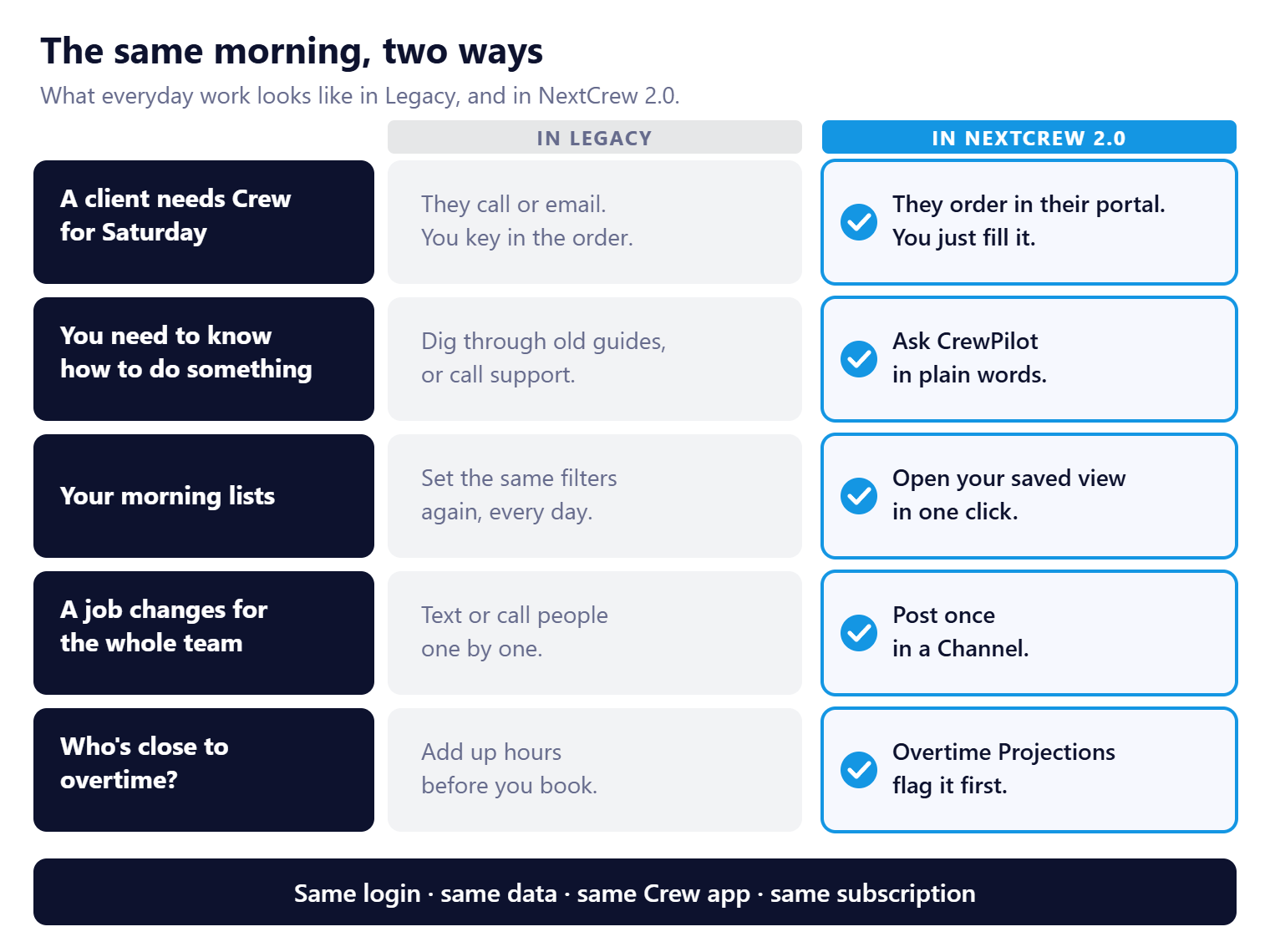
Everything in the left column still works in Legacy. The right column is the same work with less of it.
That's the whole move: six steps, free help, and no new password. Below is your week-by-week plan and everything you gain.
On this page
Legacy is being retired
We're working toward retiring Legacy. We haven't set a date, and we'd rather you didn't wait for one. Agencies that move on their own timetable get free help, time for their team to settle in, and every new feature as it ships.
Our ask: pick a switch date and be fully on NextCrew 2.0 by the end of 2026.
Your switch plan
The bar along the top shows the stage. The badge on each step shows who does it. On a phone, swipe sideways to see every step.
| Get ready | Move over | Done | ||||||||
STEP 1 NextCrew Book your free switch session We walk your team through 2.0. | → | STEP 2 You Sign in at the .app address Same username and password. | → | STEP 3 You Set your switch date Before the end of 2026. | → | STEP 4 You Move one task a week Timesheets first, then orders. | → | STEP 5 NextCrew We move your invoices Legacy accounting records, free. | → | STEP 6 You Switch day Your whole team works in 2.0. |
NextCrew · You
Your data stays in step while you move, so nothing is lost on the way.
| When | Do this in NextCrew 2.0 |
|---|---|
| Week 1 | Sign in every morning. Look at your dashboard, save the list views you use most, and ask CrewPilot a question. |
| Week 2 | Approve timesheets in Operation › Timesheet. |
| Week 3 | Take orders and fill jobs in Workspace › Orders. Send your clients the .app address for their portal. |
| Week 4 | Once we've moved your Legacy invoices and payments, invoice from Accounting › Invoices. |
| Switch day | Everyone signs in to NextCrew 2.0 only. |
What you gain
| In NextCrew 2.0 | What it saves you |
|---|---|
| Client portal | Clients place orders, approve timesheets and see who's on site, without calling you. |
| CrewPilot | Ask questions in plain words: "Who is working today?" or "How do I add a client?" See Ask CrewPilot. |
| Saved list views | Set your filters and columns once, and open the same list every morning in one click. |
| Dashboards | Widgets such as Overtime Trends and Expired Licenses show what needs attention as you sign in. |
| Channels | A group chat with your Crew and clients, instead of separate texts. |
| Tasks | Assign follow-ups to your team and see what's done. |
| Overtime Projections | See who's close to 40 hours before you book them. |
| App Marketplace | Turn on texting, background checks, payroll and more without a separate login. See App Marketplace: Start Here. |
| The NextCrew API | Connect other software through the API and webhooks. |
Your clients get their own portal
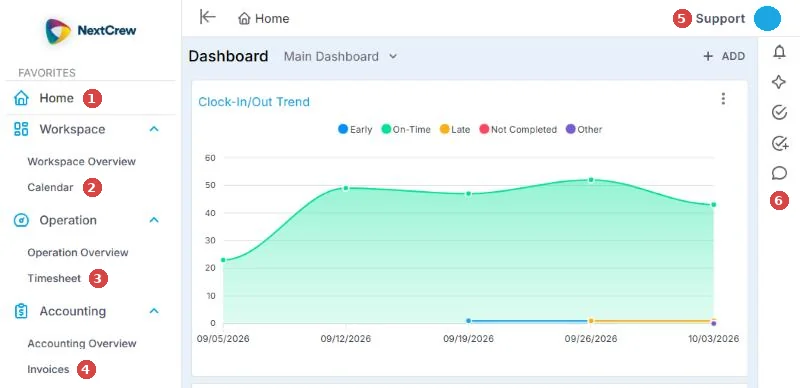
Clients place orders, approve timesheets and see who's on site here, instead of calling you.
CrewPilot answers in plain words
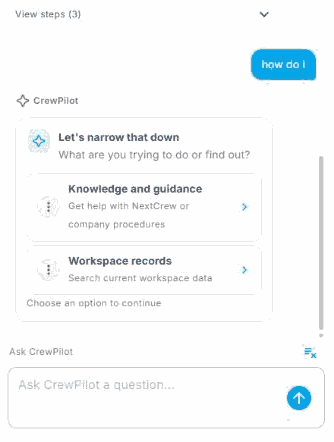
Ask how to do something, or ask about your own records, from any screen.
What stays the same
| In NextCrew 2.0 | |
|---|---|
| Your login | Same username and password. |
| Your data | Crew Members, clients, orders, jobs, timesheets and settings are all there, and stay in step with Legacy while you move. |
| Your Crew | Same NextCrew app. They don't need to do anything. |
| Your clients | Same login. They use the .app address for the client portal. |
| Your subscription | No change. |
Free help to switch
| Help | What you get |
|---|---|
| Switch session | Our team walks your staff through the screens they use every day. Free for your agency. |
| Legacy invoices and payments | We move your Legacy accounting records into 2.0. Free for your agency. |
| Guides for every area | Start with Guides for Staffing Agencies: Start Here. |
| CrewPilot | Ask it how to do something, from any screen, while you learn. |
What customers say
“NextCrew 2.0 takes workforce management to a whole new level. From the intuitive interface to constant updates and enhanced features, it's a massive leap forward. Dashboard reports, timesheet tools and customizable templates have significantly streamlined our operations. We're all in.”
A NextCrew 2.0 customer
Where each Legacy screen moved
| In Legacy | In NextCrew 2.0 |
|---|---|
| Network › Crew Members | HR › Crew Members |
| Network › Sent Invitations | HR › Sent Invitations |
| Clients | CRM › Clients, and CRM › Contacts |
| Job Orders | Workspace › Orders |
| Jobs › Active | Workspace › Orders, then an order's Jobs tab |
| Jobs › Sent (offers) | Workspace › Orders, then an order's Offers tab |
| Calendar (jobs and orders) | Workspace › Calendar |
| Timesheet | Operation › Timesheet |
| Daily Pulse | Operation › Daily Pulse |
| Messages: Inbox and Sent | Messages › Inbox and Messages › Sent |
| Invoices, expenses and payments | Accounting › Invoices |
| Deposits | Accounting › Payments |
| Reports | Reports |
| Activity › Tasks | Tasks |
| Updates | Home, in the activity widget |
| Settings › Positions, Locations, Rate Configurations | Settings › Company Profile |
| Groups, Tags, Document Categories, HR Statuses | Settings › Code Tables |
| Integrations | Settings › App Marketplace |
| Site configuration | Settings › Site Configuration |
| Data import | Data Exchange › Data Import |
| Registration page and job board | Your landing page: Register and Job Board |
| Profile | Your initials at the top right › Profile |
Invoices, payments, deposits and expenses are kept separately in 2.0. We move your Legacy accounting records across for free. Ask us when you're ready.
What your Crew and clients see
Your Crew keep using the same NextCrew app, so there's nothing for them to change. Send new Crew Welcome to NextCrew: get started in 10 minutes.
Clients sign in to the client portal at the .app address with the same login. Send them Welcome to NextCrew: your quick start as a client.
Why switch now
| Staying on Legacy | Switching to NextCrew 2.0 |
|---|---|
| A platform that's being retired | The platform we build on |
| Clients call or email their orders | Clients order and approve timesheets in their own portal |
| Questions wait for an answer | CrewPilot answers in plain words, on any screen |
| The same filters set again every morning | Saved views and dashboards open your day in one click |
| A rushed move when Legacy is retired | A calm move on your own date, with free help |
Questions people ask
Is Legacy going away?
Yes. We're working toward retiring it. No date is set yet, but plan to be fully on NextCrew 2.0 by the end of 2026.
Do I lose anything by moving?
No. Your data is already in 2.0, and the new features are added on top.
Is the help to switch free?
Yes, for your agency. That includes the switch session and moving your Legacy invoices and payments.
Does my subscription change?
No.
Do I need a new password?
No. Use your usual username and password at the .app address.
Do my Crew need to do anything?
No. The Crew app doesn't change.
Can I still use Legacy while I switch?
Yes. Your data stays in step while you move, so nothing is lost. Once you reach your switch date, work only in 2.0.
Other ways people ask this
- Is NextCrew Legacy being retired?
- When do I have to switch to NextCrew 2.0?
- Why should I switch to NextCrew 2.0?
- What's the difference between Legacy and 2.0?
- Where did a screen go in 2.0?
- Will I lose my data if I switch?
- What is the .app address?
Related guides
- Guides for Staffing Agencies: Start Here — learn 2.0 area by area
- How CrewPilot AI Works — the AI you get with 2.0
- How NextCrew Works: The Big Picture — how the pieces fit
- Everyday Tools: Start Here — lists, views, tasks and notes
- Ask CrewPilot — answers while you learn
- Get Help With NextCrew — book your switch session
Was this article helpful?
That’s Great!
Thank you for your feedback
Sorry! We couldn't be helpful
Thank you for your feedback
Feedback sent
We appreciate your effort and will try to fix the article