Hired means ready to work. It's the one step NextCrew leaves to a person on purpose, because someone should check everything first.
Summary
When a new hire reaches Docs Signed, check their documents, your counter-signatures and any checks. Then open their HR tab, enter the Hired On date and change the HR Status to Hired. The status change can send them an automated email in your own words, such as a welcome message. What goes wrong: moving someone to Hired while a check or signature is still outstanding.
How to do it
- Filter HR › Crew Members on the HR Status Docs Signed.
- Open each person and check their documents, counter-signatures and checks.
- On their HR tab, enter the Hired On date.
- Change the HR Status to Hired and save.
Hired On and HR Status
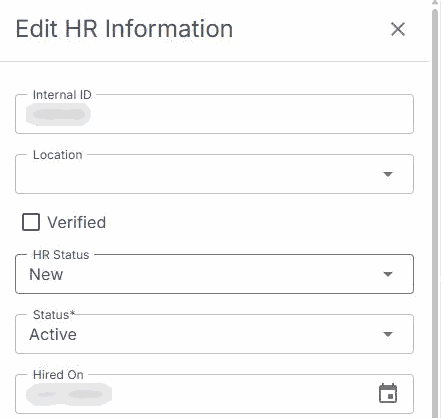
On the HR tab, click EDIT. Set Hired On, change HR Status to Hired, then save.
That is your new hire ready to work. Read on for the checklist and the automatic emails.
On this page
Why this step is by hand
Everything before this runs by itself: sending, reminders, tasks and the move to Docs Signed. That leaves your team to do the part that needs judgment. Because the paperwork is already on the profile, the final check takes minutes, not a search through emails and folders.
Check before you hire
- Every document is complete. Check the Documents tab or Workflows.
- Every document that needs your signature is counter-signed. See Counter-Sign Onboarding Documents.
- Background checks, compliance tests and E-Verify are back, where you use them. See Run Background Checks, Compliance Tests and E-Verify.
- Their Payroll tab has the tax details you need.
- Their profile details are right, such as their address and phone number.
Automatic status emails
Each HR Status change can send the Crew Member an email, written the way you want. A common one is a welcome message when they're hired, telling them what happens next and how to get the app.
To set up or change these emails, contact NextCrew support.
After they're hired
- They can be offered and booked on jobs.
- If they haven't downloaded the app yet, now is the time.
- Keep your HR Statuses meaningful, so reports stay accurate. See Set Up HR Statuses and Referral Sources.
Questions people ask
Why doesn't NextCrew move people to Hired automatically?
Because hiring someone should follow a check by a person. Everything before it is automatic.
Can I hire several people at once?
The HR Status is changed one person at a time on the HR tab. For a large change, ask NextCrew about an import.
What is the Hire Date used for?
It records when they started with you, for your records and reports.
Other ways people ask this
- How do I mark someone as hired?
- How do I make a Crew Member active?
- How do I send a welcome email?
- When is a new hire ready to work?
- What should I check before hiring?
Related guides
- Onboard New Hires: Start Here — the whole onboarding path
- Review and Contact New Candidates — changing HR Status
- Track Your Recruiting Pipeline — time to hire
Was this article helpful?
That’s Great!
Thank you for your feedback
Sorry! We couldn't be helpful
Thank you for your feedback
Feedback sent
We appreciate your effort and will try to fix the article