Many clients won't take someone until their background check is back. The faster you order it, the sooner they can work.
Summary
Background checks through Checkr and healthcare compliance tests through UNA Health are ordered from the Crew Member's profile, using the Apps icon on the quick-access bar on the right. Results come back into NextCrew automatically. E-Verify, where you need it, is part of onboarding and runs before the person is hired. What goes wrong: moving someone to Hired before their results are back.
How to do it
- Open the Crew Member's profile.
- Click the Apps icon on the quick-access bar on the right of the screen.
- Choose Checkr for a background check, or UNA Health for a compliance test.
- Select the package the client needs, and send it.
- Check the result in NextCrew before you move them to Hired.
The result comes back to the profile
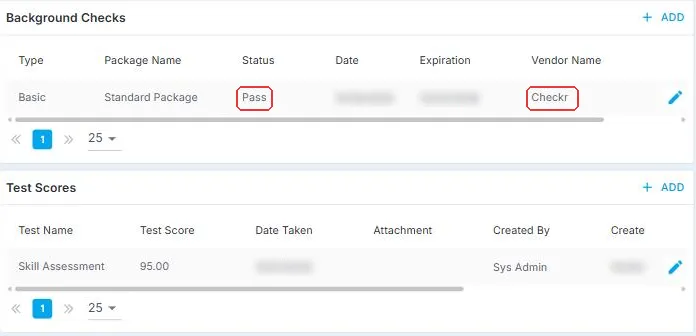
You order from the Apps icon, and the result lands on the Compliance tab of the same profile, with its status and the vendor that ran it. No second login, and no separate site to check. Test scores sit just below.
That is the check ordered. Read on for what you need first and how E-Verify fits in.
On this page
Why ordering from NextCrew is faster
Ordering outside your system means another login, typing the person's details again, and checking a separate site for the result. From NextCrew, the order starts from the profile you already have open, and the result comes back to the same profile, where your team will look for it.
Before you start
- The app needs to be turned on for your account. If you don't see it under Apps, contact NextCrew support.
- Tell candidates about background checks in your onboarding documents. Your background check policy can be one of them.
Which check to use
| Check | Use it for | Where |
|---|---|---|
| Checkr | Background checks: criminal history, driving records and similar, depending on the package. | Apps icon on the Crew Member's profile |
| UNA Health | Compliance testing for healthcare staffing. | Apps icon on the Crew Member's profile |
| VerifiedFirst | Background checks, as another option to Checkr. | Ask NextCrew support to connect it for your agency. |
| E-Verify | Confirming someone can work in the US, where you use it. | Part of onboarding. Contact NextCrew support to set it up. |
Where E-Verify fits
If you use E-Verify, it's part of onboarding. Run it once the I-9 is complete, before you move the person to Hired. Not every agency needs it, so talk to NextCrew support about turning it on.
The rules for when and how to run E-Verify come from the program, not from NextCrew. Follow the guidance for employers who use it.
Questions people ask
Do I have to use Checkr?
No. It's an option for agencies that want to order checks from NextCrew.
Where do I see the result?
It updates on the Crew Member in NextCrew when the provider returns it.
Can a Crew Member work while a check is pending?
That's your decision and your client's. Many agencies wait for the result before moving someone to Hired.
Other ways people ask this
- How do I run a background check?
- How do I order a compliance test?
- Does NextCrew integrate with Checkr?
- How do I use E-Verify in NextCrew?
- Healthcare compliance testing
Related guides
- Onboard New Hires: Start Here — the whole onboarding path
- Move a New Hire to Hired — the final check
Was this article helpful?
That’s Great!
Thank you for your feedback
Sorry! We couldn't be helpful
Thank you for your feedback
Feedback sent
We appreciate your effort and will try to fix the article