Your hiring has its own steps: applied, interviewed, background check, hired. Set up HR statuses to match, so everyone can see where each person is.
Summary
HR Statuses are the stages a person moves through, from new candidate to hired and beyond. One status is marked Primary. That's the status every new Crew Member starts with. Referral Sources record how each person found you, so you can see which sources bring good people.
How to do it
- Go to Settings › Code Tables › HR Statuses.
- Add a status for each real step in your hiring, and set Order so they appear in sequence.
- Make sure one status, usually New, is set to Primary.
- Go to Referral Sources and add the places your candidates come from.
- Turn on Use Referred By for sources where you want the name of the person who referred them, such as a former employee.
The New HR Status form
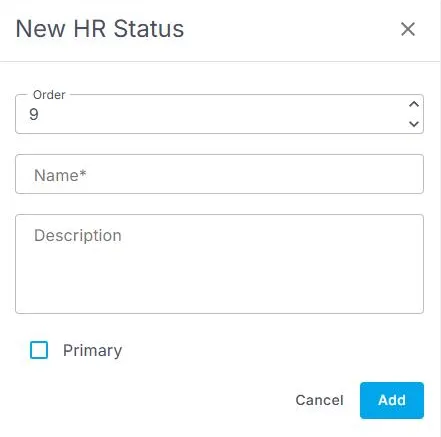
Settings › Code Tables › HR Statuses › Add Record opens this form. Only one status should be Primary, usually New.
When you would use this
You run background checks: add a Background Check status, so everyone can see who is still waiting on one.
You pay referral bonuses: use Use Referred By on your referral source, so you know who to thank.
You spend on job boards: add each board as a source, then compare how many hires each one brings.
That's your pipeline set up. Read on for how the statuses show up day to day.
Where you'll see them
HR statuses show on each Crew Member's record and in the Crew Members list, where you can filter by them. When a status changes, NextCrew adds a note to the record, so you can see the history.
Save a view for each stage, such as Interviewing or Onboarding, and your team can work each stage as its own list.
Want the whole pipeline on one screen? Group the Crew Members list by HR Status and save it as a Pipeline view. Every candidate shows under their stage, with a count for each. See Track Your Recruiting Pipeline.
Tips
- Keep the list short, so the stage is always obvious.
- Name statuses for the step, not the person doing it.
- Don't rename a status to mean something new. Add a new one instead.
Other ways people ask this
- How do I add a hiring stage?
- What does Primary mean on HR status?
- How do I track who referred a candidate?
- How do I change the default status for new applicants?
Related guides
- Add, change or delete a Code Table value — how every table works
- Save and share your own list views — a list for each hiring stage
Was this article helpful?
That’s Great!
Thank you for your feedback
Sorry! We couldn't be helpful
Thank you for your feedback
Feedback sent
We appreciate your effort and will try to fix the article