You've found someone you want to hire. Their paperwork should be on its way to them in seconds, not after twenty minutes of picking forms.
Summary
Change the candidate's HR Status to Onboarding. NextCrew sends them your onboarding package, with the state forms for the state in their address. They complete it in a browser or the app. NextCrew creates a task for each document, reminds them if they stop, and sets their status to Docs Signed when they finish. What goes wrong: an old or wrong address, so the wrong state forms go out.
How to do it
- Open the candidate from HR › Crew Members.
- Check their address. It decides which state forms they get.
- Open their HR tab.
- Change the HR Status to Onboarding and save.
- If they will also work in another state, send that state's form from Form Packages.
Setting the HR Status
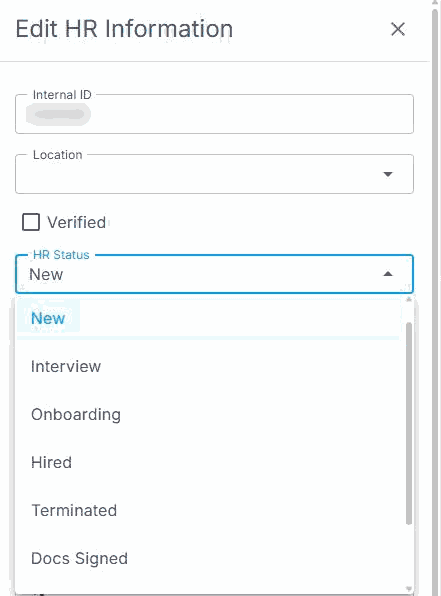
On the HR tab, click EDIT, pick Onboarding from HR Status, then save.
That is the package sent. Read on for what the new hire does and what NextCrew does for you.
On this page
Why this is faster
With a general e-signature tool, someone has to choose the right documents for each person, upload them and send them, every time. In NextCrew, your package is already built. The status change is the send button. Nobody picks forms, and nobody forgets the state form.
State forms
NextCrew reads the state from the Crew Member's address and adds that state's forms to the package. Fix the address before you send, not after.
If someone works in more than one state, send the extra state's form on its own. Open Form Packages, open the form's package and choose Send To. See Build and Send Form Packages.
What the new hire does
- They get a link and open it in a browser. Many people don't want an app before they're hired, so they don't need one. They can use the app if they have it.
- Their name and address are already filled in. They answer each question once.
- They go through the documents one at a time, step by step.
- When a form asks for an ID, they take a photo with their phone. Nothing to print, scan or download.
- Their progress saves, so they can stop and come back.
Send them Complete Your Hiring Documents if they need help.
What NextCrew does for you
| What happens | What it saves you |
|---|---|
| A task is created for each document, and it completes itself when the document is done. | Keeping a checklist per new hire. |
| If they stop, NextCrew emails reminders on day 3, day 5 and day 7. | Chasing people by phone. |
| Their answers fill their profile, such as their SSN and the details from their I-9. | Typing it into your system. |
| Tax answers from the federal and state forms, such as exemptions and deductions, fill their Payroll tab. From there they go into your payroll file. | Rekeying tax details for payroll. |
| When everything is signed, their HR Status changes to Docs Signed and you get a notification. | Checking who has finished. |
| Each document is saved as a PDF on their Documents tab. | Downloading, renaming and filing. |
See Create, Assign and Track Tasks for how tasks work.
If the documents don't arrive
| Check | If yes | If no |
|---|---|---|
| 1. Is the HR Status Onboarding? | Go to check 2. | Change it and save. |
| 2. Is their email address right? | Ask them to check Spam or Junk. Go to check 3. | Fix it on their profile, then resend. |
| 3. Did they get the wrong state forms? | Fix the address, then reset the package. See Reset, Resend or Cancel an Onboarding Form. | Contact NextCrew support with their name and what they see. |
Questions people ask
Do new hires need the app?
No. They can complete everything in a browser. They can use the app if they have it.
Can I change what's in the package?
The onboarding package is set up by NextCrew, so contact support to change it. For a form of your own, see Build and Send Form Packages.
How do I send my own custom forms?
Build them yourself in Form Packages, then choose Send To, or Get Link to paste a link into your own email. See Build and Send Form Packages.
Can I send onboarding to several people at once?
Each person's package goes out when their HR Status changes to Onboarding. For a large batch, ask NextCrew about an import.
Other ways people ask this
- How do I send onboarding paperwork?
- How do I send an I-9 and W-4?
- How do I send forms for a different state?
- Why didn't my new hire get their documents?
- Paperless onboarding for staffing
Related guides
- Onboard New Hires: Start Here — the whole onboarding path
- Track Onboarding in Workflows — who has finished
- Complete Your Hiring Documents — the guide for your new hires
Was this article helpful?
That’s Great!
Thank you for your feedback
Sorry! We couldn't be helpful
Thank you for your feedback
Feedback sent
We appreciate your effort and will try to fix the article