Some documents aren't finished when the new hire signs. The I-9, for example, has a section the employer must complete. NextCrew puts that step in the same place as everything else.
Summary
When a form needs your signature too, NextCrew adds a second row for it in Workflows, assigned to the Admin role. Open that row and click Start to complete and sign your part. Not every agency counter-signs every document, but do it wherever your own rules require it. What goes wrong: Admin rows left waiting because nobody owns them.
How to do it
- Open Workflows from the left menu.
- Find the rows where Role is Admin and the form isn't completed.
- Click the form, then click Start.
- Complete your part and sign.
- Check the row now shows a Completed date.
Your signature rows, side by side with the new hire's
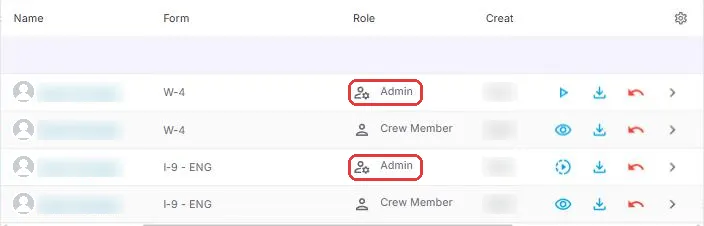
Rows where Role is Admin are the ones waiting for you. They sit right next to the new hire's own rows, so nothing gets lost in an inbox. Click the form, then Start, to complete and sign your part.
That is the document counter-signed. Read on to set up a routine so none are missed.
On this page
Why this is simpler
With a general e-signature tool, the employer's part is often a separate step: download the form, fill in your section, sign and upload it again. In NextCrew, your part sits beside the new hire's part in the same list, and the signed document is saved to their profile when you finish.
Which documents need your signature
That depends on your documents and the rules that apply to you. The employer section of the I-9 is the common one. Your contracts or policies may need a signature from your agency too.
NextCrew sets up which forms need an Admin signature when your package is built. To change it, contact NextCrew support.
We can't tell you which documents you're required to counter-sign. Check with whoever advises you on employment compliance.
Make it part of the routine
- Give one person the job of checking Admin rows each day.
- Federal rules set deadlines for the employer section of the I-9, so don't let those rows wait.
- Counter-sign before you move anyone to Hired. See Move a New Hire to Hired.
Questions people ask
Who can counter-sign?
The row is assigned to the Admin role, so someone with that role signs it. If you can't see the Start button, ask your NextCrew administrator about your access.
Where does the signed document go?
It is saved as a PDF on the Crew Member's Documents tab, and you can download it from Workflows.
The new hire made a mistake. Can I still sign?
Reset the form first so they can correct it. See Reset, Resend or Cancel an Onboarding Form.
Other ways people ask this
- How do I sign an I-9 as the employer?
- How do I complete Section 2 of the I-9?
- Where do I counter-sign documents?
- Why is there an Admin row in Workflows?
- Employer signature on onboarding forms
Related guides
- Track Onboarding in Workflows — finding Admin rows
- Onboard New Hires: Start Here — the whole onboarding path
Was this article helpful?
That’s Great!
Thank you for your feedback
Sorry! We couldn't be helpful
Thank you for your feedback
Feedback sent
We appreciate your effort and will try to fix the article