A new hire typed the wrong date of birth, or moved to another state. Once they've sent a form, they can't change it. You can reset it.
Summary
Click the red reset arrow on any of the person's rows in Workflows. The whole package resets, so the new hire can complete it again. To take one form out of someone's package, use the ⋯ menu on the form and cancel it. Crew Members can't change their tax details in the app after onboarding, so resending the form is how they update them. If they need to send state tax details again, first delete that state's record on their Payroll tab. What goes wrong: resending state forms without deleting the old payroll record.
How to do it
- Open Workflows and find the person's rows.
- Click the red reset arrow on any of their rows. The whole package resets.
- Resubmitting state information? Delete that state's record on their Payroll tab before they complete it again.
- Let the new hire know they need to complete it again.
The red reset arrow
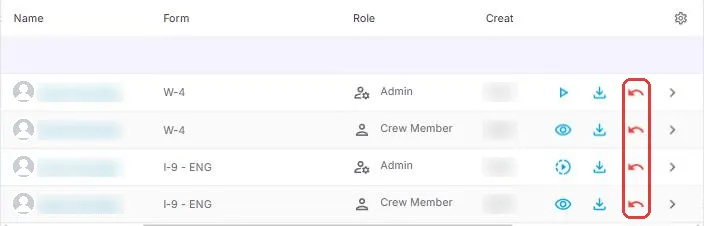
The red reset arrow is at the end of each row in Workflows. One click resets the whole package, so the new hire can complete it again: no new document, no starting over. Resubmitting state tax details? Delete that state's record on their Payroll tab first.
That is the form ready to complete again. Read on for canceling a form and for state changes.
On this page
Why this is quicker
With general e-signature tools, a mistake usually means a new document, a new envelope and starting over. In NextCrew you reset what's already there, and the corrected answers update the profile when they resubmit.
Cancel a form someone doesn't need
Say a package has five forms and one doesn't apply to this person. Click the ⋯ on that form and cancel it. The rest of the package carries on, and the form shows a Canceled Form label in Workflows.
State changes and the Payroll tab
When state forms are completed, their tax details are stored on the Crew Member's Payroll tab. If they must send state information again, for example after moving, that old record is still there.
- Update their address on their profile.
- Open their Payroll tab and delete the record for the state they are resubmitting.
- Reset the package so they can complete it again.
⚠️ Watch out
If you skip deleting the old state record, the old details stay on the Payroll tab and can end up in your payroll file.
For someone working in a second state as well, don't reset anything. Send the extra state form from Form Packages. See Send Onboarding Documents.
Questions people ask
Can the new hire fix a form themselves?
No. Once a form is sent, only your office can reset it.
Does resetting delete what they already entered?
They complete the form again, and their new answers are what's saved.
Can I undo a canceled form?
Contact NextCrew support if you canceled the wrong form.
Other ways people ask this
- How do I resend onboarding documents?
- A new hire made a mistake on their W-4
- How do I reset a signed form?
- How do I remove a form from a package?
- Crew Member moved to another state
Related guides
- Track Onboarding in Workflows — finding the form
- Send Onboarding Documents — state forms
- Build and Send Form Packages — resetting your own packages
Was this article helpful?
That’s Great!
Thank you for your feedback
Sorry! We couldn't be helpful
Thank you for your feedback
Feedback sent
We appreciate your effort and will try to fix the article