NextCrew 2.0
Release 4.9
Most of this you will notice the first time you use it. A faster way to send an invoice. A way to pull a stack of forms in one go. Replies that point at the message they answer.
In this release
- Scheduling Crew booked on a split schedule are now free on their days off, so you can book them elsewhere
- Invoice batches now include Paid timesheets as well as Approved — the one change that happens on its own
- Chat reply to a specific message, and threads sort in time order again
- Forms select several and download them together as one zip
- Invoices email one straight from the list
- Permissions a new Write (Deny Delete) level for jobs, orders, timesheets and clients
- Rate changes the note now names the person who made the change, not “System”
Start here
One thing changes on its own
Everything else in this release waits for you to go and use it. This one does not.
Invoice batches now pick up Paid timesheets as well as Approved
A new invoice batch used to start with Approved selected and nothing else. It now starts with Approved and Paid.
Been creating a batch and then going back for the paid ones separately? That second pass is gone.
Check your first batch after the release. It will be bigger than you are used to. It is picking up timesheets it used to leave behind. That is intended — but look before you send, not after.
Want the old behavior? Nothing is taken away. Save a view with just Approved and use that instead — the same way you could before this change.
New
Things you can now do
Reply to a specific message
In a chat thread, you can now reply to one particular message. Before, every reply went to the bottom of the pile.
In a quiet thread that hardly matters. In a busy one it is the whole difference. The question sits with the answer, so both still make sense next week.
Download a stack of forms in one go
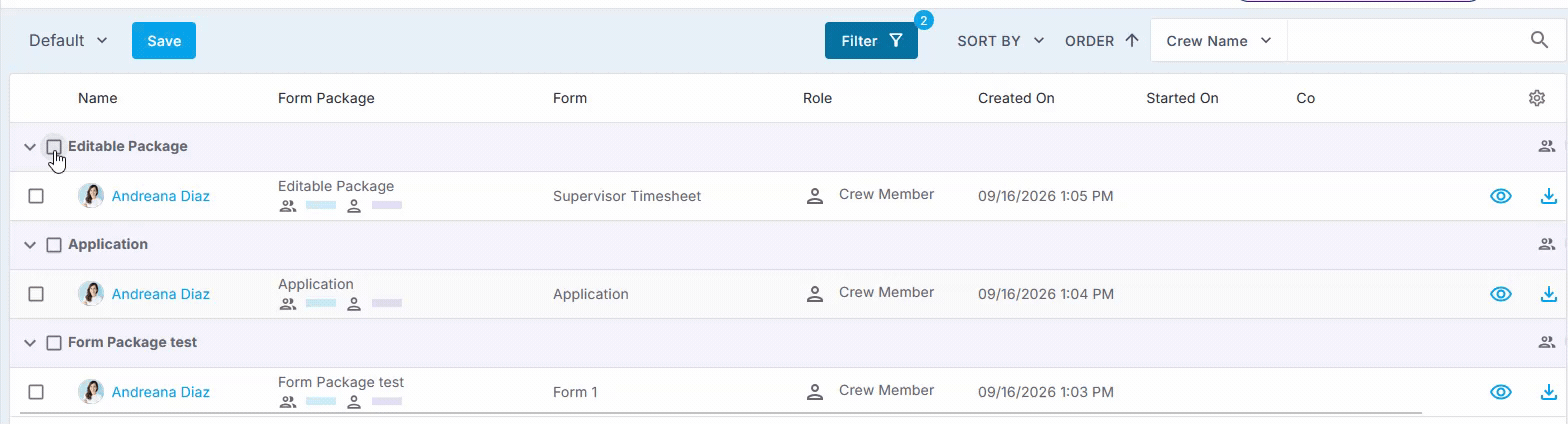
The Forms page now has checkboxes. Tick the forms you want, or tick a whole grouping to take everything under it. They download together as one zip file.
This works for every kind of form, not one particular type. Anything on that page can go in the zip.
Ever pulled forms one at a time for an audit or a client request? This is the item to try first.
Email an invoice without opening it
On the invoice list, open the … menu on any row and email that invoice from there.
Three clicks fewer, on something most back-office teams do several times a day.
A permission for people who should edit but not delete
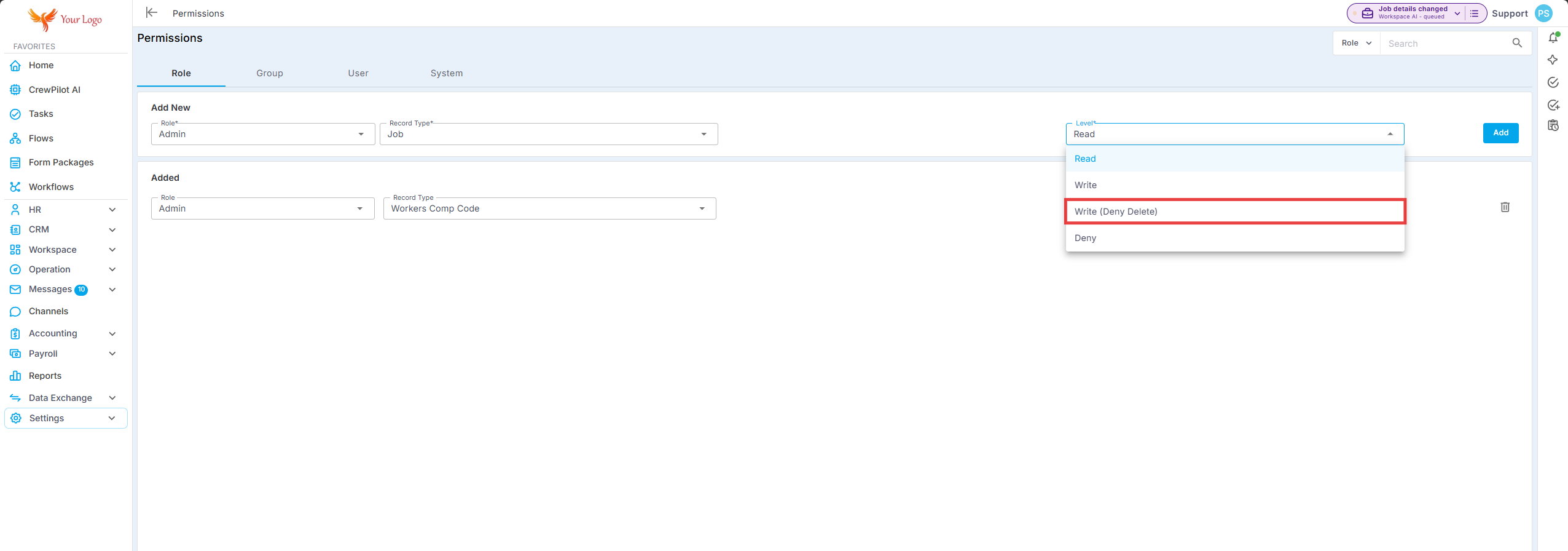
There is a new data-access level: Write (Deny Delete).
Somebody with it can create and change a record, but not remove it. It covers jobs, orders, timesheets and clients.
This fills a gap most agencies have worked around. The person you trust to fix a timesheet is not always the one you want deleting them. Until now those were the same permission.
Fixed
Fixed and improved
Crew on a split schedule are free on the days in between
A job can carry a schedule that spreads across a week. The same person works Monday 9 to 5, Wednesday 5 to 9, and Sunday 12 to 5 — all on one job.
Until now, that booking effectively held the whole stretch. The days with no shift on them were not open, even though the person was not working them.
That is fixed. The days in between are free, and that Crew member can be booked on other work.
Rate changes now show who made them
When someone changes a Crew member's rate, NextCrew adds a note recording the change. That has always happened.
What was wrong is who the note was credited to. It said System, whatever human actually made the change. It now names the person.
A rate change is a money change. A note crediting System told you something happened and gave you nobody to ask. The trail is real now.
Messages show in the order they were sent
Messages inside a chat thread were not always sorting by time. Viewing a thread now shows them in order.
This one came from customers who reported it more than once. Thank you for telling us twice.
A cloned job remembers where it came from
When a job is cloned, NextCrew now records which job it was cloned from.
You will not see this day to day. It matters when a job looks wrong and nobody remembers how it was created. The trail is there now. You do not have to rebuild it from memory.
Under the hood
Behind the scenes
This release also carried a lot of platform work. Groundwork across 21 API surfaces, plus changes to the job rules engine, the reporting engine and the data-import foundations.
None of it changes how anything works today. It is the kind of work that makes the next set of features quicker to build and less likely to break something else on the way.
Something not behaving the way this page describes?
Raise a ticket through the Support menu and we will come back to you. Tell us early — the message-ordering fix above exists because somebody did.
Was this article helpful?
That’s Great!
Thank you for your feedback
Sorry! We couldn't be helpful
Thank you for your feedback
Feedback sent
We appreciate your effort and will try to fix the article