NextCrew protects your data with several layers of security. Your team adds the last layer. Use the checklist below to see if you're covered. It takes about two minutes.
Summary
Your data passes through five layers that NextCrew runs for you: Cloudflare, a firewall in Amazon Web Services (AWS), application security, database security and encryption, both when data is stored and when it's sent. The sixth layer is your team: two-step sign-in, strong passwords, one login per person and permissions on personal information. What goes wrong: a shared login, a former employee who can still sign in, or every office user able to see every Crew Member's Social Security number.
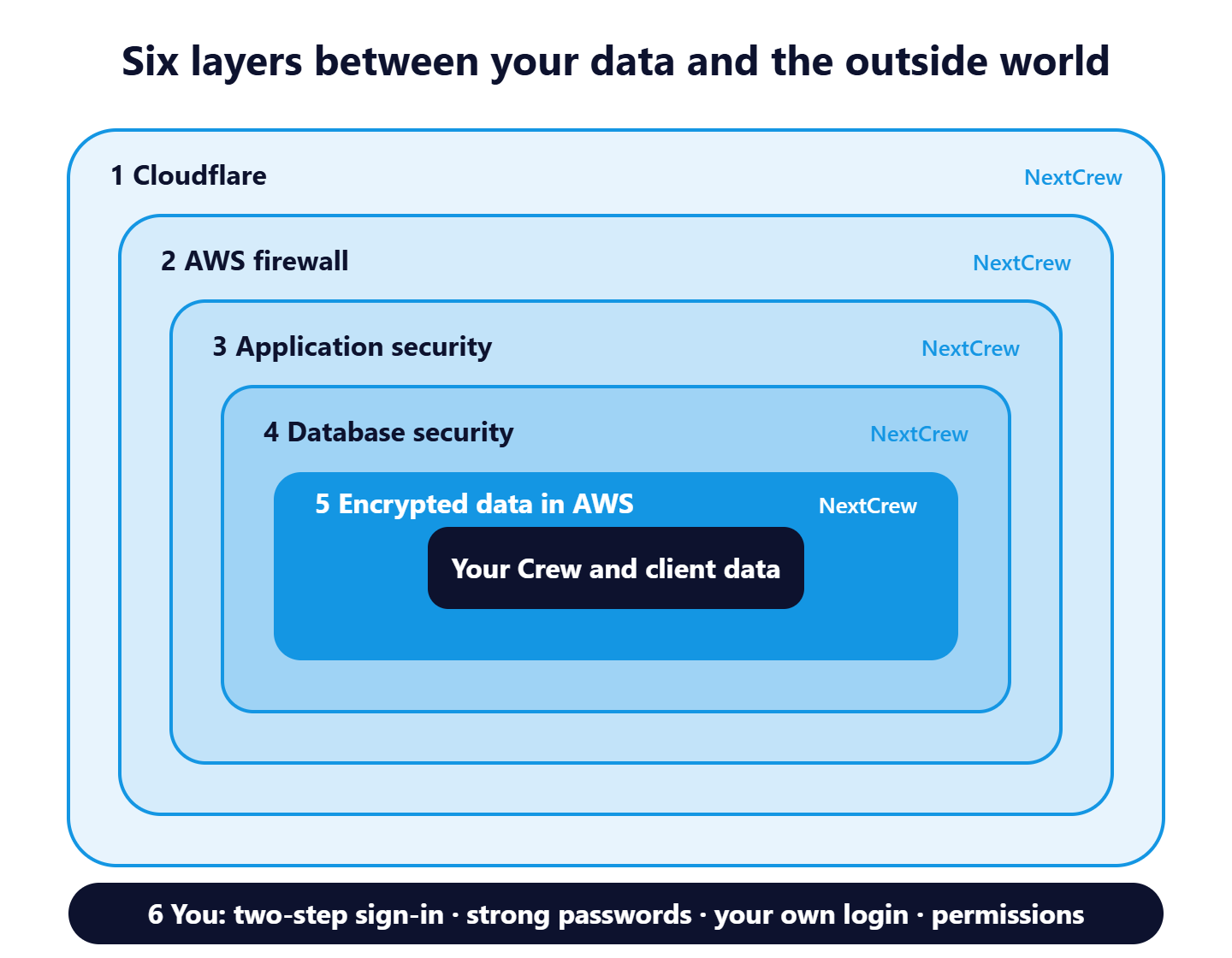
The first five layers are NextCrew's, and they're always on. The sixth is yours: the checklist below.
Your security checklist
Tick every line. If you can't, the fix is right next to it.
| Are you doing this? | If not, here's the fix | |
|---|---|---|
| Two-step sign-in is on for your office users | Email support@nextcrew.com and ask us to turn it on. There's no extra cost. NextCrew 2.0 only. | |
| Everyone has their own login. No shared accounts | Add each person as an office user. NextCrew emails them their sign-in. See Add an Office User. | |
| Nobody shares or writes down a password | Tell your team: never by email, text or sticky note, and never with a coworker. | |
| Your password rules are strong | Check Password Policy in Settings › Site Configuration › Company. Ask for length, numbers, uppercase and special characters. | |
| Passwords change every 30 days | Nothing to do. NextCrew asks everyone, office users and Crew, for a new password every 30 days. | |
| Only the right people see SSNs and birthdates | Set them to Deny or Read for everyone who doesn't need them. See Permissions. | |
| People who left can't sign in | Disable their login the same day in Settings › Company Profile › Admin Users. | |
| You check all of this every quarter | Put a 10-minute reminder on your calendar. |
All ticked? Your agency is covered.
These security settings are part of NextCrew 2.0. Read on only if you want the detail behind a line.
On this page
What NextCrew does to protect your data
| Layer | What it does for you |
|---|---|
| 1. Cloudflare | Every visit to NextCrew passes through Cloudflare first, which screens out unwanted traffic before it reaches us. |
| 2. AWS firewall | NextCrew runs in Amazon Web Services (AWS). A firewall there lets in only the traffic NextCrew needs. |
| 3. Application security | NextCrew itself checks who you are and what you're allowed to see before it shows anything. |
| 4. Database security | The database that holds your records has its own protection, separate from the application. |
| 5. Encryption | Your data is encrypted when it's stored in AWS and when it travels between NextCrew and your browser or phone. |
You don't set any of these up. They're on for every agency, all the time.
Two-step sign-in
After the password, NextCrew emails a one-time code that the person types in. Someone who steals or guesses a password still can't get in without that code.
- To turn it on, email support@nextcrew.com. We turn it on for your whole company. There's no extra cost.
- It covers office users: staffing managers, recruiters, payroll and billing staff. Crew sign-in doesn't change.
- NextCrew trusts a browser for 30 days after a code is used, so people aren't asked every time they sign in.
- Once it's on, it stays on for your company.
- It's available in NextCrew 2.0 only, not in NextCrew Legacy.
Strong passwords that change every 30 days
Your agency sets its password rules in Settings › Site Configuration › Company › Password Policy: the minimum and maximum length, whether a password needs letters, numbers, uppercase, lowercase and special characters, and how many days before an old password can be used again. NextCrew won't accept a password that breaks the rules.
Every 30 days, NextCrew asks each person, office users and Crew, to choose a new password. If a password was ever seen or guessed, it stops working within a month.
- Tip: a short phrase you'll remember, with a number and a symbol, is easier to type and harder to guess than a single word.
- Use your NextCrew password only for NextCrew.
- Forgot it? See Forgot Your Password? Reset It and Sign In.
One login per person
NextCrew records every change against the person who made it. Open the Feed in the tray on any record to see who changed what and when. A shared login turns that into "someone in the office", and you can't remove one person's access without locking out everyone else.
Adding a person is quick: when you add an office user, NextCrew emails them so they can sign in. See Add an Office User.
Who sees personal information
Not everyone in your office needs to see a Crew Member's Social Security number or birthdate. In Settings › Permissions, you set each sensitive field for a role, an office location, a group or one person:
- Deny: the field is hidden.
- Read: they can see it but not change it. A Social Security number shows only partly.
- Write: they can see it and change it.
Fields you can protect include SSN, Birthdate, Pay Rate, Bill Rate and Rate Markup. The most specific rule wins, so a rule for one person beats the rule for their role. By default, only the master admin can open Permissions.
An example you can adapt
| Role | SSN | Birthdate | Pay Rate | Bill Rate and Markup |
|---|---|---|---|---|
| Recruiters | Deny | Read | Read | Deny |
| Schedulers | Deny | Deny | Read | Deny |
| Payroll | Read (partly shown) | Read | Write | Deny |
| Billing | Deny | Deny | Read | Write |
| Owners and admins | Write | Write | Write | Write |
Set it to fit your team. Full steps are in Control What Each Person Can See and Do: Permissions.
When someone leaves
- Disable their login on their last day in Settings › Company Profile › Admin Users.
- Reassign their open tasks and the clients they looked after.
- Change any passwords they knew outside NextCrew, such as a shared email inbox.
Why it's done this way
| Without NextCrew | In NextCrew |
|---|---|
| Social Security numbers sit in spreadsheets and email attachments anyone can forward | They live in one place, and you decide who sees them, who sees part of them and who never does |
| One office password that never changes | Each person has their own strong password that changes every 30 days, plus a sign-in code |
| You can't tell who changed a pay rate | The Feed shows who changed what and when |
| Removing someone means changing every shared password | Disable one login and they're out |
If something isn't working
| What you see | Check this first | Who fixes it |
|---|---|---|
| The sign-in code didn't arrive | Spam and Junk, and that the email on the user record is right. | Your admin, then NextCrew support |
| NextCrew won't accept a new password | It must meet every rule in your Password Policy, and may not reuse a recent password. | You |
| Someone can't see a field they need | Their Permissions. A user or role rule may say Deny. | Your master admin |
| Locked out after a password change | Forgot Your Password? Reset It and Sign In | You, or your admin |
Questions people ask
Is NextCrew secure?
NextCrew protects your data with five layers: Cloudflare, an AWS firewall, application security, database security, and encryption when data is stored and when it's sent. Your team adds the sixth layer with two-step sign-in, strong passwords, one login per person and permissions.
Is my data encrypted?
Yes. Your data is encrypted when it's stored in AWS and when it travels between NextCrew and your browser or phone.
How do we turn on two-step sign-in?
Email support@nextcrew.com and we'll turn it on for your company. There's no extra cost.
Is two-step sign-in available in NextCrew Legacy?
No. It's available in NextCrew 2.0 only.
Do Crew Members get a sign-in code?
No. Two-step sign-in covers office users. Crew passwords still change every 30 days.
Can we turn two-step sign-in off?
Once it's on, it stays on for your company.
Can a recruiter see Social Security numbers?
Only if your Permissions allow it. Set the field to Deny for recruiters, or Read to show only part of the number.
Can two people share one login?
No. Each person needs their own, so every change can be traced and access can be removed one person at a time.
Other ways people ask this
- Is NextCrew secure?
- How do I secure my staffing agency?
- Does NextCrew have two-factor authentication?
- How do I turn on MFA?
- Why do I have to change my password?
- How do I hide Social Security numbers from my staff?
- Who can see SSNs in NextCrew?
- Is our data encrypted?
- Can we share a login?
- Staffing agency security checklist
Related guides
- Control What Each Person Can See and Do: Permissions: who sees which fields
- Add an Office User: give each person their own login
- Forgot Your Password? Reset It and Sign In: get back in
- Site Configuration: What Each Setting Does: where the Password Policy lives
- Users and Permissions: Start Here
- Switch From NextCrew Legacy to NextCrew 2.0: get two-step sign-in
Was this article helpful?
That’s Great!
Thank you for your feedback
Sorry! We couldn't be helpful
Thank you for your feedback
Feedback sent
We appreciate your effort and will try to fix the article