Forgot your password, or locked out after too many tries? You can reset it yourself from the sign-in page in about a minute.
Summary
On the NextCrew sign-in page, click Forgot Password, type the email on your NextCrew account and click GET RESET LINK. Open the email and set a new password. Resetting your password also unlocks your account if it was locked, so there's no need to wait for anyone. If the email doesn't arrive, or you can't get into that inbox, ask your master admin or another admin who can reset passwords for your team. What goes wrong: typing a different email from the one on your NextCrew account. Use the email your admin set up for you.
How to do it
- Go to your NextCrew sign-in page, the address ending in .app, such as yourcompany.nextcrew.app.
- Click Forgot Password, just under the Password box.
- Type the email on your NextCrew account.
- Click GET RESET LINK.
- Open the reset email and click its link to set a new password.
- Sign in with your new password.
Where to find it
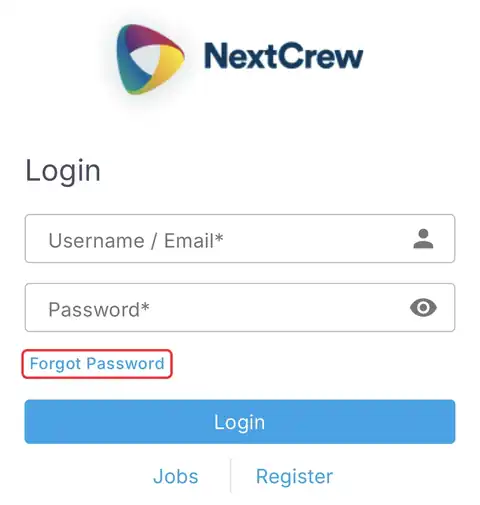
Forgot Password sits right under the Password box on your sign-in page.
That's it: a new password, and your account is unlocked too. Read on if the email doesn't arrive.
On this page
Locked out after too many tries
Resetting your password from the sign-in page also unlocks your account. You don't need to wait for an admin to unlock it.
If the reset doesn't work
| What you see | Check this first | Who fixes it |
|---|---|---|
| The reset email isn't in your inbox | Check Spam and Junk, and give it a few minutes. | You |
| You can't get into that email inbox | Ask your master admin, or another admin who can reset passwords, to reset it for you. | Your master admin |
| Your email address has changed | Your admin can update the email on your user record. See Add an Office User. | Your admin |
| Your new password isn't accepted | Your agency's password rules. See Update Your Name, Profile and Password. | You |
| Your account is disabled | A reset won't turn it back on. Only an admin can. | Your admin |
For admins: helping a teammate get back in
The quickest fix is to send your teammate to Forgot Password on the sign-in page. The reset also unlocks their account.
If they can't get the email, check the email on their user record in Settings › Company Profile › Admin Users. If you're the master admin, or an admin who can reset other users' passwords, you can reset it for them there.
Why it works this way
| Without self-service | In NextCrew |
|---|---|
| You wait for someone to reset your password | You reset it yourself, any time, in about a minute |
| A locked account means waiting to be unlocked | The same reset unlocks it |
| Your admin spends time on password requests | Your admin only steps in when the email can't reach you |
Questions people ask
Does resetting my password unlock my account?
Yes. A reset from the sign-in page also unlocks it.
Who do I ask if the reset email never arrives?
Your master admin, or another admin who can reset passwords for your team.
Can I change my password while I'm signed in?
Yes. Click your initials at the top right, choose Profile and change it under Account Details. See Update Your Name, Profile and Password.
Is this the same for Crew Members?
No. Crew reset their password in the NextCrew app. This guide is for office users.
Other ways people ask this
- I forgot my password.
- How do I reset my password?
- I'm locked out of NextCrew.
- How do I unlock my account?
- The reset email didn't come.
- How do I reset another admin's password?
- I can't sign in to NextCrew.
Related guides
- Update Your Name, Profile and Password — change it while signed in
- Add an Office User — what your admin sets for you
- Get Help With NextCrew — when you're still stuck
Was this article helpful?
That’s Great!
Thank you for your feedback
Sorry! We couldn't be helpful
Thank you for your feedback
Feedback sent
We appreciate your effort and will try to fix the article