Everything you need to keep your agency’s sign-ins and your Crew’s personal information safe, ready to use. Print the checklist, send the messages, and come back to this page once a quarter. It takes about ten minutes.
In this kit
- The security checklist to print and tick
- A message for your team about passwords and logins
- The email that turns on two-step sign-in
- What to say when a client asks if their data is safe
- A starting point for who sees Social Security numbers and pay rates
- What to do the day someone leaves
- What to ask CrewPilot
Why it’s worth it
| For your Crew and clients | For your agency |
|---|---|
| Their Social Security numbers, birthdates and pay are seen only by the people who need them. | A stolen or guessed password isn’t enough to get in. |
| Their information isn’t sitting in spreadsheets and email attachments. | Every change is tied to one person, so you can always see who did what. |
| You can answer “is my data safe?” with confidence. | When someone leaves, you remove one login, not change every password. |
The checklist
Print it, or keep this page open, and tick every line. If you can’t, the fix is next to it. The detail behind each line is in Is Your Agency Secure? A 2-Minute Security Checklist.
| ☐ Are you doing this? | If not |
|---|---|
| ☐ Two-step sign-in is on for your office users | Send the email below. There’s no extra cost. NextCrew 2.0 only. |
| ☐ Everyone has their own login. No shared accounts | Add each person as an office user. See Add an Office User. |
| ☐ Nobody shares or writes down a password | Send your team the message below. |
| ☐ Your password rules are strong | Check your Password Policy. See Site Configuration: What Each Setting Does. |
| ☐ Passwords change every 30 days | Nothing to do. NextCrew asks everyone, office users and Crew, every 30 days. |
| ☐ Only the right people see SSNs and birthdates | Use the starting point below. See Set Up Permissions Your Way. |
| ☐ People who left can’t sign in | Use the “When someone leaves” list below, the same day. |
| ☐ You check all of this every quarter | Add the calendar reminder below. |
A message for your team
Send it to everyone in your office, and again when someone new starts.
Copy and share
Hi team, a quick reminder on keeping our agency and our Crew’s information safe:
Use only your own NextCrew login. Never share a password, write it down, or send it by email or text. Use your NextCrew password only for NextCrew.
NextCrew asks for a new password every 30 days. A short phrase with a number and a symbol is easy to remember and hard to guess.
Questions? Ask [name].
Save it as a shared template in Messages so it goes out the same way every time. See Create and Share Message Templates.
Turn on two-step sign-in
After the password, NextCrew emails a one-time code. It covers your office users, and Crew sign-in doesn’t change. Once it’s on, it stays on for your company. Send this email to start:
Copy and send
To: support@nextcrew.com
Subject: Please turn on two-step sign-in for [agency name]
Hi NextCrew team, please turn on two-step sign-in for [agency name]. Thanks, [your name], [your role]
When a client asks if their data is safe
Copy and adapt
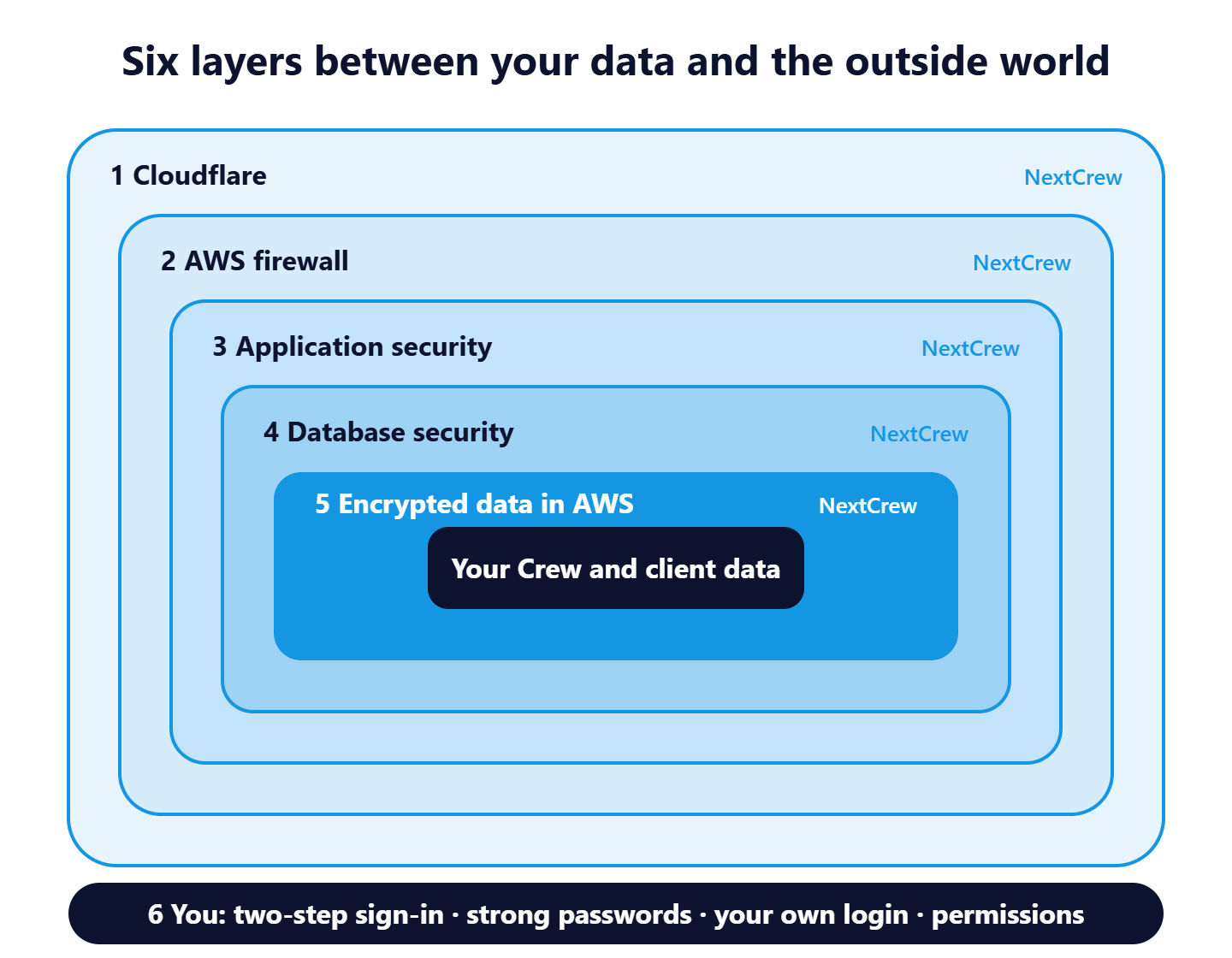
Yes. We run our agency on NextCrew, which protects data with five layers: Cloudflare, a firewall in Amazon Web Services (AWS), application security, database security, and encryption both when data is stored and when it’s sent. On our side, every office user has their own login with two-step sign-in, passwords change every 30 days, and only the people who need them can see personal information such as Social Security numbers.
Only say two-step sign-in once it’s on for your agency.
Who sees what: a starting point
Not everyone needs to see a Crew Member’s Social Security number or birthdate. Adapt this to your team, then set it up with Set Up Permissions Your Way: by User, Group or Location. Deny hides the field. Read shows it without changes, and shows only part of a Social Security number. Write lets them change it.
| Role | SSN | Birthdate | Pay Rate | Bill Rate and Markup |
|---|---|---|---|---|
| Recruiters | Deny | Read | Read | Deny |
| Schedulers | Deny | Deny | Read | Deny |
| Payroll | Read (partly shown) | Read | Write | Deny |
| Billing | Deny | Deny | Read | Write |
| Owners and admins | Write | Write | Write | Write |
When someone leaves
Do all three on their last day:
- ☐ Disable their NextCrew login.
- ☐ Reassign their open tasks and the clients they looked after.
- ☐ Change any passwords they knew outside NextCrew, such as a shared email inbox.
Your quarterly reminder
Copy into your calendar
Title: NextCrew security check (10 minutes)
Notes: Tick the checklist in the NextCrew Security Kit, or at https://nextcrew.freshdesk.com/support/solutions/articles/11000138548. Check who can see SSNs and pay rates, and that everyone who left can’t sign in.
See who changed what
Every change in NextCrew is recorded against the person who made it. If a pay rate or a Social Security number changes and you don’t know why, open the record’s Feed. See See Who Did What, and When: The Audit Trail.
Ask CrewPilot
Not sure of an answer? Open CrewPilot in NextCrew and ask in plain words. It points you to the right guide. Try “How do I turn on two-step sign-in?” or “How do I hide Social Security numbers from recruiters?” See Ask CrewPilot.
Go further
- Is Your Agency Secure? A 2-Minute Security Checklist: the detail behind every line, and what NextCrew does to protect your data
- Control What Each Person Can See and Do: Permissions: every field you can protect
- Forgot Your Password? Reset It and Sign In: for anyone locked out
- Run Your Agency: The NextCrew University Course: more ways to get the most out of NextCrew
This kit goes with the “Is your agency secure?” NextCrew email.
Was this article helpful?
That’s Great!
Thank you for your feedback
Sorry! We couldn't be helpful
Thank you for your feedback
Feedback sent
We appreciate your effort and will try to fix the article