A Crew Member says they replied yesterday. Here's how to find it, and how to make sure replies aren't missed when someone is out.
Summary
Inbox holds messages sent to you. Sent holds what you sent, one line per person. Use Show Unread to see what still needs an answer. If your admin has set up a shared group, turn off Show Only Mine to see your teammates' messages as well.
How to do it
- Go to Messages › Inbox.
- Turn on Show Unread to see only messages you haven't read.
- Search by Subject, or use Filter, to find a message.
- Click a message to open it.
- Go to Messages › Sent to see what you sent and when.
Your Inbox
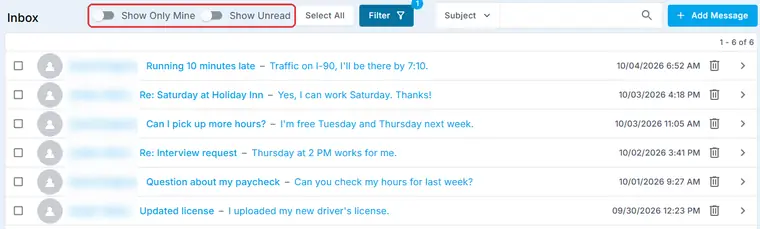
Every reply from your Crew lands here, newest first, with the subject and a preview. Turn on Show Unread to see what still needs an answer.
That's where everything is. Read on to share messages across your team.
On this page
Share messages across your team
When someone is away, their replies still need answers. Your admin can put your team in a group with Share Messages turned on, in Settings › Code Tables › Groups.
Then, in Inbox, turn off Show Only Mine to see messages for everyone in the group. Turn it back on to see only your own.
⚠️ Watch out
Only put office staff in a group with Share Messages on. Anyone in the group can see its messages.
Read the Sent list
A message to thirty people shows as thirty lines, one per person, each with their own name filled in. The date shows when it went out.
Sent opens with a filter on. Check the number on the Filter button if an older message seems to be missing.
If something's not right
| What you see | Check this first | Who fixes it |
|---|---|---|
| An older message isn't in the list | The filter on the list. Change or clear it. | You |
| You can't see a teammate's messages | Show Only Mine, and whether you're both in a group with Share Messages on. | Your NextCrew admin |
Other ways people ask this
- Where do Crew replies go?
- How do I see messages I sent?
- How do I cover a coworker's inbox?
- How do I see only unread messages?
Related guides
- Send a message to Crew, clients or your team — writing and sending
- See What Was Sent and What Came Back: Email, Push and Text Tracking — delivered, opened or bounced
Was this article helpful?
That’s Great!
Thank you for your feedback
Sorry! We couldn't be helpful
Thank you for your feedback
Feedback sent
We appreciate your effort and will try to fix the article