Offer Screen
Stat cards are now clickable on the job offer screen.
Quick tip: Click a card to see more details instantly.

- HR status is now shown on the fly-out for quicker access during reviews.
CRM Updates
Client Crew Preferences can now be sorted to help you organize faster.
You can now filter crew by 'Bill City' for more precise searches.
Tags can now be added by client for improved organization.
Workspace Enhancements
The new column, “Requested Count,” has been added on the list of offers for better visibility for number of crew that have been requested.
Two new filter options let you view order, job, and offer records by created or modified date range.
Users can add tags on job orders and jobs for easy categorization.
Operations
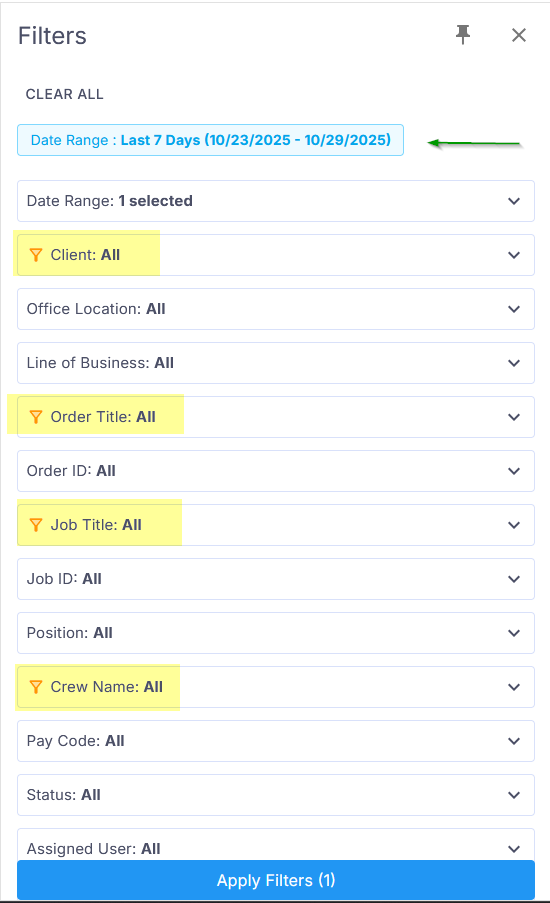
Filters on the platform are now cascading by date range, helping you find and segment data more efficiently. This is not compatible with legacy filters.
You can now add template reviews, streamlining feedback across jobs.
Timesheet Break Adjustments
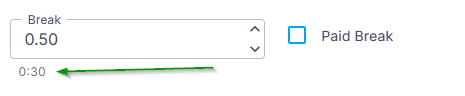
When adding a break, new helper text makes it clear: .50 equals 30 minutes.
HR ->Payroll
Now you can have withholding details by state for your crew members.
Was this article helpful?
That’s Great!
Thank you for your feedback
Sorry! We couldn't be helpful
Thank you for your feedback
Feedback sent
We appreciate your effort and will try to fix the article