Overview
NextCrew AI Assistant employs advanced OpenAI technology to streamline staffing agency workflows. It answers platform, scheduling, and candidate questions using natural language, providing instant help articles, real-time business data, and resume analysis—directly within the NextCrew environment.
Steps to Activate
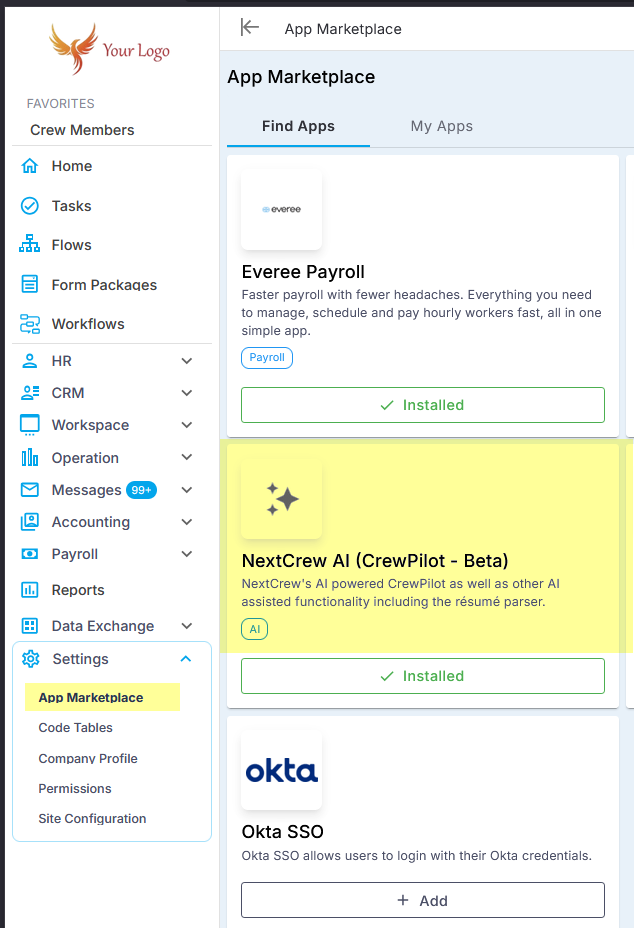
Verify Your Pricing Tier:
Before adding NextCrew AI Assistant, confirm it is included in your organization’s pricing plan. Some features, including AI add-ons, might only be available in premium or custom tiers.Go to Settings:
In your NextCrew dashboard, click ‘Settings’ to access account configuration options.Open App Marketplace:
Navigate to ‘App Marketplace’ and search for ‘NextCrew AI (Crew Pilot)’.Add the AI Module:
Select ‘NextCrew AI (Crew Pilot)’ and click ‘+Add’ to install it for your account.Enable in My Apps:
Once added, open ‘My Apps’, find Crew Pilot, and toggle or click ‘Enable’ to activate the AI add-on.Start Using:
Click the AI icon on the right side of your interface. The chatbot window will open, ready for questions.
Benefits
Instant Guidance:
Reduces onboarding and support time by quickly answering help and workflow-related queries.Live Data Access:
Brings up real-time staffing data, crew assignments, and open positions using conversational questions.Resume Search and AI Analysis:
Instantly search resumes (“search resumes for license CNA”) or analyze candidates viewing their profile—click ‘Analyze’ and ask specific questions for AI-generated insight.Automation and Efficiency:
Automates reporting, scheduling, and candidate matching for optimized agency operations.User-Friendly Design:
No technical skills required; works for every team member, whether managing schedules or handling onboarding.
How to Use
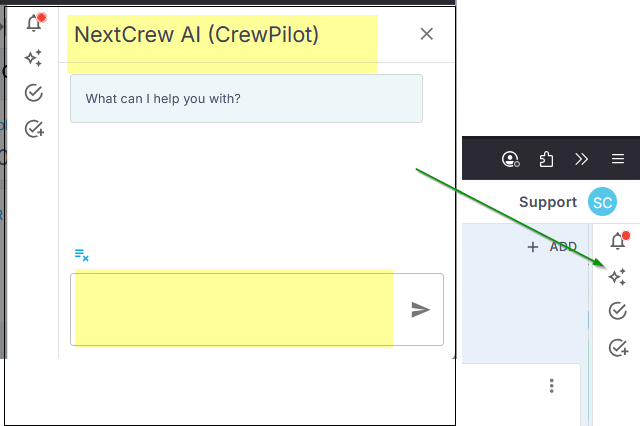
Ask System and Help Questions:
Examples: “How do I use groups?” or “How do I add crew members?”—the Assistant provides relevant guides.Query Business Metrics:
Examples: “Show me open jobs for this week”, “Who is working today?”—receive live, actionable answers instantly.Resume Search and Analysis:
Use prompts like “search resumes for license CNA” for targeted candidate searches. While viewing any resume, click ‘Analyze’ and ask custom candidate questions for deep, AI-powered analysis.Continue the Conversation:
Ask clarifying follow-ups and explore additional queries for layered insights or instructions.
FAQ
Do I need training to use Crew Pilot?
What business data can the AI Assistant access?
Can I analyze resumes and candidates with AI?
Is Crew Pilot suitable for healthcare, event, hospitality, and industrial staffing?
Is my business data protected when using NextCrew?
What if the AI Assistant add-on isn’t available in my plan?
Was this article helpful?
That’s Great!
Thank you for your feedback
Sorry! We couldn't be helpful
Thank you for your feedback
Feedback sent
We appreciate your effort and will try to fix the article