Before a travel nurse says yes, they want to see the package. Build it on the offer, check your margin as you go, send it as a PDF, and keep it current. This is for travel nursing assignments only.
Summary
For a travel nursing assignment, the offer's Pay Package tab builds the package. It puts the taxable pay rate, the non-taxable meals, lodging and incidentals, the bill rate and your burden costs in one place, and works out the weekly and total amounts, the blended hourly rate, your gross profit and your margin. Add GSA Rates fills in the allowed stipends for the work location. When it's right, use Print or Generate Contract to get a PDF you can email to the nurse or the facility. What goes wrong: a cost line with no unit (it shows NotSet) counts as $0, so the package looks better than it is.
How to do it
- Open the job, go to Offers and open the nurse's offer. They can be interested, requested or already offered.
- Click the Pay Package tab.
- Fill in Distance, Hours Per Day, Days Per Week and Number of Weeks, plus any Orientation or PTO hours.
- Under Pay Rate Details, click Add GSA Rates to bring in the stipends for the work location, or ADD a line yourself.
- Check Bill Rate Details and Burden Costs, then read Net Profit & Margin at the bottom.
- Click Print or Generate Contract, save the PDF and email it.
Where you check the margin
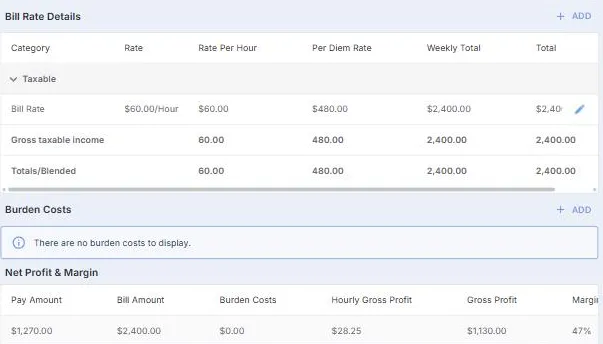
The bottom of the Pay Package tab. Net Profit & Margin updates as you change the package, so you see the margin before the nurse does.
That's a package the nurse can compare and a margin you can stand behind. Below: what each part means, GSA stipends, checking the numbers, and keeping the package current.
On this page
What's on the Pay Package tab
| Part | What it holds |
|---|---|
| Job Details | The job, position and dates, plus the nurse's home location and the work location. |
| Distance, hours and weeks | Distance (miles), Hours Per Day, Days Per Week, Number of Weeks, Orientation Hours, PTO Hours and Total Hours. |
| Pay Rate Details | Taxable: the pay rate. Non Taxable: stipends such as meals and lodging. Each line shows its rate per hour, per day, per week and in total. |
| Totals/Blended | Taxable and non-taxable pay added together, shown per hour, per day, per week and in total. The blended hourly rate is the number nurses compare. |
| Bill Rate Details | What you bill the facility, worked out the same way. |
| Burden Costs | Costs you carry that the nurse isn't paid, such as VMS fees or insurance. |
| Net Profit & Margin | Pay Amount, Bill Amount, Burden Costs, Hourly Gross Profit, Gross Profit and Margin. |
Meals, lodging and incidentals from GSA rates
Travel packages usually split pay into a taxable hourly rate and weekly non-taxable stipends for meals, lodging and incidentals. The stipends need to stay within the allowed amount for where the nurse is working.
Click Add GSA Rates under Pay Rate Details. NextCrew looks up the allowed rates for the work location and adds them as non-taxable lines, so you start from the right ceiling instead of looking it up by hand.
⚠️ Watch out
NextCrew works out the numbers. Whether a stipend can be paid tax-free depends on the nurse's own situation, such as keeping a tax home. Check with whoever advises you on tax.
Add or change a line yourself
Click ADD under Pay Rate Details or Bill Rate Details, or the pencil on a line to change it. Stipends and other extras also come from the offer's Additional Costs tab: a cost with Taxable unticked shows under Non Taxable.
⚠️ Watch out
Give every line a unit, such as Day, Week or Hour. A line with no unit shows NotSet and counts as $0 everywhere in the package.
For costs on the offer, see Track Additional and Burden Costs to See Your True Margin.
Check your margin before you send it
Net Profit & Margin updates as you change the package. Margin here is gross profit divided by the bill amount, after burden costs.
| If the margin is too low | Try this |
|---|---|
| Stipends are high | Check the GSA rates are for the right work location. |
| Burden costs eat the profit | Check each burden cost is real for this job, such as the VMS fee. |
| The bill rate is low | Check the facility's rate configuration. See Set Up Rate Configurations for a Client. |
New to markup and margin? See How a Staffing Business Works.
Send the package
Click Print or Generate Contract to get a PDF of the package. Save it and email it to the nurse, or to the facility if they ask for it. Think of it as the contract: what the nurse is paid, week by week, for this assignment.
Manage the package after it's sent
| When | What to do |
|---|---|
| The nurse or facility asks for a change | Edit the line with its pencil, or change the hours or weeks. The totals and margin update as you go. |
| Anything changed | Make a new PDF with Print or Generate Contract and send it again, so everyone has the same version. |
| The nurse signs it | Keep the signed copy on the offer: on the Overview tab, under Documents, click ADD. |
| A fee changes, such as the VMS fee | Update it on the offer's Burden Costs tab and check the margin again. |
Why it's done this way
| Without NextCrew | In NextCrew |
|---|---|
| A spreadsheet per traveler, rebuilt for every offer | The package lives on the offer it belongs to |
| Looking up GSA rates by hand | Add GSA Rates fills in the stipends for the work location |
| Finding out the margin after the nurse has signed | Margin, after burden costs, shows before you send anything |
| Retyping the numbers into a contract | Print or Generate Contract gives you the PDF |
If something isn't right
| What you see | Check this first | Who fixes it |
|---|---|---|
| A stipend line shows $0 | Its unit is NotSet. Edit the line and pick Day, Week or Hour. | You |
| The totals look too small or too big | Hours Per Day, Days Per Week and Number of Weeks. | You |
| The margin ignores a fee you pay | Add it on the offer's Burden Costs tab. | You |
| The stipends look wrong for the city | The work location on the job. GSA rates follow it. | You |
| Add GSA Rates adds nothing | Check the work location has a full address with a ZIP code, then contact NextCrew support. | You, then NextCrew |
Questions people ask
Where is the pay package?
On the offer. Open the job, open the nurse's offer and click the Pay Package tab.
What is the blended rate?
Taxable pay and non-taxable stipends added together, per hour. It's the number travelers compare between agencies.
How do I send the package to the nurse?
Click Print or Generate Contract, save the PDF and email it.
Do burden costs reduce the margin?
Yes. Net Profit & Margin takes burden costs off before it works out gross profit and margin.
Do I need a pay package for every job?
No. Pay packages are for travel nursing assignments only. For other jobs, the offer's pay and bill rates are all you need.
What if the package changes after I sent it?
Change the lines on the Pay Package tab, then make a new PDF and send it again, so the nurse always has the latest version.
Other ways people ask this
- How do I make a pay package?
- How do I update a pay package?
- How do I resend a pay package?
- Where do I add GSA rates?
- How do I add meals and lodging stipends?
- How do I see the margin on a travel contract?
- How do I send a contract to a travel nurse?
- What is the blended rate?
- Travel nurse deal sheet
- Pay package calculator
Related guides
- Track Additional and Burden Costs to See Your True Margin — fees and extras on an offer
- Pay One Crew Member a Different Rate on a Job — change one nurse's rate
- Set Up Rate Configurations for a Client — the facility's bill rates
- How a Staffing Business Works — markup and margin, simply
- Orders, Jobs and Offers — where offers fit
Was this article helpful?
That’s Great!
Thank you for your feedback
Sorry! We couldn't be helpful
Thank you for your feedback
Feedback sent
We appreciate your effort and will try to fix the article