When an invoice carries extra charges, such as travel or a drug screen, your client wants to know what each one is. Expense Categories give every charge a clear label that's the same on every invoice.
Summary
Expense Categories are the choices in the Expense Type list when you add an expense to an invoice. Set them up in Settings › Code Tables › Expense Categories. Each one has an Order, a Name and a Description. What goes wrong: a long list of near-duplicates, such as Travel, Travel Expense and Trip, so the same cost gets labeled three ways.
How to do it
- Go to Settings › Code Tables and click Expense Categories (under Accounting).
- Click Add Record.
- Type a Name your clients will understand, such as Travel or Drug Screening.
- Add a Description that tells your team what belongs in it.
- Set Order. Lower numbers show first in the Expense Type list.
- Click Add.
The New Expense Category form
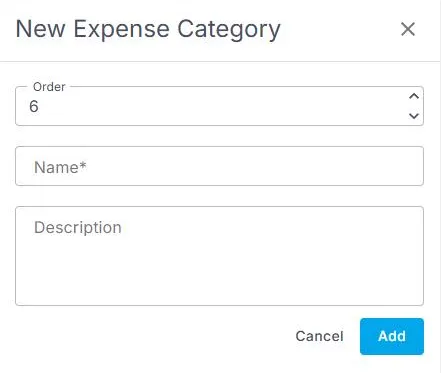
Settings › Code Tables › Expense Categories › Add Record opens this form. Order sets where it shows in the Expense Type list.
That's a category ready. The next time someone adds an expense to an invoice, it's in the Expense Type list.
On this page
Where you use them
Open an invoice in Accounting › Invoices. Under Expenses / Credits, click + ADD. The Add Expense / Credit panel opens.
| Field | What to enter |
|---|---|
| Expense or Credit | Expense adds a charge. Credit takes money off the invoice. |
| Expense Type | One of your Expense Categories. You can search the list. |
| Description | Details about this charge, such as the dates or a receipt number. |
| Units and Bill Rate | How many, and the price of each. NextCrew works out the Amount for you. |
The charge is added to the invoice's Expense Total. For every part of an invoice, see Anatomy of an Invoice.
Good categories to start with
Keep the list short and clear. Most agencies start with a handful, such as Travel, Lodging, Meals, Mileage, Supplies and Drug Screening. Add more only when a charge doesn't fit any of them.
Why set them up
| Without Expense Categories | With Expense Categories |
|---|---|
| Each person types their own label for the same cost. | Everyone picks from one list. |
| Clients call to ask what a charge is. | Each charge says what it is. |
| The list grows every time someone spells it differently. | An admin keeps one short list for the whole team. |
Paying a Crew Member back is different
Expense Categories label charges on client invoices. To pay a Crew Member back for something they bought, use a timesheet with the Reimbursement pay code. See Add, Clone or Fix a Timesheet.
Change or remove a category
Renaming a category changes it everywhere it's used, including invoices you already sent. To change what a category means, add a new one instead. Before you delete one, check Associated Records. See Add, Change or Delete a Code Table Value.
If something isn't working
| What you see | Check this first | Who fixes it |
|---|---|---|
| A new category isn't in the Expense Type list | Close the Add Expense / Credit panel and open it again, or refresh the invoice. | You |
| You can't see Code Tables in Settings | Your role. Code Tables are for admins. | Your NextCrew admin |
| You can't add an expense to an invoice | Your permissions for invoices. | Your NextCrew admin |
Questions people ask
Where do I add an expense to an invoice?
Open the invoice, go to Expenses / Credits and click + ADD.
Can I take money off an invoice?
Yes. In the same panel, choose Credit instead of Expense.
Are Expense Categories used for Crew pay?
No. They label charges on client invoices. Crew pay uses pay codes, such as Reimbursement.
Who can change the list?
Admins who can open Code Tables.
Other ways people ask this
- How do I add an expense type?
- How do I bill a client for travel?
- Where do I set up invoice expense categories?
- How do I add a drug screening charge to an invoice?
- What is Expense Type on an invoice?
Related guides
- Anatomy of an Invoice: Every Section and What You Can Change — every part of an invoice
- Add, Change or Delete a Code Table Value — how every table works
- Lookup Tables (Code Tables): Start Here — what each table controls
Was this article helpful?
That’s Great!
Thank you for your feedback
Sorry! We couldn't be helpful
Thank you for your feedback
Feedback sent
We appreciate your effort and will try to fix the article