An invoice is more than a total. Knowing where each part lives makes fixing one a two-minute job.
Summary
Open an invoice from Accounting › Invoices. At the top are its type (Actual or Estimate), status and print status, with Print, delete and a ⋮ menu. Invoice General Information holds the client contact, dates, payment terms, tax and any surcharge or discount. Below, the Detail tab lists the service lines from timesheets, expenses and credits, attachments and a memo, with the totals. What goes wrong: adding tax by hand on every invoice when it could be set on the client.
How to use this page
- Go to Accounting › Invoices and click an invoice number.
- Click EDIT beside Invoice General Information to change contacts, dates, terms, tax or a discount.
- Use + ADD in a section to add a line, an expense or an attachment.
- Use the tables below to see what each part does.
One invoice, six parts
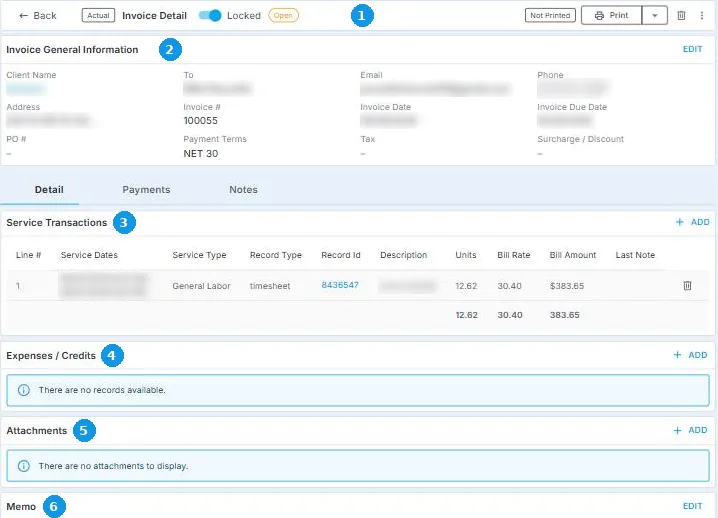
1 The top: Actual or Estimate, status, print status, Print, delete and the ⋮ menu.
2 Invoice General Information: who it goes to, dates, terms, tax and any discount. EDIT changes them.
3 Service Transactions: one line per timesheet.
4 Expenses / Credits: parking, a rush fee, or a credit.
5 Attachments: receipts and documents for the client.
6 Memo: a note that goes on the invoice.
Each change happens in the section it belongs to, and + ADD is always on the right.
That's every part of an invoice. Read on for what each one holds.
The top of the invoice
| Item | What it means |
|---|---|
| Actual or Estimate | Whether it bills actual hours or planned ones. |
| Status | Open until it's paid. |
| Not Printed, Printed, Reprinted | Whether it has been sent. Printed means sent, and Reprinted means sent again. |
| Print or download it. | |
| Delete (trash icon) | Deletes this invoice, if you have permission. See Delete or Correct an Invoice. |
| ⋮ menu | Add Attachment, Add Payment and Recalculate. |
Invoice General Information
| Field | What it holds |
|---|---|
| Contact and email | Who the invoice goes to. Add more than one email address, pressing Enter or a comma after each. |
| Invoice #, Invoice date, Due date | The number and dates. Numbering starts from the number set in Site Configuration. |
| PO # | The client's purchase order number, if they use one. |
| Payment Terms | Days until it's due, such as NET 30. |
| Tax | A sales tax percentage for this invoice. |
| Surcharge/Discount | A surcharge added, or a discount taken off. |
| Address | The billing address. |
Set tax and payment terms on the client instead, so every invoice gets them automatically. See Set Up Invoicing for a Client.
The Detail tab
| Section | What it holds |
|---|---|
| Service Transactions | One line per timesheet: dates, service type, the timesheet number, the Crew Member, hours, rate and amount. + ADD adds a line. |
| Expenses / Credits | Extra charges, such as parking or a rush fee, or a credit. + ADD adds one. |
| Attachments | Receipts and documents for the client. |
| Memo | A note that goes on the invoice. |
| Totals | Service Total, Expense Total, Surcharge/Discount Total, Tax Total, Payments and Payment Due. |
The Payments tab shows payments recorded against it, and Notes holds your team's notes.
Questions people ask
How do I add an expense to an invoice?
Open the invoice and click + ADD under Expenses / Credits.
How do I add sales tax?
Click EDIT and enter the Tax percentage, or set it on the client so it's added automatically.
Can I send an invoice to more than one person?
Yes. Add several email addresses in Invoice General Information.
Other ways people ask this
- How do I add a line to an invoice?
- How do I add a discount to an invoice?
- Where do I add a PO number?
- How do I change the due date on an invoice?
- How do I add a note to an invoice?
Related guides
- Create Invoices in a Batch — where invoices come from
- Send Invoices and Record Payments — after you've checked it
- Hours Missing From an Invoice? Find Out Why and Bill Them — find which invoice a timesheet is on
Was this article helpful?
That’s Great!
Thank you for your feedback
Sorry! We couldn't be helpful
Thank you for your feedback
Feedback sent
We appreciate your effort and will try to fix the article