Texting, background checks, payroll, license checks. The App Marketplace connects them to NextCrew, so your team works in one place.
Summary
The App Marketplace is in Settings › App Marketplace. Find Apps lists every partner app you can add. My Apps lists the ones you've added, where you Configure or Remove them. Most apps need an account with the partner first, and some partners charge for their service, so there may be a cost. What goes wrong: adding an app before you have the partner account and details it asks for.
How to do it
- Go to Settings › App Marketplace.
- On Find Apps, click an app to read what it does.
- Click Add.
- Open My Apps and click Configure on the app, if it has settings.
- Enter the details from your partner account and click Update.
- To stop using an app, click Remove on My Apps.
Find Apps
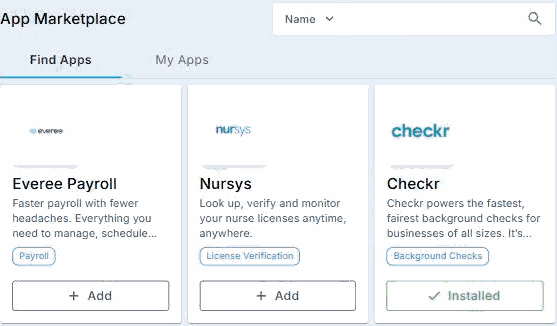
Each app on Find Apps has a short description and a category. Click Add to connect it. Apps you already have show Installed.
That's an app added. Read on for what each one does and the guides that set them up.
On this page
The apps
| App | What it's for | Guide |
|---|---|---|
| Twilio | Text messages to Crew from your own number. | Turn On Text Messaging with Twilio |
| Checkr | Background checks from the Crew Member's record. | Run Background Checks, Compliance Tests and E-Verify |
| E-Verify | Employment eligibility checks. | Run Background Checks, Compliance Tests and E-Verify |
| UNA Health | Compliance testing. | Run Background Checks, Compliance Tests and E-Verify |
| Nursys | Look up and monitor nurse licenses. | — |
| Everee Payroll | Pay hourly workers. | Export Payroll to Your Payroll Company |
| JobTarget | Advertise jobs on job sites. | — |
| Spark Hire | Video interviews. | — |
| CrewPilot AI | Ask questions about NextCrew and your data. | Ask CrewPilot |
| Okta SSO | Sign in with your Okta account. | Sign In with Okta (SSO) |
New partners are added over time. Check Find Apps for the current list.
Why connect apps here
| Without the App Marketplace | With it |
|---|---|
| Logging in to each partner's website | Use the partner's service from inside NextCrew. |
| Copying a Crew Member's details into another system | The details are sent from their NextCrew record. |
| Results arriving by email | Results come back to the Crew Member's record. |
Connecting something else
If the software you use isn't listed, your developer can connect it with the NextCrew API. See Connect Other Software with the NextCrew API.
If something isn't working
| What you see | What to do |
|---|---|
| No App Marketplace in the Settings menu | You don't have permission. Ask your NextCrew admin. |
| The app is added but nothing happens | Open My Apps, click Configure, and check every detail against your partner account. |
| An app shows Disabled on My Apps | It's added but not switched on. Check its settings. |
Questions people ask
Do apps cost extra?
Some partners charge for their service, so there may be a cost. Check with the partner.
Do I need an account with the partner?
Usually, yes. Set it up before you add the app.
Can I remove an app?
Yes. Click Remove on My Apps.
Other ways people ask this
- What integrations does NextCrew have?
- Where is the App Marketplace?
- How do I add an integration?
- Does NextCrew integrate with Checkr?
- Does NextCrew integrate with Okta?
Related guides
- Company Setup: Start Here — everything else to set up
- Connect Other Software with the NextCrew API — for software that isn't listed
Was this article helpful?
That’s Great!
Thank you for your feedback
Sorry! We couldn't be helpful
Thank you for your feedback
Feedback sent
We appreciate your effort and will try to fix the article