Every agency sends a wrong invoice sometimes. What matters is fixing it cleanly, with a record of what changed.
Summary
Most mistakes can be fixed on the invoice itself: edit the contact, dates, terms, tax or discount, or add a line, expense or credit. If the invoice shouldn't exist at all, open it and delete it with the trash icon at the top. Deleting is permission-based, and invoices are deleted one at a time. If the hours changed, unlock the invoice and recalculate it instead. What goes wrong: deleting an invoice the client has already been sent, without telling them.
How to do it
- Go to Accounting › Invoices and open the invoice.
- To fix a detail, click EDIT beside Invoice General Information, or + ADD in a section.
- To remove it, click the trash icon at the top of the invoice and confirm.
- Add a note on the invoice, or on the client, saying what happened.
Where the trash icon is
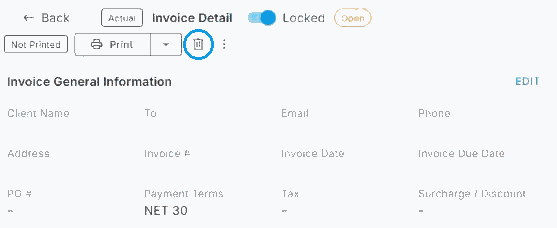
The trash icon sits next to Print at the top of the invoice. To fix a detail instead, click EDIT.
That's the mistake fixed, with a record of why. Read on for when to edit and when to delete.
Edit or delete?
| Situation | What to do |
|---|---|
| Wrong contact, dates, terms or tax | Edit Invoice General Information. |
| Missing expense or a credit owed | Add it under Expenses / Credits. |
| Wrong type (Estimate instead of Actual) | Delete it and create it again. The type can't be changed. |
| Invoice shouldn't exist | Delete it. |
Delete an invoice
- Open the invoice.
- Click the trash icon at the top.
- Confirm.
⚠️ Watch out
Only people with the delete permission can delete invoices. There's no way to delete a whole batch: delete each invoice on its own.
If the client already has it, tell them it's been canceled before you send the corrected one.
Fix hours on an invoice: unlock and recalculate
An invoice marked Locked can't be edited. That keeps a finished invoice safe. When hours change after you've invoiced, unlock it, fix the timesheet and recalculate, all from the same screen.
- Open the invoice and turn off Locked.
- In the invoice details, click the record ID (the timesheet ID) on the line that needs fixing. The timesheet opens in a panel on the same screen.
- Update the hours on the timesheet.
- Click the ⋯ menu on the invoice and choose Recalculate. The invoice picks up the new hours.
Questions people ask
Can I void an invoice?
Delete it, if you have permission, and create a corrected one.
Can I delete a whole batch?
No. Delete the invoices one at a time.
Why can't I see the delete icon?
You don't have the permission. Ask an administrator.
Other ways people ask this
- How do I void an invoice?
- How do I cancel an invoice?
- I sent the wrong invoice
- How do I delete an invoice batch?
Related guides
- Anatomy of an Invoice — what you can edit
- Create Invoices in a Batch — creating it again
- Hours Missing From an Invoice? Find Out Why and Bill Them — when hours never made it onto an invoice
Was this article helpful?
That’s Great!
Thank you for your feedback
Sorry! We couldn't be helpful
Thank you for your feedback
Feedback sent
We appreciate your effort and will try to fix the article