An invoice nobody sent is never paid. A payment nobody recorded looks like a client who owes you.
Summary
Email an invoice from the ⋮ menu on its row in Accounting › Invoices, or print it from the invoice. Once it's sent it shows as Printed. For online payment, include your Stripe or Bill.com link. When the client pays, open the invoice and use Add Payment; when the Balance reaches zero, it's paid. The Aging column shows how many days old each unpaid invoice is. What goes wrong: forgetting to record payments, so your list of who owes what is wrong.
How to do it
- Go to Accounting › Invoices.
- To email one invoice, click ⋮ on its row and choose Email Invoice. To print it, open it and click Print.
- When the client pays, open the invoice, click ⋮ and choose Add Payment.
- Enter the amount and date, and save.
- Sort the list by Balance or Aging to see who still owes you.
Where Add Payment is
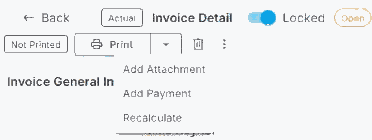
Open the invoice and click ⋮ next to Print. Add Payment is greyed out on an estimate; it works on an actual invoice.
That's an invoice sent and paid, with the record to prove it. Read on for online payment and keeping on top of what's owed.
On this page
Send invoices
- Email Invoice from the ⋮ menu on the row sends it to the email addresses on the invoice.
- Print on the invoice prints or downloads it.
- Once it's sent, it shows as Printed. If it's sent again, it shows as Reprinted.
- Check who invoices go to on the client. See Set Up Invoicing for a Client.
Let clients pay online
NextCrew doesn't take card or bank payments itself. If your clients pay online, include a payment link from Stripe or Bill.com, for example in the client's Remittance Information or Note to Client.
Record a payment
- Open the invoice.
- Click ⋮ and choose Add Payment.
- Enter the amount and the date it was paid, and save.
Part payments are fine: the Balance shows what's left. Once it reaches zero, the invoice is paid. You can also record payments in Accounting › Payments with + Add Payment.
Keep on top of what's owed
| Column | Use it to |
|---|---|
| Balance | See what's still owed on each invoice. |
| Due Date | See when it's due. |
| Aging (Days) | See how many days old it is, so you chase the oldest first. |
NextCrew doesn't send payment reminders for you. Save a view of unpaid invoices and check it every week.
Questions people ask
How do I know an invoice was sent?
It shows as Printed, with the date in Sent On.
Can clients pay online?
Include a Stripe or Bill.com link. NextCrew doesn't process payments itself.
Does NextCrew remind clients to pay?
No. Check Balance and Aging regularly and follow up.
How do I record a part payment?
Use Add Payment with the amount received. The Balance shows the rest.
Other ways people ask this
- How do I email an invoice?
- How do I mark an invoice as paid?
- How do I record a client payment?
- How can clients pay invoices online?
- Which invoices are overdue?
Related guides
- Anatomy of an Invoice — every part of an invoice
- Export Invoices to QuickBooks — for your accounting system
Was this article helpful?
That’s Great!
Thank you for your feedback
Sorry! We couldn't be helpful
Thank you for your feedback
Feedback sent
We appreciate your effort and will try to fix the article