Set it once on the client, and every invoice comes out with the right tax, terms and recipients without anyone remembering.
Summary
Each client's Configuration tab has Payment Settings (payment term, tax, week-ending day and pay period) and Invoice Settings (roll-up to a parent client, remittance information, a note to the client and email recipients). Set them once and they're applied to every invoice for that client. What goes wrong: tax set on the client and added again by hand on the invoice.
How to do it
- Go to CRM › Clients and open the client.
- Open the Configuration tab.
- Under Payment Settings, click EDIT and set the payment term and tax.
- Under Invoice Settings, click EDIT and set the email recipients, remittance information and note.
- Turn on Rollup to Parent if this client's invoices should go to a parent client.
Payment and invoice settings
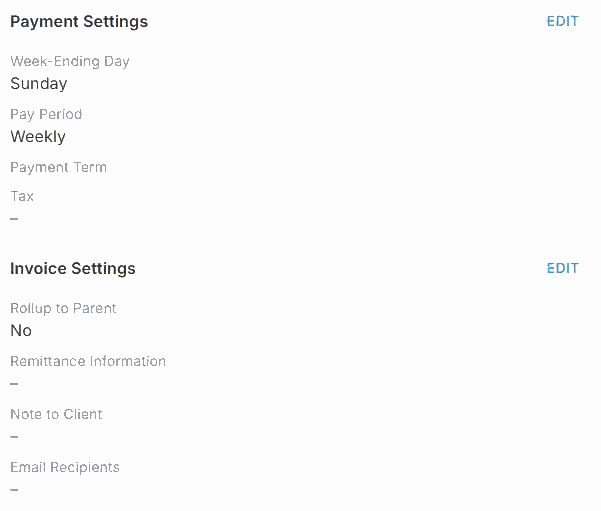
On the client’s Configuration tab, each section has its own EDIT.
That's the client set up, so every invoice comes out right. Read on for each setting.
On this page
Payment Settings
| Setting | What it does |
|---|---|
| Payment Term | Days until invoices are due, such as NET 30. |
| Tax | A sales tax percentage, added to this client's invoices automatically. |
| Week-Ending Day, Pay Period | How this client's weeks and pay periods run. Weekly overtime for this client is counted over its week. Leave Week-Ending Day blank to use your company's, and tell the NextCrew team during implementation if a client needs its own. See How NextCrew Calculates Overtime Automatically. |
Invoice Settings
| Setting | What it does |
|---|---|
| Rollup to Parent | Puts this client's work on its parent client's invoice. |
| Remittance Information | How the client should pay you. A good place for a Stripe or Bill.com payment link. |
| Note to Client | A message for this client's invoices. |
| Email Recipients | Who receives this client's invoices. |
Roll up branch invoices to a parent
When one company has several locations or departments, you can send one invoice to the parent instead of one per branch.
- Make sure each branch is set up as a child of the parent client.
- Open each child client's Configuration tab.
- Under Invoice Settings, turn on Rollup to Parent.
A child client can have only one parent. See Set Up Parent and Child Clients.
Invoice numbers and company defaults
The starting invoice number and company-wide invoice defaults are in Site Configuration. See Site Configuration: What Each Setting Does. For bill rates, see Set Up Rate Configurations for a Client.
Questions people ask
Should I set tax on the client or the invoice?
On the client, if it always applies. Use the invoice only for one-off changes.
How do I send one invoice for several locations?
Set the locations up as child clients and turn on Rollup to Parent on each.
Who gets the invoice email?
The Email Recipients on the client.
Other ways people ask this
- How do I add sales tax for a client?
- How do I change payment terms?
- How do I consolidate invoices for a parent company?
- Where do I change who receives invoices?
- How do I roll up invoices?
Related guides
- Set Up Parent and Child Clients — the client relationship
- Anatomy of an Invoice — what the settings change
Was this article helpful?
That’s Great!
Thank you for your feedback
Sorry! We couldn't be helpful
Thank you for your feedback
Feedback sent
We appreciate your effort and will try to fix the article