A Crew Member who can work three positions but only has one on their record is only offered a third of the work they could do.
Summary
The Position tab on a Crew Member record lists every position they can work, such as RN or Bartender, each with an optional level, pay rate, bill rate and note. It also holds their Default Rates. Positions matter because Crew hear about jobs by position. What goes wrong: a position missing from the record, so the person is never offered those jobs.
How to do it
- Open HR › Crew Members, click the name, and open the Position tab.
- To add several positions at once, click MASS EDIT, pick them and click Update.
- To add one with its details, click + ADD, pick the Industry - Position, then set the level, rates and a note.
- Click Add to save it.
- Set Default Rates at the top with EDIT, if this person has them.
The Position tab
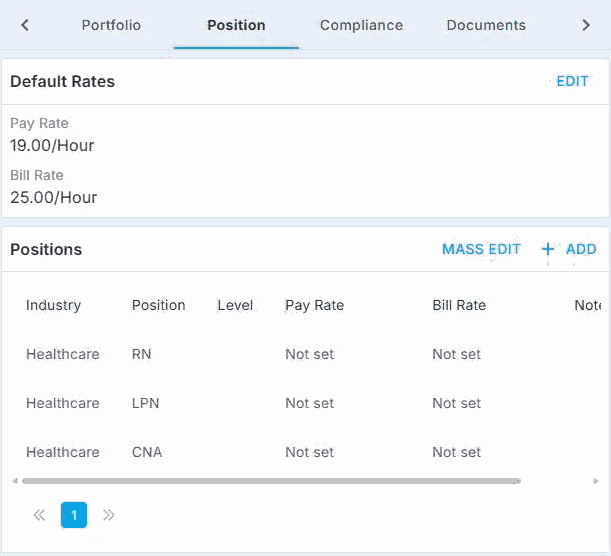
Default Rates sit at the top. Positions are listed below, with MASS EDIT and + ADD.
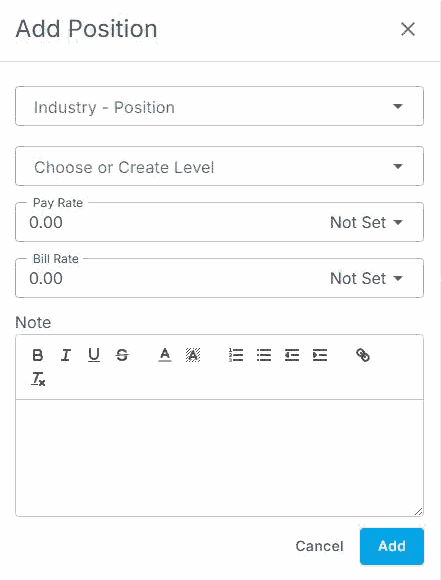
+ ADD opens this form. Pick the Industry - Position, then set the level, rates and a note.
That's every position on the record, so they're offered every job they can do. Read on for levels, rates and where the list comes from.
On this page
Why positions matter so much
| Without NextCrew | In NextCrew |
|---|---|
| Remembering who can do what | Every position is on the record, for the whole team. |
| Calling people about jobs they can't do | Crew hear about jobs that match their positions. See Choose Who Hears About a Job. |
| Pay differences kept in someone's notes | Each position can carry this person's own pay and bill rate. |
| Searching resumes for the right skill | Search the Crew list by Position. |
What each position holds
| Field | What to enter |
|---|---|
| Industry - Position | The position, picked from your company's list. |
| Level | Choose one your team uses, or type a new one. Agree a scale as a team, such as 1 to 5, so levels mean the same to everyone. |
| Pay Rate, Bill Rate | This person's own rates for the position, and the unit, such as per hour. |
| Note | Anything the next person should know, such as "Only day jobs". |
Add or Mass Edit
- + ADD adds one position with its level, rates and note.
- MASS EDIT adds many positions at once, without the details. Open each one afterward if it needs a level or rates.
Default Rates
The Default Rates box at the top of the tab holds a pay rate and bill rate for this person. Click EDIT to change them.
Where the list of positions comes from
The positions you can pick are set up in Settings › Company Profile. If a position is missing, an administrator adds it there first. See Add Your Positions.
Can Crew change their own positions?
Only if an administrator has given Crew permission to. Otherwise, your team keeps positions current.
Best practice
- Add every position someone can work when they're hired, not when you're short.
- Keep levels consistent across your team, so "Level 3" means the same thing to everyone.
- Use the note for limits, such as days, sites or clients they won't work.
Questions people ask
Why isn't someone offered a job they could do?
Check the job's position is on their Position tab. See when a Crew Member can't see a job.
How do I add a position that isn't in the list?
An administrator adds it in Settings › Company Profile.
Can I add positions to many people at once?
MASS EDIT adds many positions to one person at a time.
Do I have to set a level or rates?
No. They're optional. Add them when they help your team choose, or when this person's rates differ.
Other ways people ask this
- How do I add a position to a Crew Member?
- How do I set a Crew Member's pay rate?
- What are position levels?
- How do I give someone a different bill rate?
- Why can't a Crew Member see jobs for their position?
Related guides
- Find the Right Crew Member Fast — searching by position
- Pay Setup: Employee, Contractor and Payroll Details — the Payroll tab
- Choose Who Hears About a Job — how positions decide who is offered a job
Was this article helpful?
That’s Great!
Thank you for your feedback
Sorry! We couldn't be helpful
Thank you for your feedback
Feedback sent
We appreciate your effort and will try to fix the article