RN, Housekeeper, Forklift Driver. Positions are the jobs you staff. Set them up once, and they drive job matching, rates and Crew skills.
Summary
Add positions under Settings › Company Profile › Positions. Each one has an Industry and a Skill, the name people see. You can add standard Pay Rate and Bill Rate, and use Hide From Crew for positions Crew shouldn't pick themselves. Client-specific rates live in rate configurations.
How to do it
- Go to Settings › Company Profile › Positions.
- Click Add Record.
- Choose the Industry and choose the Skill, such as RN.
- Add a Level, a Description and standard Pay Rate and Bill Rate if you use them.
- Turn on Hide From Crew if Crew shouldn't see or choose it. Then click Add.
The Add Position form
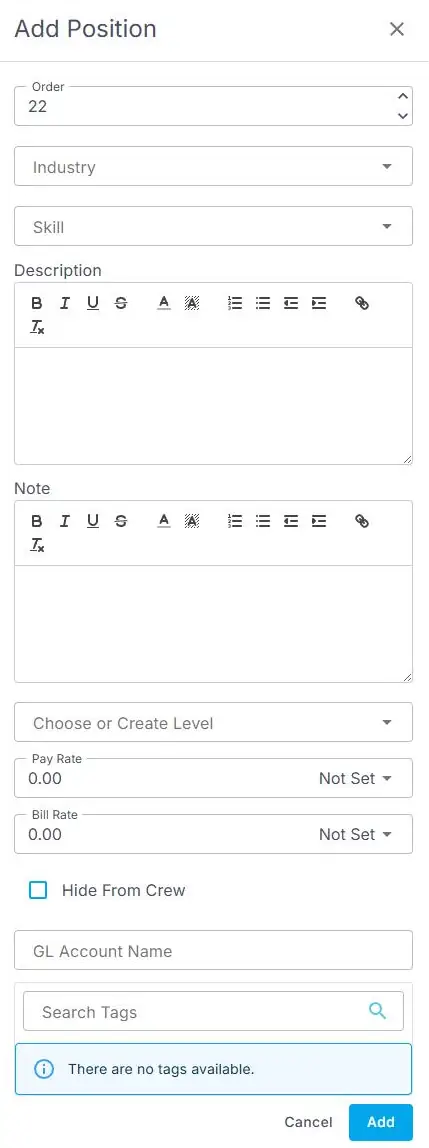
Settings › Company Profile › Positions › Add Record opens this form. Industry and Skill are both drop-downs.
That's the position added. Read on for how it connects to rates.
Other fields
| Setting | What it does |
|---|---|
| Order | Where the position sits in lists. |
| Note | Anything your team should know about this position. |
| GL Account Name | Your accounting (general ledger) account name for this position, if you use one. |
| Tags | Labels to group positions. |
Positions and rates
Most agencies charge different clients different rates. Set those in a rate configuration and attach it to the client. See Set up client rates.
Other ways people ask this
- How do I add a new job title?
- How do I add a skill?
- Where do I set the pay rate for a position?
- How do I hide a position from Crew?
Related guides
- Set up client rates — rates per client and position
- Company Settings: Start Here — everything else to set up
Was this article helpful?
That’s Great!
Thank you for your feedback
Sorry! We couldn't be helpful
Thank you for your feedback
Feedback sent
We appreciate your effort and will try to fix the article