The menu on the left has four areas: Home, Workspace, Operation and Accounting. Star the pages you use most, and they appear under Favorites.
What you can see and do depends on how your agency set up your access. If something here isn't on your screen, ask your agency.
Where things are
| 1 | Home: your dashboard, such as today's Crew and who is on site. |
| 2 | Workspace › Calendar: order staff and see your jobs. |
| 3 | Operation › Timesheet: check and approve hours. |
| 4 | Accounting › Invoices: see and print your invoices. |
| 5 | Top right: Support opens the help guides. |
| 6 | Right side: notifications and tasks. |
Where things are on your screen
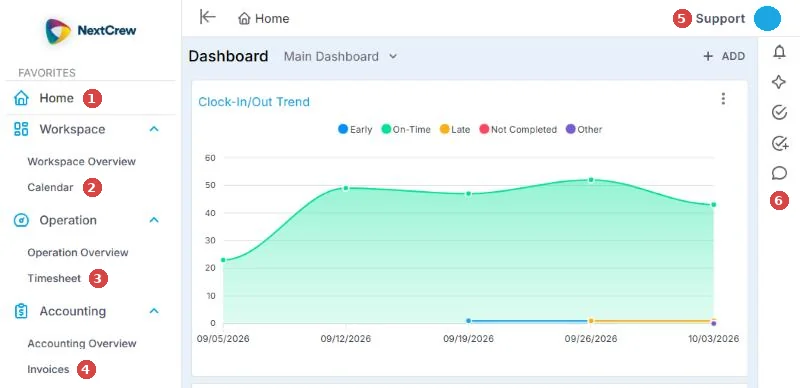
The numbers match the list above: 1 Home, 2 Calendar, 3 Timesheet, 4 Invoices, 5 Support, 6 notifications and tasks.
Add a page to Favorites
Hover over a menu item and choose the star. It now appears under Favorites at the top of the menu.
See jobs in your time zone
In Workspace › Calendar, choose My Time Zone and pick the zone you want. Each job also shows its own time zone, such as EST or PST.
Change the calendar view
In the Calendar, use the icons at the top right to switch between day, week and month.
Get back in one click
Bookmark the sign-in page in your browser, or drag the address from your browser to your desktop to make a shortcut.
If this doesn't work
| What you see | What to do | Who fixes it |
|---|---|---|
| A menu item is missing | Your agency decides which areas you can use. Ask them. | Your agency |
| Job times look wrong | Check My Time Zone on the Calendar. | You |
Only your agency can
- Add or remove areas you can use.
Call or email your contact at your staffing agency.
Other ways people ask this
- Where do I approve timesheets?
- How do I add a job?
- How do I change the time zone?
- How do I add favorites?
- Where are my invoices?
Related guides
- Welcome to NextCrew: your quick start as a client
- Place an order for staff
- Approve or decline timesheets
If your agency's site has its own name and logo, it is powered by NextCrew and works the same way.
Was this article helpful?
That’s Great!
Thank you for your feedback
Sorry! We couldn't be helpful
Thank you for your feedback
Feedback sent
We appreciate your effort and will try to fix the article