Your agency pays you, not NextCrew. If your agency uses NextCrew for pay details, add your bank information under Profile. Some agencies use a pay card or their own payroll company instead. They'll tell you how.
Do this
| 1 | Tap Profile and scroll down to Bank Information. |
| 2 | Enter your account type, bank name, the name on the account, your account number and routing number. |
| 3 | Check every number carefully. |
| 4 | Tap UPDATE to save. |
The Bank Account screen
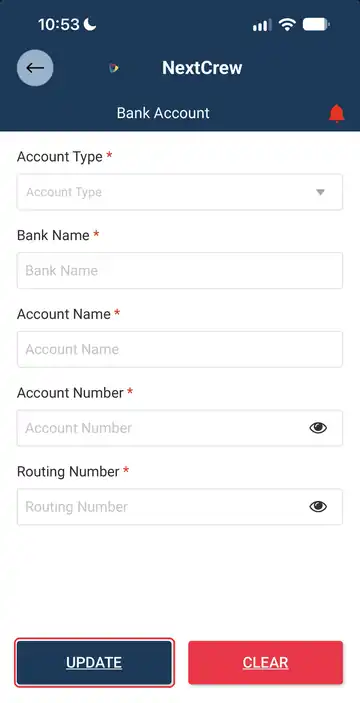
Every box with a red star has to be filled in. Tap the eye next to a number to check what you typed, then tap UPDATE.
In Canada
You'll see Bank Number and Transit Number instead of a routing number.
If this doesn't work
| What you see | What to do | Who fixes it |
|---|---|---|
| You don't see Bank Information | Your agency takes your pay details another way. Ask them. | Your agency |
| It won't save | Check each number, then try again. If it still fails, ask your agency. | You, then your agency |
| You got an email from a payroll or pay card company | Your agency uses that company. Follow its steps, or ask your agency. | Your agency |
Only your agency can
- Tell you when and how you get paid.
- Set up direct deposit or a pay card.
Message your agency in the app, or use the phone number or email they gave you.
Other ways people ask this
- How do I set up direct deposit?
- I need to update my banking information.
- It won't let me add my bank information.
- I got an email to set up a payment account.
Related guides
If your agency gives you its own branded app, it is powered by NextCrew and works the same way.
Was this article helpful?
That’s Great!
Thank you for your feedback
Sorry! We couldn't be helpful
Thank you for your feedback
Feedback sent
We appreciate your effort and will try to fix the article