Three hotels under one group, four facilities under one health system. Each site keeps its own jobs and Crew. Head office gets one invoice and sees everything.
Summary
Make every site its own client, then set each site's Parent Client to the head office. The link is set on the site, not on the head office. For one invoice across the group, turn on Rollup to Parent in each site's invoice settings. Where you add a contact decides what they see: a contact at the head office sees every site, and a contact at a site sees only that site. What goes wrong: linking four sites out of six, so two invoices still go out separately and nobody notices until the client asks.
How to do it
- Create a client for the head office and one for each site. Name them so they sort together, such as Northside Health: Downtown.
- Open each site and set Parent Client to the head office in General Information.
- For one invoice, open each site's Configuration tab, click EDIT on Invoice Settings, and turn on Rollup to Parent.
- Add each contact where their view should be: head office for the whole group, a site for that site only.
- In CRM › Clients, add the Parent Client column and sort by it to check every site is linked.
One head office, three sites, one invoice
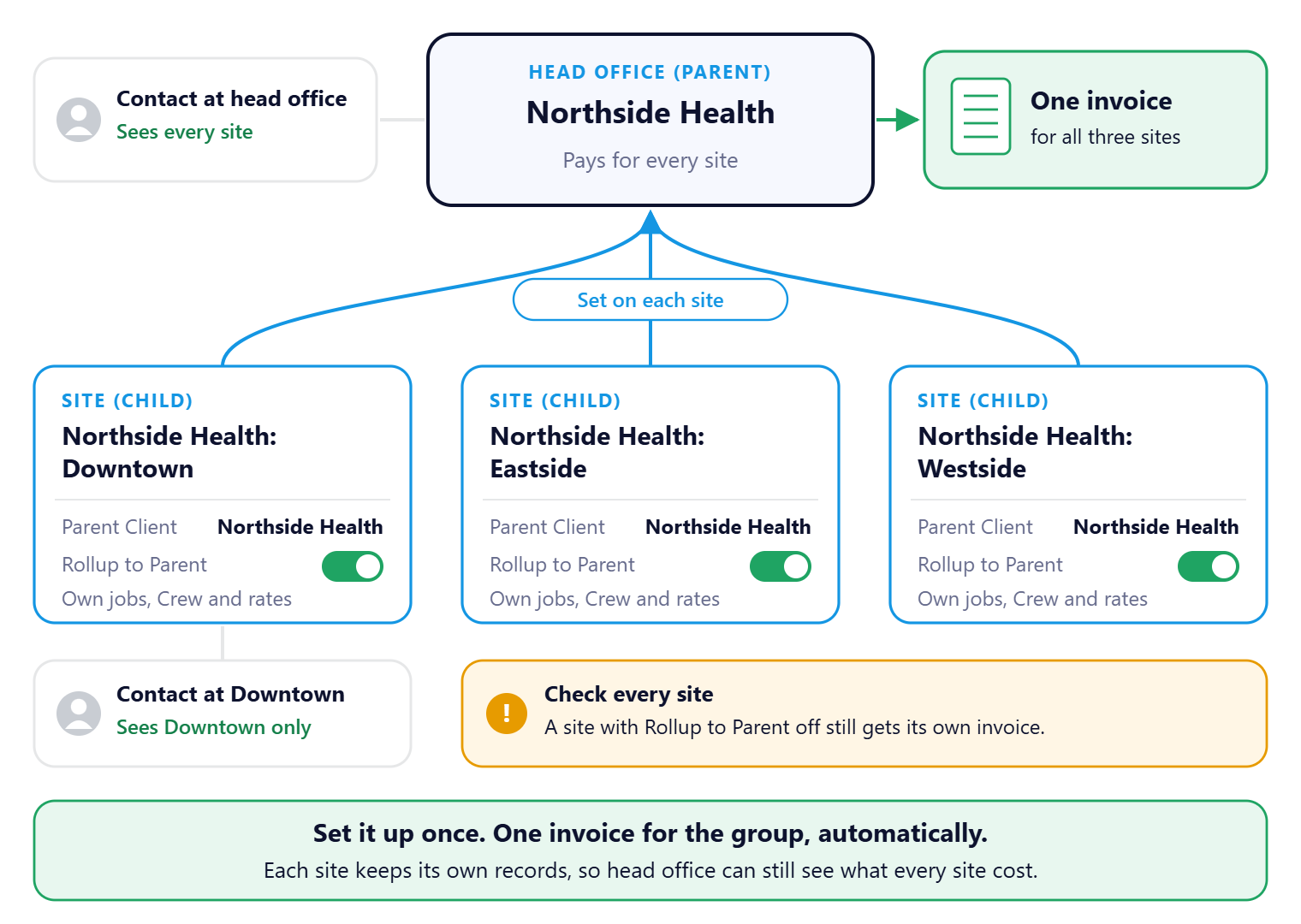
Each site stays its own client, with its own jobs, Crew and rates. Set Parent Client on each site and turn on Rollup to Parent, and every billing run puts the whole group on one head office invoice. Nobody splits or combines invoices by hand. Where you add a contact decides what they see.
That's the group set up. Read on to decide whether you need it at all.
On this page
Do you need parent and child?
| If this is true | Then |
|---|---|
| One head office pays for every site and wants one invoice. | Use parent and child with Rollup to Parent. |
| Each site pays its own bills, but you want to report across them. | Use parent and child, and leave rollup off. |
| One company, several addresses, one set of paperwork. | One client with several addresses. |
| Two companies with the same owner that bill separately. | Two separate clients. |
A rule of thumb: if two sites would never be on the same invoice, they aren't parent and child. A site can have only one parent, so pick the one that pays.
Who sees what
| Contact added to | Sees |
|---|---|
| The head office | Jobs and timesheets for every site in the group. |
| One site | That site only. |
There's nothing in between. Put the group's accounts payable person at head office, and each site manager at their own site. See Add and Manage Client Contacts.
How rollup billing works
With Rollup to Parent on, a site's work goes on the head office's invoice instead of its own. Each site's records stay in NextCrew for reporting. A site with rollup off still gets its own invoice, even with a parent set. See Set Up Invoicing for a Client.
⚠️ Watch out
Before the first billing run, preview the invoice batch and count the invoices. A group with rollup on should produce one.
Why set it up this way
| Without parent and child | With it |
|---|---|
| Splitting or combining invoices by hand each month. | One invoice for the group, automatically. |
| Head office asks for a report across sites. | Every site sits under one parent. |
| A site manager sees other sites' costs. | Each contact sees only what they should. |
If something isn't working
| What you see | Check this first | Who fixes it |
|---|---|---|
| No Configuration tab on the client | Your permissions. The tab is usually admin-only. | Your NextCrew admin |
| A site's work isn't on the parent's invoice | Rollup to Parent on that site, and its Parent Client. | You |
| A contact sees too much, or too little | Which client they were added to: head office or site. | You |
Questions people ask
Can a site have two parents?
No. Choose the one that pays the invoice.
Does rollup hide what each site cost?
No. Each site's records stay for reporting.
Can rates differ by site?
Yes. Each site can have its own rate configuration. See Set Up Rate Configurations for a Client.
Other ways people ask this
- How do I set up a client with multiple locations?
- How do I send one invoice for several sites?
- What is a parent client?
- How do I combine invoices for a client group?
- Why can a client contact see other sites?
Related guides
- Add a New Client — creating each site
- Set Up Invoicing for a Client — roll-ups and recipients
- Give Clients Access to the Client Portal — logins for contacts
Was this article helpful?
That’s Great!
Thank you for your feedback
Sorry! We couldn't be helpful
Thank you for your feedback
Feedback sent
We appreciate your effort and will try to fix the article