Your details changed, or you want a new password. You can update your own profile in a minute, without asking your admin.
Summary
Click your initials at the top right of the screen and choose Profile. On the User tab, change what you need under Account Details and click Update. The Edit and New buttons next to your picture are for your profile photo. The API Keys tab is for connecting other software to NextCrew. Most users never need it.
How to do it
- Click your initials at the top right of the screen.
- Choose Profile.
- Under Account Details, change your First Name or Last Name.
- Change your Username, Password, Email or Phone if you need to.
- Turn Enable Text Notifications on or off, then click Update.
Where to find it
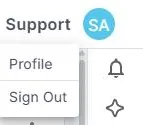
Click your initials, then choose Profile.
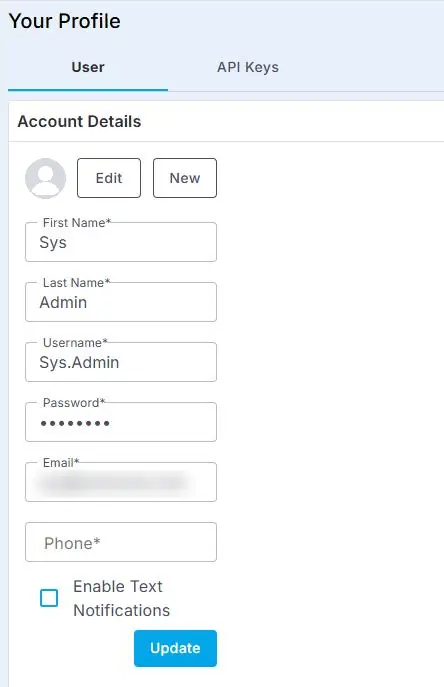
Change the fields under Account Details, then click Update.
That's your profile up to date. Read on for signing out and API keys.
On this page
Choosing a password
Your agency sets the password rules, such as the minimum length and whether you need a number or a special character. If a password is rejected, check it against those rules. Your admin can see them in Settings › Site Configuration › Company.
Sign out
Click your initials at the top right and choose Sign Out. Always sign out on a shared computer.
API keys
The API Keys tab lets you create a key so other software can connect to NextCrew. Only do this if your admin or a technical partner asks you to. Treat a key like a password. See Connect Other Software with the NextCrew Open API.
If something's not right
| What you see | Check this first | Who fixes it |
|---|---|---|
| Your new password isn't accepted | Your agency's password rules. | You, then your NextCrew admin |
| You're locked out, or you forgot your password | Reset it from Forgot Password on the sign-in page. That also unlocks your account. See Forgot Your Password? Reset It and Sign In. | You |
| You can't change your office, roles or groups | Those are set by your admin on your user record. | Your NextCrew admin |
| Someone else on your team needs their name changed | They can change it themselves under Profile. An admin can also change it on their user record. See Add an Office User. | Them, or your NextCrew admin |
Other ways people ask this
- How do I change my name?
- My name is spelled wrong in NextCrew.
- How do I change my password?
- How do I update my email?
- How do I stop getting texts from NextCrew?
- How do I sign out?
- Where is my profile?
Related guides
- Forgot Your Password? Reset It and Sign In — when you can't sign in
- Add an office user — what your admin sets for you
- Guides for Staffing Agencies: Start Here — where to go next
Was this article helpful?
That’s Great!
Thank you for your feedback
Sorry! We couldn't be helpful
Thank you for your feedback
Feedback sent
We appreciate your effort and will try to fix the article