Good Crew have choices. The agency they pick up for is often the one that talks to them when it doesn't need anything.
Summary
NextCrew can tell you who to reach out to each day. The Birthday List and 1st Day on the Job dashboard widgets show whose birthday it is and who is starting their first job. From there, a message takes a minute, and less once you save it as a shared template so the whole team sends the same tone. Most agencies only contact Crew when a job needs filling. What goes wrong: nobody adds the widgets, so the only message a Crew Member ever gets is a job offer.
How to do it
- Go to HR › HR Overview, or your Home dashboard, and click + ADD.
- Pick a list layout under Chart/List and click ADD.
- In Source, choose Birthday List. Give it a title and click ADD.
- Do the same for 1st Day on the Job.
- Each morning, open the names on those lists and click Add Message on their record.
Set it up once, get names every morning
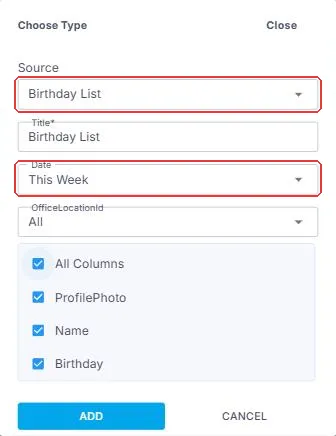
Choose Birthday List as the Source and pick how far ahead to look under Date, such as This Week. Do the same with 1st Day on the Job. From then on, your dashboard hands you the names worth a quick hello, with no spreadsheet and no remembering.
That's two minutes a day that makes your agency the one Crew want to work for. Read on for more ways to keep in touch.
On this page
Staying connected, day to day
The bar along the top shows how often. The badge on each step shows who does it. On a phone, swipe sideways to see every step.
| Every day | Every month | |||||
STEP 1 Automatic The dashboard tells you Birthday List and 1st Day on the Job widgets show who to reach out to today. | → | STEP 2 You Reach out A quick message from their record, or a word in the team's channel. | → | STEP 3 Crew They hear from you Not only when you need a job filled. | → | STEP 4 You Keep the good ones close Check who hasn't worked in a while, and offer them the next job that fits. |
Automatic · You · Crew
NextCrew does the remembering. Your team sends the message.
Why it's worth two minutes a day
| Without NextCrew | In NextCrew |
|---|---|
| Birthdays in someone's calendar, or forgotten | The Birthday List widget shows them on your dashboard. |
| A new starter's first job goes by without a word | 1st Day on the Job shows who is starting, so you can wish them luck. |
| Good people drift to another agency | Keep in touch, and find who hasn't worked in a while. |
| Messages scattered across personal phones | Every message is on the Crew Member's record. |
The widgets to add
| Widget | Where to find it in Source | Use it to |
|---|---|---|
| Birthday List | HR | Send a happy birthday. |
| 1st Day on the Job | Operation | Wish a new starter luck, and check in after their first job. |
| Has Not Worked | Workspace | Find Crew you haven't used in a while, before they drift away. |
Ways to reach out
- Add Message on the Crew Member's record, for a personal note. It goes by email and in the app, and by text if your agency has turned on text messaging through Twilio (there may be a monthly fee). Every message is kept on their record, and replies come straight back to you.
- Channels, for a group, such as everyone working an event. See Channels.
- A thank-you after a good job. When a client leaves a good review, pass it on.
Messages you can use today
Short and personal beats long and polished. Here is a starting point for each moment. Change the words to sound like your agency. {Recipient.FirstName} is the first-name macro: NextCrew puts each Crew Member's own first name in its place.
Birthday
From the Birthday List widget.
Happy birthday, {Recipient.FirstName}! Everyone here hopes you have a great day. Thank you for being part of our Crew.
First day on the job
From the 1st Day on the Job widget, the morning they start.
Hi {Recipient.FirstName}, good luck on your first job today! If anything comes up on site, message us here and we'll help right away.
After the first job
The day after their first job.
Hi {Recipient.FirstName}, how did your first job go? We'd love to hear about it, and anything we can do to make the next one easier.
Work anniversary
When someone reaches another year with you.
Happy work anniversary, {Recipient.FirstName}! Another year with us today. Thank you for every job you've worked. We're glad you're on the team.
Thank you for a great job
When a client says something good.
Hi {Recipient.FirstName}, the client told us you did a great job. Thank you! People like you are why our clients keep coming back.
We've missed you
From the Has Not Worked widget.
Hi {Recipient.FirstName}, we've missed you! New jobs are coming up that could suit you. Reply here and we'll send you the ones that fit.
Make each one a template
Save each message as a shared template, such as Birthday or First Day. Every recruiter then sends the same words in the same tone, so your Crew hear one agency, not five different people. And the next message takes seconds: pick the template, check it, send. See Create and Share Message Templates.
A simple routine
- Every morning: check Birthday List and 1st Day on the Job, and send a message to each.
- After a first job: ask how it went.
- On a work anniversary: say thank you for another year.
- Every month: look at Has Not Worked, and offer those people the next job that fits them.
Questions people ask
How does Add Message reach the Crew Member?
By email and in the NextCrew app. By text too, if your agency has turned on text messaging through Twilio.
Can Crew reply?
Yes. A reply from the app reaches the staffing manager by email and in the NextCrew web app. A reply to a text lands on the Crew Member's record. Either way, the AI Ticker at the top of your screen shows who wrote and what they said.
How do I keep an eye on text replies?
Add the Incoming SMS widget to a dashboard. You'll find it under Integration in the widget Source list.
Other ways people ask this
- How do I see Crew birthdays?
- How do I know who is starting today?
- How do I keep Crew engaged?
- How do I improve Crew retention?
- How do I message a Crew Member?
- What should I say in a birthday message?
- Work anniversary message for employees
- How do I keep the tone the same across recruiters?
Related guides
- Keep Crew Records Current — who updates what
- Channels — group conversations
- Create and Share Message Templates — save these messages for the whole team
- Manage Your Crew: Start Here — the rest of life after hire
Was this article helpful?
That’s Great!
Thank you for your feedback
Sorry! We couldn't be helpful
Thank you for your feedback
Feedback sent
We appreciate your effort and will try to fix the article