Open the person's timesheet, write a short review and give 1 to 5 stars. Your feedback helps your agency send you the right people next time.
What you can see and do depends on how your agency set up your access. If something here isn't on your screen, ask your agency.
Do this
| 1 | Go to Operation › Timesheet. |
| 2 | Choose › at the end of the person's row to open the details. |
| 3 | Scroll down to Review and write a few words about their work. |
| 4 | Choose 1 to 5 stars. |
| 5 | Turn on Completed if they finished the job. |
| 6 | Choose Update to save. |
The Review section
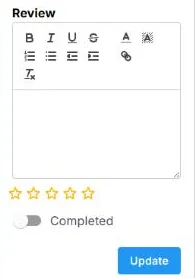
At the bottom of the timesheet details: write your review, choose 1 to 5 stars, turn on Completed if they finished the job, then choose Update.
If this doesn't work
| What you see | What to do | Who fixes it |
|---|---|---|
| You don't want someone back | Tell your agency. They can keep that person off your jobs. | Your agency |
| You don't see Review | Your agency hasn't turned it on for you. | Your agency |
Only your agency can
- Keep someone off your jobs.
- Add someone to your preferred Crew.
Call or email your contact at your staffing agency.
Other ways people ask this
- How do I rate a worker?
- How do I leave feedback?
- I don't want this person back.
- Can I review the staff?
Related guides
If your agency's site has its own name and logo, it is powered by NextCrew and works the same way.
Was this article helpful?
That’s Great!
Thank you for your feedback
Sorry! We couldn't be helpful
Thank you for your feedback
Feedback sent
We appreciate your effort and will try to fix the article