There's a newer guide for this. See Approve Many Timesheets at Once. This page stays here for reference.
Bulk approving or rejecting timesheets is important because it streamlines the process of managing multiple timesheets at once, saving time and reducing administrative workload. This feature helps you efficiently process large volumes of timesheets, ensuring that crew members are paid on time and that any discrepancies are addressed quickly. It also improves accuracy and consistency by applying actions to multiple timesheets simultaneously, reducing the likelihood of errors.
1. Click on Operation > Timesheet 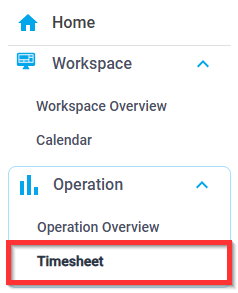
2A. To sort or group views, click the three dots or column names

2B. To move a column, click on the six dots then drag and drop the column order 3. Select one or more timesheets
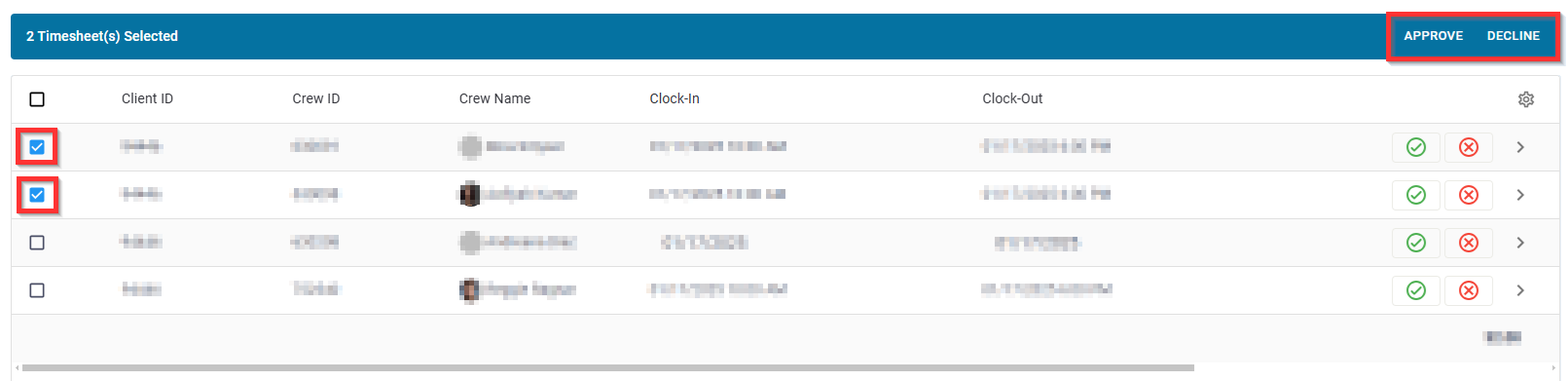 4. Click Approve or Decline
Was this article helpful?
That’s Great!
Thank you for your feedback
Sorry! We couldn't be helpful
Thank you for your feedback
Feedback sent
We appreciate your effort and will try to fix the article