A Crew Member can't sign in, or asks you to send their login. You can sort it out yourself in under a minute. There are three ways, and none needs a call to support.
Summary
Way 1: the Crew Member resets their own password in the NextCrew app with Forgot Password. Way 2: an admin opens the Crew Member's record and, on the Overview tab under Account, clicks Send Password Instructions, which emails them a reset link. Way 3: send them a personal email with their username and a reset link, using the Recipient's Login ID and Forgot Password Link macros. Every way, the Crew Member sets a new password themselves. Don't email a password: it would travel in plain text. What goes wrong: an old or mistyped email address on their record, so the instructions go nowhere.
How to do it
- Ask the Crew Member to tap Forgot Password on the app's sign-in screen. That's often all it takes.
- If they'd rather you help, go to HR › Crew Members and open their record.
- On the Overview tab, check their email address is the one they use.
- Under Account, check that Locked and Disabled are both off.
- Click Send Password Instructions.
- Tell them to check their email, including Spam or Junk, and set a new password.
Where to find it
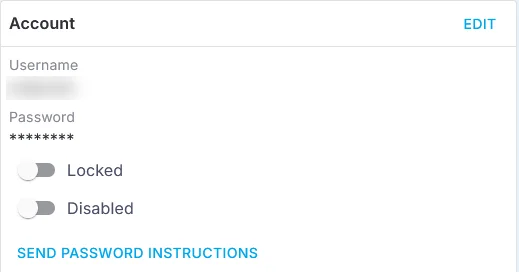
The Account card on the Crew Member's Overview tab. Locked and Disabled should both be off. Then click Send Password Instructions.
That's them signed in, without anyone handling a password. Below: what's on the Account card, when an account is locked or disabled, and what to tell them.
On this page
Two ways to get them back in
| Who does it | Where | Best when | |
|---|---|---|---|
| Way 1: Forgot Password | The Crew Member | The sign-in screen of the NextCrew app | They have their phone and know which email they signed up with |
| Way 2: Send Password Instructions | An admin | The Crew Member's record, Overview tab, Account card | They know their username and just need a reset link |
| Way 3: A personal email with their login | You or anyone on your team | Add Message on the Crew Member's record | They've forgotten their username too, or you want to add a note of your own |
Send the Crew Member their guide for Way 1: I Can't Sign In to the NextCrew App.
The Account card on their record
| What you see | What it means |
|---|---|
| Username | What they sign in with. They can also sign in with their email address. |
| Password | Always hidden. Nobody can see it, so nobody can send it. |
| Locked | On when the account is locked. Turn it off, or have them reset their password. |
| Disabled | On when your agency has turned off their access. They can't sign in at all until it's off. |
| Send Password Instructions | Emails them a link to set a new password. It doesn't include their username. |
| EDIT | Change the account details, such as the username. |
⚠️ Watch out
Check the email address on their record before you click Send Password Instructions. If it's old or mistyped, fix it first, or the instructions won't reach them.
Way 3: Send their username and a reset link in your own email
Send Password Instructions only sends a reset link. If the Crew Member has forgotten their username as well, send both in a message of your own.
- Open the Crew Member's record and click Add Message.
- Type a subject, such as Your NextCrew sign-in.
- In the message, click the </> button to open Macros. Pick Recipient's Login ID where their username should go, then Forgot Password Link where the reset link should go.
- Under Notify by, tick Email.
- Click Send.
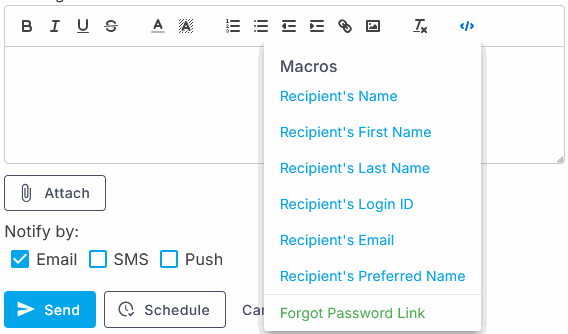
The </> button in the message editor opens Macros. Recipient's Login ID adds their username; Forgot Password Link adds a reset link.
Save it as a shared template so anyone on your team can send it in seconds. Because the macros fill in for each person, one template works for every Crew Member. See Create and Share Message Templates. For more on messages, see Send a Message to Crew, Clients or Your Team.
Why not just set a password and email it?
You can change a Crew Member's password and send it to them, but we don't recommend it. An email isn't secure, so the password travels in plain text and anyone who sees the email can sign in as them. A reset link lets the Crew Member choose their own password, and nobody else knows it.
Locked or Disabled?
Locked usually happens after too many wrong passwords. Turning it off, or a password reset, gets them back in.
Disabled is a decision your agency made, for example after inactivity or when someone left. Only turn it off if they should be working for you again. See Terminate or Rehire a Crew Member. Crew are told to contact their agency about a disabled account. See My Account Is Locked, Disabled or Not Active.
What to tell the Crew Member
- Watch for an email with instructions to set a new password. Check Spam or Junk if it's not there.
- Use the link right away. If it has expired, ask for a new one. See The Password Reset Link Doesn't Work.
- Sign in with their email address or username, and the new password. See It Says My Username or Password Is Wrong.
Why it's done this way
| Without NextCrew | In NextCrew |
|---|---|
| Someone at the agency resets and reads out a temporary password | The Crew Member sets their own password. Nobody else ever knows it |
| Waiting on support to resend a login | Your team sends password instructions from the record in one click |
| Logins sent by email in plain text | A reset link and their username are sent, never the password |
If something isn't working
| What you see | Check this first | Who fixes it |
|---|---|---|
| The email never arrives | The email address on their record, then their Spam or Junk folder. | You, then the Crew Member |
| They still can't sign in after resetting | Locked or Disabled on the Account card. | You |
| Their Status on the HR tab is Pending | They haven't verified their account yet. Ask them to find the verification email and check Spam or Junk. If it's gone, they sign in again and NextCrew offers to send another. Your team can't resend it. | The Crew Member |
| The reset link has expired | Send the instructions again and ask them to use the link straight away. | You |
| You don't see Send Password Instructions | You may not have permission. Ask an admin. | Your admin |
| They work for more than one agency | Each agency has its own password. They need to reset the one for your agency. | The Crew Member |
Questions people ask
Can NextCrew send a Crew Member their login details?
There's no need to contact support. The Crew Member can use Forgot Password in the app, your admin can click Send Password Instructions on their record, or you can email their username and a reset link with the message macros.
Does Send Password Instructions include their username?
No. It sends a reset link only. To send their username as well, use Way 3: a message with the Recipient's Login ID and Forgot Password Link macros.
Does NextCrew send new Crew Members a welcome message?
Not automatically. To send one, write a message with the Recipient's Login ID and Forgot Password Link macros and save it as a template for every new hire.
Can I see or send a Crew Member's password?
You can't see it; passwords are always hidden. You can set a new one and send it, but we don't recommend emailing passwords in plain text. Send a reset link instead.
Where is Send Password Instructions?
On the Crew Member's record, Overview tab, in the Account card.
What's their username?
It's shown on the Account card. They can also sign in with their email address.
Other ways people ask this
- How do I send a Crew Member their login credentials?
- Can you resend the login to a Crew Member?
- A nurse forgot her password
- How do I reset a Crew Member's password?
- Crew Member can't log in
- Where is Send Password Instructions?
- How do I unlock a Crew Member's account?
- What is the Crew Member's username?
- How do I send a Crew Member their username?
- How do I send a welcome email with their login?
Related guides
- Support Your Crew Members: What They Ask and What to Do — what Crew ask, what to check, what to send
- Anatomy of a Crew Member Record — every tab on the record
- Train and Support Your Crew in the NextCrew App — answering Crew questions
- I Can't Sign In to the NextCrew App — the Crew Member's own guide
- Manage Your Crew: Start Here — the whole area
Was this article helpful?
That’s Great!
Thank you for your feedback
Sorry! We couldn't be helpful
Thank you for your feedback
Feedback sent
We appreciate your effort and will try to fix the article