A client calls at 6 a.m. short two people. You don't have time to wait for interest and confirm each one. With Auto-Confirm, the first Crew Members who accept are booked.
Summary
Turn on Auto Confirm on the job. Crew then see Accept instead of Interested, and whoever accepts is confirmed at once, until the job is full. Pair it with the right Privacy setting, so only people you trust hear about it, and Notify Now, so they hear straight away. What goes wrong: Auto-Confirm on a job that's open to everyone, so someone is booked before you've had a chance to look.
How to do it
- Open the job and click EDIT on General Information.
- Tick Auto Confirm and click Update.
- Set the job's Privacy to the Crew you trust for this client. See Choose Who Hears About a Job.
- Use Notify Now, so Crew hear right away instead of in the overnight batch.
- Watch the job's offers. Each Crew Member who accepts shows as Confirmed.
The Auto Confirm box
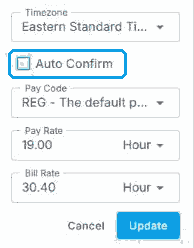
In the job’s General Information edit form, tick Auto Confirm and click Update.
That's the job set to fill itself. Read on for when to use it, and when not to.
On this page
When to use it
| Use Auto-Confirm for | Don't use it for |
|---|---|
| Last-minute call-outs and no-shows. | Jobs where the client picks the person. |
| Urgent requests where speed matters most. | Jobs that need a credential you check by hand first. |
| A trusted group of Crew you've used before. | Jobs open to everyone, if you want to choose who goes. |
What Crew see
On an Auto-Confirm job, Crew see Accept instead of Interested. Accepting books them straight away, and they get the job details and reminders like any confirmed job. See Offer Statuses.
Use it to backfill a no-show
When someone doesn't show, add a job for the missing spot, turn on Auto-Confirm and use Notify Now. See Handle No-Shows and Backfill.
Why it's faster
| Without Auto-Confirm | With Auto-Confirm |
|---|---|
| Wait for interest, then confirm each person. | The first to accept are booked. |
| Call around while the client waits. | The right Crew hear at once and book themselves. |
| Several people think they have the job. | Once the job is full, no one else can accept. |
If something isn't working
| What you see | Check this first | Who fixes it |
|---|---|---|
| No one has accepted | Privacy may be too narrow, or notifications are waiting for the overnight batch. Use Notify Now. | You |
| Someone you didn't want was booked | Privacy was too wide. Cancel the offer and narrow it. | You |
| You don't see Auto Confirm on the job | Auto-Confirm may be turned off for your agency in permissions. | Your NextCrew admin |
Questions people ask
Can I turn Auto-Confirm off again?
Yes. Edit the job and clear the tick. People already confirmed stay confirmed.
Does Auto-Confirm book more people than the job needs?
No. Once every spot is filled, no one else can accept.
Do clients see that the job was auto-confirmed?
They see who's confirmed, as on any job.
Other ways people ask this
- What does Auto-Confirm do?
- How do I fill a shift fast?
- How do I let Crew book themselves?
- Why do Crew see Accept instead of Interested?
- How do I backfill a no-show quickly?
Related guides
- Choose Who Hears About a Job — Privacy and Notify Now
- Offer Statuses: From Requested to Confirmed — how offers move
- Anatomy of a Job — every job setting
Was this article helpful?
That’s Great!
Thank you for your feedback
Sorry! We couldn't be helpful
Thank you for your feedback
Feedback sent
We appreciate your effort and will try to fix the article