Your carrier and your auditor want to know which workers' comp code each job falls under. Set the code once on the client, and every new order and job picks it up for you.
Summary
Workers' comp codes are an optional part of NextCrew. Once they're turned on, add your codes in Settings › Code Tables › Worker Comp Code, each with a Code and a Description. A default code on each client is optional, but it saves time: new orders for that client fill it in, and jobs take it from the order. You can change it on either. NextCrew stores and carries the code; your carrier or broker decides which code fits the work. What goes wrong: leaving the client default blank, so someone has to pick a code on every order.
How to do it
- Ask whoever manages permissions to turn on the Workers Comp Code module. It's off until your agency turns it on. See Users and Permissions: Start Here.
- Go to Settings › Code Tables › Worker Comp Code and click Add Record.
- Enter the Code exactly as your carrier writes it, and a Description of the work it covers. Rate is optional.
- Click Add. Repeat for each code you use.
- Optional, but worth it: open each client and, on the Worker Comp Codes card, click + ADD. Pick the code and tick Primary to make it the client's default.
- Create an order for that client and check the code filled in.
Add a code once
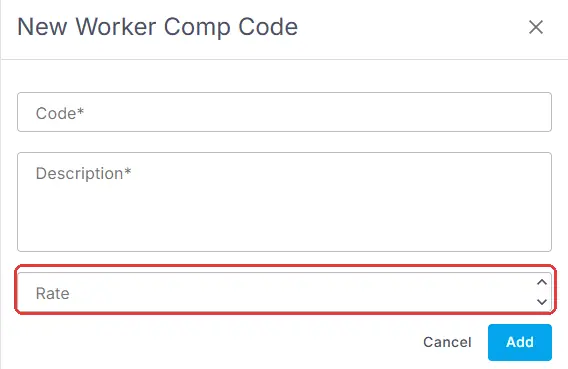
Settings › Code Tables › Worker Comp Code › Add Record. Code and Description are required. Rate is optional.
That's your codes set up. Read on to see how the code moves from client to order to job.
On this page
How the code moves
| Where | What happens | Can you change it? |
|---|---|---|
| Client | You set a default code. | Yes |
| Order | The client's code fills in when you create the order. It's under Client Information on the order. An order needs a code once the module is on. | Yes, for this order |
| Job | The job takes the code from its order. | Yes, for this job |
Set the client's default
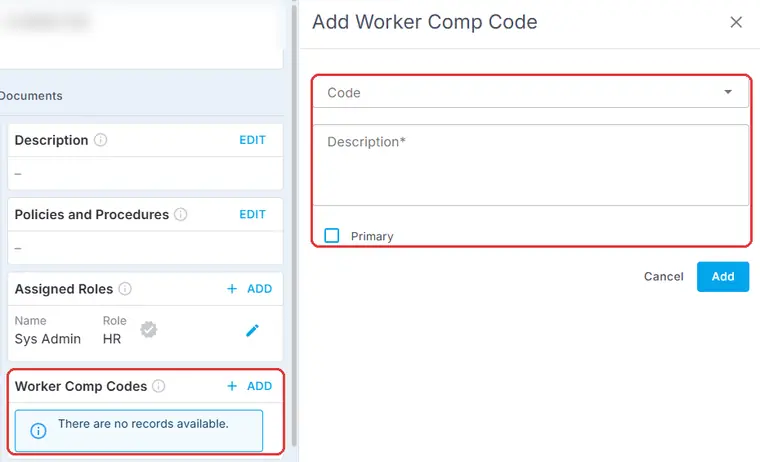
On the client's Overview, click + ADD on the Worker Comp Codes card. Tick Primary on the code new orders should use.
Check it on the order
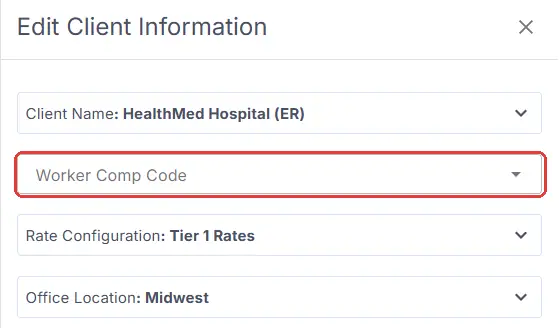
On an order, click EDIT on Client Information to see or change its Worker Comp Code.
So most of the time, nobody picks a code at all. Change it only when one order or job is different work from the client's usual, such as a warehouse client that books a driver.
Who decides the code
⚠️ Watch out
NextCrew stores the code and carries it from client to order to job. It doesn't choose the code or work out your premium. Your insurance carrier or broker decides which code fits the work.
Who can see or change the code
The workers' comp code field has its own permission: Read, Write or Deny. For example, let recruiters see the code but only admins change it. See Users and Permissions: Start Here.
Why set them up
| Without workers' comp codes | With workers' comp codes |
|---|---|
| Looking up the code for every new order. | Set once on the client, filled in for you. |
| Codes typed differently on each job. | Everyone picks from the same list. |
| Orders with no code when the auditor asks. | Every order carries a code. |
If something isn't working
| What you see | Check this first | Who fixes it |
|---|---|---|
| No Worker Comp Code table in Code Tables | The Workers Comp Code module is off. | Your NextCrew admin |
| The code didn't fill in on a new order | The client has no default code. | You |
| You can't change the code on an order or job | Your workers' comp code permission may be Read only. | Your NextCrew admin |
Questions people ask
Do I have to set a code on every client?
No, but it saves time. Without a client default, you pick the code on each order.
Can one job have a different code from its order?
Yes. Change it on the job.
Does NextCrew tell me which code to use?
No. Your carrier or broker decides. NextCrew keeps the code with the work.
Is it turned on for everyone?
No. It's optional. Your agency turns it on in permissions.
Is a code required on every order?
Yes, once workers' comp codes are turned on for your agency. Without a client default, you pick one on each order. Set a client default and it fills in for you. You can still change it on the order, though you rarely need to.
Other ways people ask this
- How do I add a workers comp code?
- Where do I set the WC code for a client?
- Why is there no workers comp code on my order?
- How do I track workers compensation class codes?
- Can I change the workers comp code on a job?
Related guides
- Create an Order and Its Jobs — where the code fills in
- Add, Change or Delete a Code Table Value — how every table works
- Lookup Tables (Code Tables): Start Here — what each table controls
Was this article helpful?
That’s Great!
Thank you for your feedback
Sorry! We couldn't be helpful
Thank you for your feedback
Feedback sent
We appreciate your effort and will try to fix the article