Working out overtime by hand across states is where payroll goes wrong. NextCrew does the arithmetic, so your team only checks the exceptions.
Summary
For employees, NextCrew works out overtime automatically, using the rules of the job's work state. It's set up with you during implementation, then it runs on its own. Contractors don't get overtime worked out for them. Each timesheet's pay code decides how its hours are paid, such as regular, holiday or reimbursement. When you need to, the Override section on a timesheet lets you set regular, overtime and double-time hours by hand. What goes wrong: the wrong tax classification on a Crew Member, which changes whether overtime is worked out at all.
How to do it
- Open a timesheet from Operation › Timesheet.
- Check the Pay Code and the Tax Classification.
- Check the regular, overtime and double-time hours in Override.
- Change them by hand only when you need to, add a note saying why, and click Update.
Pay code, tax classification and Override
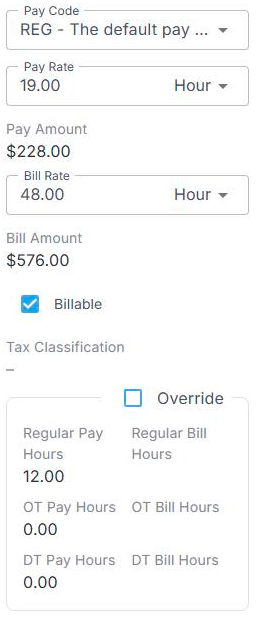
Check the Pay Code and Tax Classification. Tick Override only when you need to change the regular, overtime or double-time hours by hand, add a note saying why, then click Update.
That's overtime checked, with the exceptions explained. Read on for how it's worked out.
On this page
How overtime is worked out
| Case | What NextCrew does |
|---|---|
| Employees | Works out overtime from the rules of the job's work state. In most states that means hours over 40 in a week. |
| California | Also works out daily overtime, daily double time and the seventh-day rules. |
| Hawaii | Also works out daily overtime. |
| No tax classification | Treated as an employee, so overtime is worked out. |
| Contractors | Doesn't work out overtime. Handle any extra pay under your own policy. |
| Remote jobs with no work state | Uses the Crew Member's primary work state. |
Whether someone is an employee or a contractor is set on their Payroll tab. See Pay Setup: Employee, Contractor and Payroll Details.
⚠️ Watch out
Overtime needs one timesheet per day, with no overlap. A timesheet that covers several days, such as Feb 1 to Feb 5, gets no overtime worked out. If you must record a week on one timesheet, set the hours with Override. See How NextCrew Calculates Overtime Automatically.
⚠️ Watch out
NextCrew does the calculation. Whether your pay practices meet the law is your call. Check with whoever advises you on wage and hour rules.
Override the hours
The Override section on a timesheet shows regular, overtime and double-time hours, for pay and for bill, separately. Change them only for a real exception, and add a note saying why, so anyone who looks later understands.
See overtime across all your timesheets
NextCrew works out the hours again every time you change a timesheet's dates or times, so what you see is always up to date.
To see overtime for many timesheets at once, add the columns to your list:
- Go to Operation › Timesheet.
- Click the cog icon at the top right of the list.
- Type Hours in the search box, then tick OT Pay Hours and OT Bill Hours. Add DT Pay Hours and DT Bill Hours too if you pay double time.
- Save the view, so the columns are there next time.
Pick the overtime columns
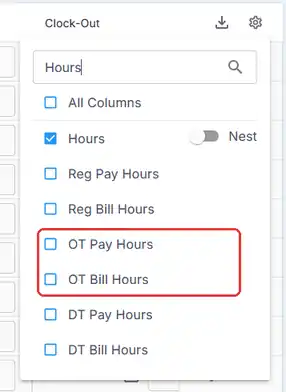
The cog icon opens this list. Search for Hours to find the overtime columns fast.
Overtime on every timesheet, at a glance
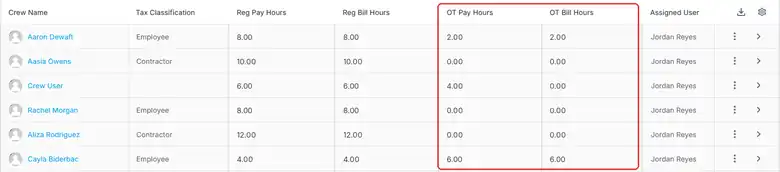
Example hours. Crew User is paid 4 hours of overtime but the client isn't billed it, because their other hours that week were for other clients. Contractors show no overtime.
For totals by Crew Member or client, run the Pay and Bill Detail Report in Reports › Timesheet & Payroll.
Pay codes
The pay code on a timesheet decides how its hours are paid. Pay codes are set up in Settings › Code Tables › Pay Codes, such as REG for regular pay, OT, Holiday, Reimbursement and Bonus.
| Setting on a pay code | What it does |
|---|---|
| Primary | Picked automatically on new jobs. |
| Apply Overtime Calculations | Ticked by default. Untick it for pay that shouldn't count toward overtime, such as reimbursements. |
| Taxable | A label for your records. |
| Skip in Refresh Rates | Keeps a rate you entered by hand when rates are refreshed. |
The Edit Pay Code form
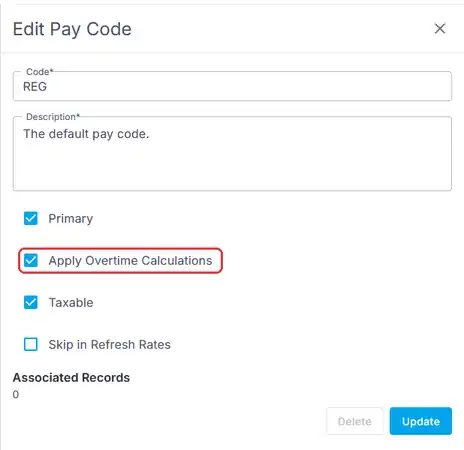
Settings › Code Tables › Pay Codes opens this form. Untick Apply Overtime Calculations for pay that shouldn't count toward overtime, such as reimbursements.
Holiday hours
Holiday pay follows your holiday schedule. See Set Up Your Holiday Schedule.
Questions people ask
Do I have to set up overtime rules?
No. It's set up with you during implementation, then NextCrew uses the rules of the job's work state.
Why doesn't this person get overtime?
Check their Tax Classification. Contractors don't get overtime worked out for them.
Should a reimbursement count toward overtime?
Usually not. Use a pay code with Apply Overtime Calculations unticked.
Other ways people ask this
- How is overtime calculated in NextCrew?
- Does NextCrew handle California overtime?
- Does NextCrew handle Hawaii overtime?
- How do I change overtime hours on a timesheet?
- What are pay codes?
- Why is overtime missing?
- How do I see overtime hours on the timesheet list?
- Where can I see OT pay hours for all timesheets?
Related guides
- How NextCrew Calculates Overtime Automatically — what's counted, when, and invoices
- Prevent and Manage Overtime — spotting overtime before you book
- Pay Setup: Employee, Contractor and Payroll Details — tax classification
- Anatomy of a Timesheet — every field on a timesheet
Was this article helpful?
That’s Great!
Thank you for your feedback
Sorry! We couldn't be helpful
Thank you for your feedback
Feedback sent
We appreciate your effort and will try to fix the article