A timesheet's status tells you who has checked it and what still needs doing. Read it right and you'll never pay or bill an hour twice.
Summary
Every timesheet has an Approval Status, from Unapproved to Paid, and an Invoice Status, Not Invoiced or Invoiced. Open a timesheet to see its detail: scheduled and actual times, where the Crew Member clocked in and out, break, hours, pay code, pay and bill rates, overtime hours, attachments, notes and reviews. What goes wrong: treating Crew Approved as done. It only means the Crew Member clocked in and out.
Pay and bill rates are copied from the job when the timesheet is created, at the start of the job. Changing the job, its position or its rates afterward doesn’t change them. See Fix the rate on a timesheet after the job changed.
How to use this page
- Go to Operation › Timesheet.
- The counts at the top show how many timesheets are Unapproved, Client Approved, Approved and Under Review.
- Open a timesheet with the arrow at the end of its row.
- Use the tables below to see what each status and field means.
How a timesheet moves
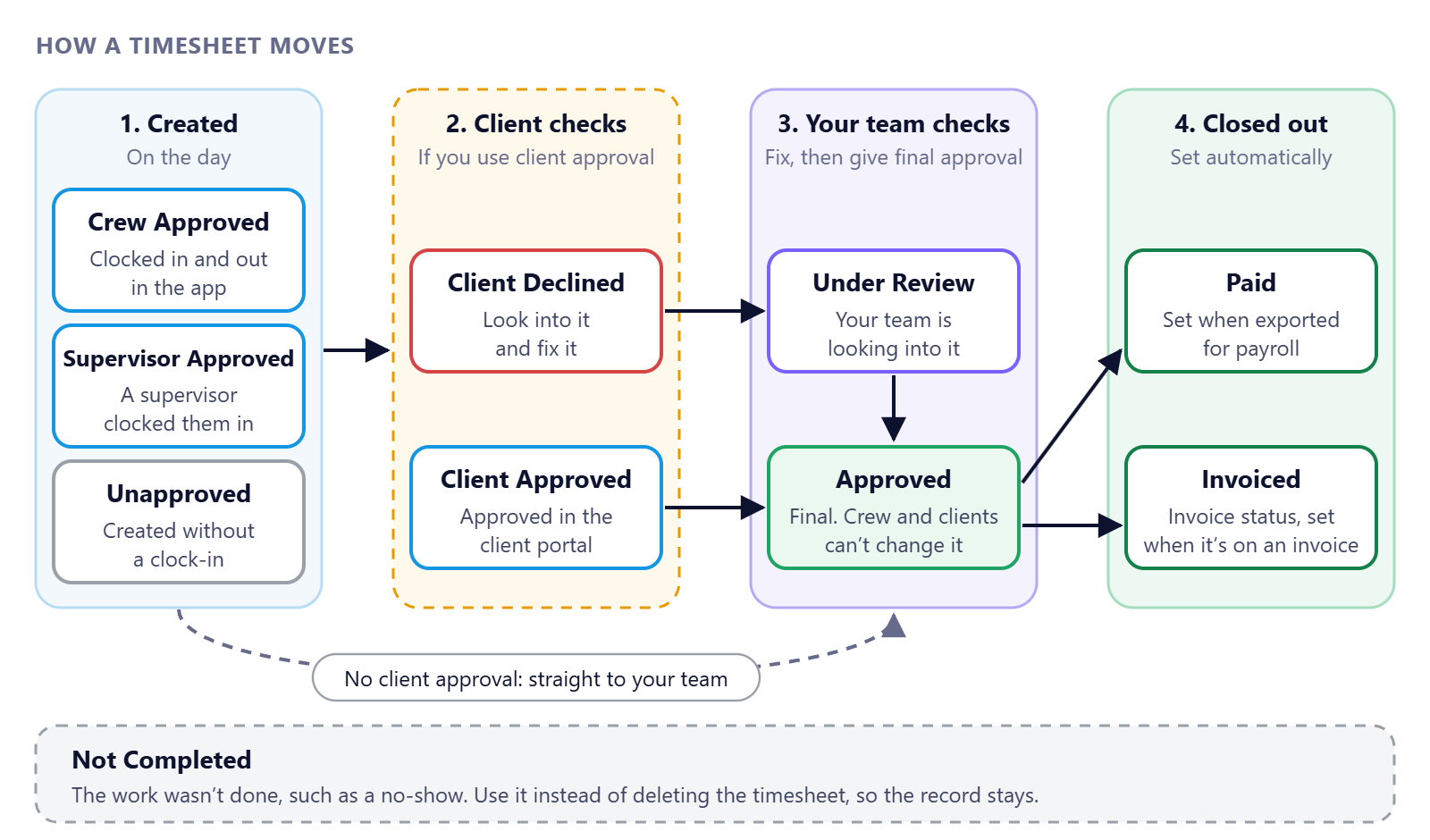
Only Approved timesheets should go to payroll. Crew Approved means the Crew Member clocked in and out, not that anyone has checked it.
That's every status and field. Read on for what each one means.
On this page
Approval statuses
| Status | What it means |
|---|---|
| Unapproved | The timesheet was created without a clock-in, for example because the job finished and the Crew Member didn't clock in. |
| Crew Approved | The Crew Member clocked in and out in the app. Nobody has checked it yet. |
| Supervisor Approved | An on-site supervisor clocked the Crew Member in. |
| Client Approved | The client checked and approved it in their portal. |
| Client Declined | The client declined it. Look into it and fix it. |
| Under Review | Your team is looking into it. It stops the Crew Member changing it. |
| Approved | Your team gave the final approval. Crew and clients can't change it, and it's ready for payroll and invoicing. |
| Paid | Set automatically when the timesheet is exported for payroll. |
| Not Completed | The work wasn't done, such as a no-show. Use this instead of deleting the timesheet, so the record stays. |
Only Approved timesheets should go to payroll. Anything still at Crew Approved hasn't been checked.
Invoice status
Not Invoiced or Invoiced. It changes to Invoiced automatically when the timesheet goes onto an invoice, so you can see what still needs billing.
What's on a timesheet
| Section | What it holds |
|---|---|
| Job | Job title, Crew Member, job and order numbers, position, client and the user assigned to the job. |
| Times | Scheduled from and to, and the actual clock-in and clock-out date and time. |
| Locations | The work location, and where the Crew Member was when they clocked in and out. |
| Break and hours | Break length, whether it's a paid break, and total hours. |
| Pay and bill | Pay code, pay rate and pay amount, bill rate and bill amount, whether it's billable, and the Crew Member's tax classification. |
| Reimbursement | Ticked when the timesheet is for an expense rather than hours. |
| Override | Regular, overtime and double-time hours, for pay and for bill, when you need to set them by hand. |
| Attachments, tags, notes | Receipts and documents, labels, and notes from your team. |
| Reviews | Your team's review of the job, and any client reviews. |
What you can do from a timesheet
- Send Message to the Crew Member about this timesheet.
- Clone it, for example to add a reimbursement or a timesheet for someone else.
- View Feed, from the ⋮ menu on the row, to see its history.
- Add Channel, from the ⋮ menu, to start a group conversation. See Channels.
Questions people ask
What's the difference between Crew Approved and Approved?
Crew Approved means the Crew Member clocked in and out. Approved means your team checked it and gave the final approval.
Should I delete a timesheet for a no-show?
No. Set it to Not Completed so the record stays.
Can Crew change a timesheet?
Only before it's approved, and only if your agency allows it. Once a timesheet is Approved, Crew and clients can't change it. Your team can still change its status if something needs fixing.
When does a timesheet become Paid?
When it's exported for payroll. NextCrew sets it for you.
Why does the timesheet still have the old rate after the job changed?
Its rates were copied when the job started. Change them on the timesheet. See Fix the rate on a timesheet after the job changed.
Other ways people ask this
- What does Crew Approved mean?
- What is Under Review on a timesheet?
- What does Not Completed mean?
- What's the difference between Client Approved and Approved?
- What does Invoiced mean on a timesheet?
Related guides
- Approve Timesheets: Start Here — the whole flow
- Review and Approve Timesheets — the step by step
- Make a Crew Member the Supervisor on an Order — how a timesheet becomes Supervisor Approved
- Hours Missing From an Invoice? Find Out Why and Bill Them — trace hours to an invoice
Was this article helpful?
That’s Great!
Thank you for your feedback
Sorry! We couldn't be helpful
Thank you for your feedback
Feedback sent
We appreciate your effort and will try to fix the article