Nurses need licenses, drivers need a license, event staff may need food handler cards. Set up each type once, and choose what proof you need.
Summary
License Types and Certification Types are the credentials Crew Members can add. For each one, choose whether an expiration date is required and whether a file must be attached. Turn on the expiration date for anything that runs out, so NextCrew can keep every expiry visible.
How to do it
- Go to Settings › Code Tables › License Types, or Certification Types.
- Click Add Record and type the name, such as RN License.
- Turn on Require Expiration Date if it expires.
- Turn on Require Attachment if you need a copy on file.
- Click Add.
The New License Type form
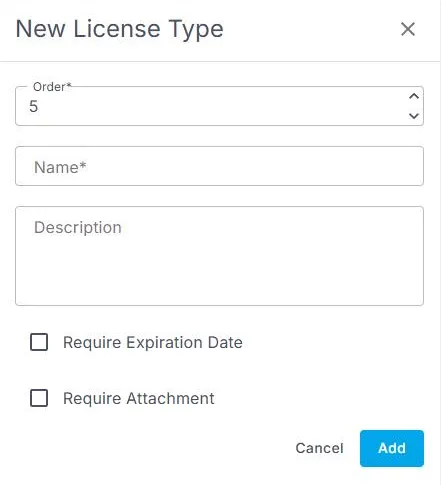
Settings › Code Tables › License Types › Add Record opens this form. Fields marked * are required.
That's the credential set up. Read on for how to choose between the two lists.
License or certification?
Use License Types for official licenses and IDs, such as a nursing license or a driver's license. Use Certification Types for training and certificates, such as CPR or BLS. Both work the same way. Pick one home for each credential and stick to it.
The two settings
| Setting | Turn it on when |
|---|---|
| Require Expiration Date | The credential runs out and must be renewed. Without a date, nobody can see when it's lapsing. |
| Require Attachment | You need a copy on file, for a client audit or your own records. |
Other ways people ask this
- How do I add a new license type?
- How do I make Crew upload a copy of their license?
- How do I track when certifications expire?
- Where do I add CPR as a certification?
Related guides
- Add and renew licenses and certifications — what Crew Members see when they add one
- Add, change or delete a Code Table value — how every table works
Was this article helpful?
That’s Great!
Thank you for your feedback
Sorry! We couldn't be helpful
Thank you for your feedback
Feedback sent
We appreciate your effort and will try to fix the article