If a client asks you to work for them directly, add the job in the app so your agency knows about it. You can only do this if your agency has turned it on, and only for clients who have you on their preferred list.
Do this
| 1 | Tap ☰, then New Job. |
| 2 | Set the Start Date and End Date, with the times. Check the Hours. |
| 3 | Choose the Client and the Skills you'll be working. Add a Note if your agency asks for one. |
| 4 | Tap ADD. Then choose ADD ANOTHER JOB, or CLOCK-IN if you're starting now. |
Find New Job in the menu
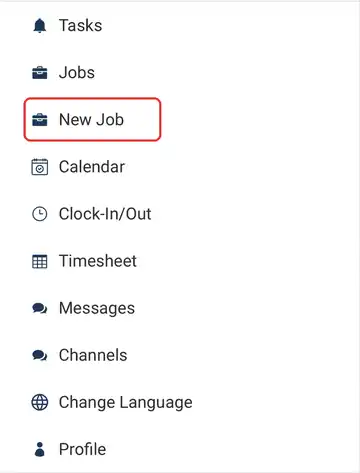
Tap ☰ and New Job is just below Jobs. If it isn't there, your agency hasn't turned it on.
Add the job, then pick what's next
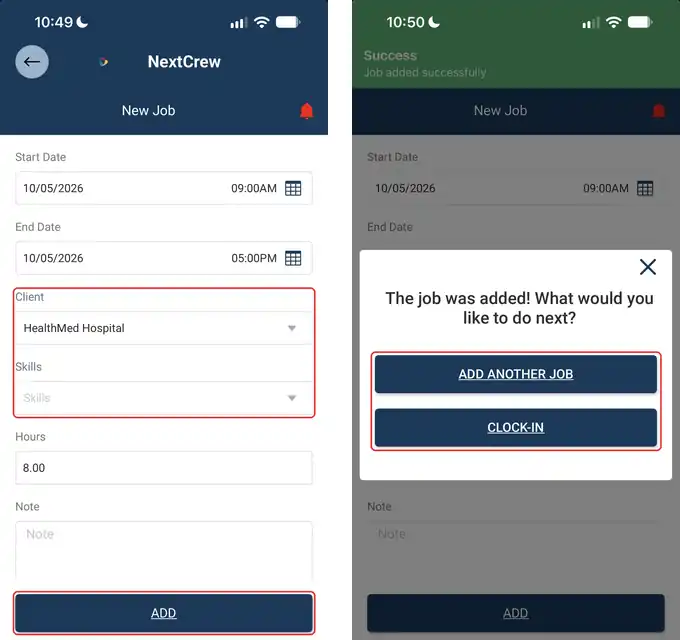
Fill in when, the client and your skill, then tap ADD. Once it's added, you can add another job or clock in straight away.
If this doesn't work
| What you see | What to do | Who fixes it |
|---|---|---|
| You don't see New Job in the menu | Your agency hasn't turned this on. | Your agency |
| The client isn't in the list | You can only add jobs for clients who have you on their preferred list. Ask your agency. | Your agency |
| Your skill isn't in the Skills list | Your agency sets up the skills and pay rates for each client. Ask them to add yours. | Your agency |
| You made a mistake on the job | Tell your agency, so they can fix or remove it. | Your agency |
Only your agency can
- Let you add your own jobs.
- Add you to a client's preferred list.
- Set up the skills and pay rates for each client.
- Change or remove a job you added.
Message your agency in the app, or use the phone number or email they gave you.
Other ways people ask this
- Can I add my own jobs?
- How do I create a job?
- I picked up an extra shift with a client. How do I add it?
- Why can't I see New Job?
Related guides
If your agency gives you its own branded app, it is powered by NextCrew and works the same way.
Was this article helpful?
That’s Great!
Thank you for your feedback
Sorry! We couldn't be helpful
Thank you for your feedback
Feedback sent
We appreciate your effort and will try to fix the article