Go to Accounting › Invoices to see your invoices, the balance and the due date. Open one to see the detail and print it.
What you can see and do depends on how your agency set up your access. If something here isn't on your screen, ask your agency.
Do this
| 1 | Go to Accounting › Invoices. |
| 2 | Check the list: invoice number, date, amount, balance, due date and how many days old it is. |
| 3 | Click an invoice to open it. |
| 4 | Use the Detail, Payments and Notes tabs. |
| 5 | Choose Print to print or save it. |
An invoice
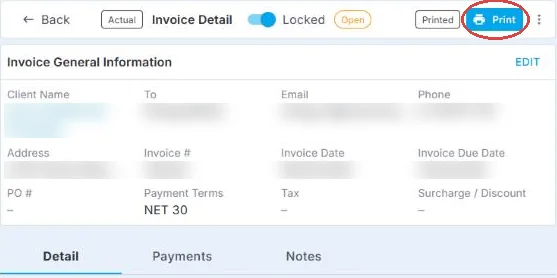
Open an invoice to see its details. The Detail, Payments and Notes tabs are below, and Print is at the top.
If this doesn't work
| What you see | What to do | Who fixes it |
|---|---|---|
| A charge looks wrong | Check the timesheets for those dates, then ask your agency. | Your agency |
| You don't see Invoices | Your agency hasn't shared invoices with you. | Your agency |
| You want to pay online | Ask your agency how they take payment. | Your agency |
Only your agency can
- Correct an invoice.
- Take your payment.
- Send you invoices by email.
Call or email your contact at your staffing agency.
Other ways people ask this
- Where are my invoices?
- How do I print an invoice?
- How much do we owe?
- When is my invoice due?
- Why is my invoice this amount?
Related guides
If your agency's site has its own name and logo, it is powered by NextCrew and works the same way.
Was this article helpful?
That’s Great!
Thank you for your feedback
Sorry! We couldn't be helpful
Thank you for your feedback
Feedback sent
We appreciate your effort and will try to fix the article