Most sign-in problems are a forgotten password or the wrong sign-in link. Reset your password from the sign-in page. If that doesn't work, your agency can check your login.
What you can see and do depends on how your agency set up your access. If something here isn't on your screen, ask your agency.
Do this
| 1 | Check you're on your agency's sign-in link, for example yourcompany.nextcrew.app. |
| 2 | Check your username or email for typos, and make sure Caps Lock is off. |
| 3 | Forgot your password? Choose the forgot password link on the sign-in page and enter your username. |
| 4 | Open the email from NextCrew and follow the link to set a new password. |
| 5 | Sign in with your new password. |
Where Forgot Password is
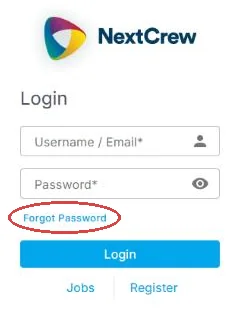
Forgot Password sits just under the Password box on the sign-in page.
If this doesn't work
| What you see | What to do | Who fixes it |
|---|---|---|
| It asks for a login code | Open the newest email from NextCrew, copy the code and paste it in. | You |
| No reset email or login code arrives | Check Spam and Junk. Wait 5 minutes, then try again. | You |
| It says other users are signed in to your account | You probably closed your browser without signing out. Choose Continue to end the old session. If you didn't expect this, change your password. | You |
| The page won't load or looks broken | Clear your browser's history for the last 24 hours, close the browser and try again. See Get help, and supported browsers. | You |
| Your login stopped working | Your agency may have turned off your access. Ask them. | Your agency |
Only your agency can
- Turn your login back on.
- Change your username or email.
- Send you your sign-in link.
Call or email your contact at your staffing agency.
Other ways people ask this
- I can't log in.
- I forgot my password.
- My login code never came.
- It says there are other users logged in with this account.
- My password doesn't work.
Related guides
If your agency's site has its own name and logo, it is powered by NextCrew and works the same way.
Was this article helpful?
That’s Great!
Thank you for your feedback
Sorry! We couldn't be helpful
Thank you for your feedback
Feedback sent
We appreciate your effort and will try to fix the article